S

Stéphane Bordas

2
Workflows

Workflows by Stéphane Bordas
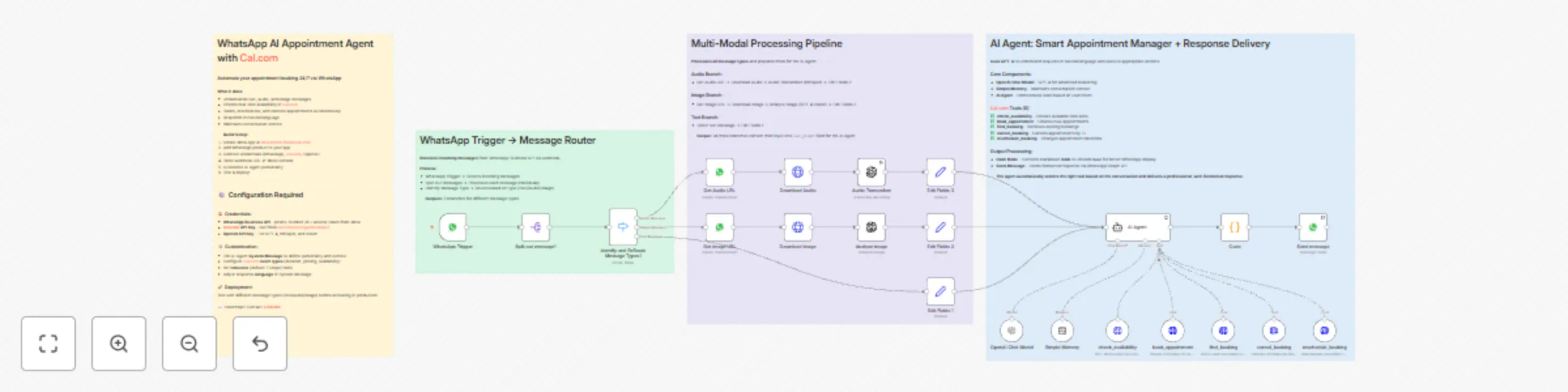
Workflow preview: Automate multi-modal appointment booking via WhatsApp using GPT-4 and Cal.com
Free advanced

Automate multi-modal appointment booking via WhatsApp using GPT-4 and Cal.com

## Who is this for? This workflow is for **healthcare professionals, consultants, coaches, and service businesses** who want to completely automate their appointment booking system via WhatsApp — without manual intervention for reservations, availability checks, or cancellation management. ## What problem is this workflow solving? / Use case Managing appointments manually via WhatsApp is extremely time-consuming: checking availability, confirmations, rescheduling, cancellations. This workflow **automates the entire process** — from initial request to final confirmation — allowing your clients to book, modify, or cancel appointments 24/7, in natural language, directly via WhatsApp. ## What this workflow does * Processes multi-modal messages (text, audio, images) from WhatsApp Business API * Detects message type and routes to appropriate processing (Whisper for audio, GPT-4 Vision for images) * Uses AI Agent with 5 Cal.com tools to manage complete appointment lifecycle * Checks real-time availability in your Cal.com calendar * Books appointments autonomously without human intervention * Handles cancellations and rescheduling requests * Maintains conversation context with Simple Memory for natural exchanges * Formats responses with Unicode bold for better WhatsApp readability * Sends automated replies directly to the client **The result:** a fully automated 24/7 appointment management system via WhatsApp. ## Setup ### 1. WhatsApp Business API * Connect your WhatsApp Business API account in n8n. * Set up the webhook in Facebook Developer Console (Webhook → Messages → Subscribe). * Add your phone_number_id and access token credentials. ### 2. Cal.com * Create a Cal.com account and configure your calendar. * Generate an API Key from Cal.com settings. * Set up your event types (duration, availability, pricing). * Add your Cal.com API credentials in n8n. ### 3. OpenAI * Get an OpenAI API key (for GPT-4, Whisper, and Vision). * Add your OpenAI credentials in n8n. * The workflow uses GPT-4 for conversation, Whisper for audio transcription, and GPT-4 Vision for image analysis. ### 4. Customize the AI Agent * Edit the System Message to define your agent's personality, tone, and business context. * Adjust timezone in tool parameters (default: Europe/Paris). * Configure event type IDs for different appointment types. ### 5. Test & activate * Test with different message types (text, audio, image) from WhatsApp. * Verify appointments are created correctly in Cal.com. * Switch to production mode and activate the workflow. This workflow helps you build a **fully autonomous AI booking assistant**, transforming WhatsApp into a 24/7 appointment management system. --- ## Need help customizing? Contact me for consulting and support: **[LinkedIn](https://www.linkedin.com/in/st%C3%A9phane-bordas-3439b4179/)** / **[Youtube](https://www.youtube.com/@stephane_bordas)**

S
Stéphane Bordas
Support Chatbot
24 Nov 2025
837
0

Workflow preview: Facebook Messenger Bot with GPT-4 for Text, Image & Voice Processing
Free advanced

Facebook Messenger Bot with GPT-4 for Text, Image & Voice Processing

### How it Works This workflow lets you build a **Messenger AI Agent** capable of understanding **text**, **images**, **and voice notes**, and replying intelligently in real time. It starts by receiving messages from a Facebook Page via a **Webhook**, detects the message type (text, image, or audio), and routes it through the right branch. Each input is then prepared as a **prompt** and sent to an **AI Agent** that can respond using text generation, perform quick calculations, or fetch information from Wikipedia. Finally, the answer is formatted and sent back to Messenger via the **Graph API**, creating a smooth, fully automated chat experience. ### Set Up Steps 1. Connect credentials Add your **OpenAI API key** and **Facebook Page Access Token** in n8n credentials. 2. Plug the webhook Copy the Messenger webhook URL from your workflow and paste it into your Facebook Page Developer settings (Webhook → Messages → Subscribe). 3. Customize the agent Edit the **System Message** of the AI Agent to define tone, temperature, and purpose (e.g. “customer support”, “math assistant”). 4. Enable memory & tools Turn on **Simple Memory** to keep conversation context and activate tools like **Calculator** or **Wikipedia**. 5. Test & deploy Switch to production mode, test text, image, and voice messages directly from Messenger. ### Benefits 💬 **Multi-modal Understanding** — Handles text, images, and audio messages seamlessly. ⚙️ **Full Automation** — End-to-end workflow from Messenger to AI and back. 🧠 **Smart Replies** — Uses OpenAI + Wikipedia + Calculator for context-aware answers. 🚀 **No-Code Setup** — Build your first Messenger AI in less than 30 minutes. 🔗 **Extensible** — Easily connect more tools or APIs like Airtable, Google Sheets, or Notion.

S
Stéphane Bordas
Support Chatbot
7 Oct 2025
2668
0