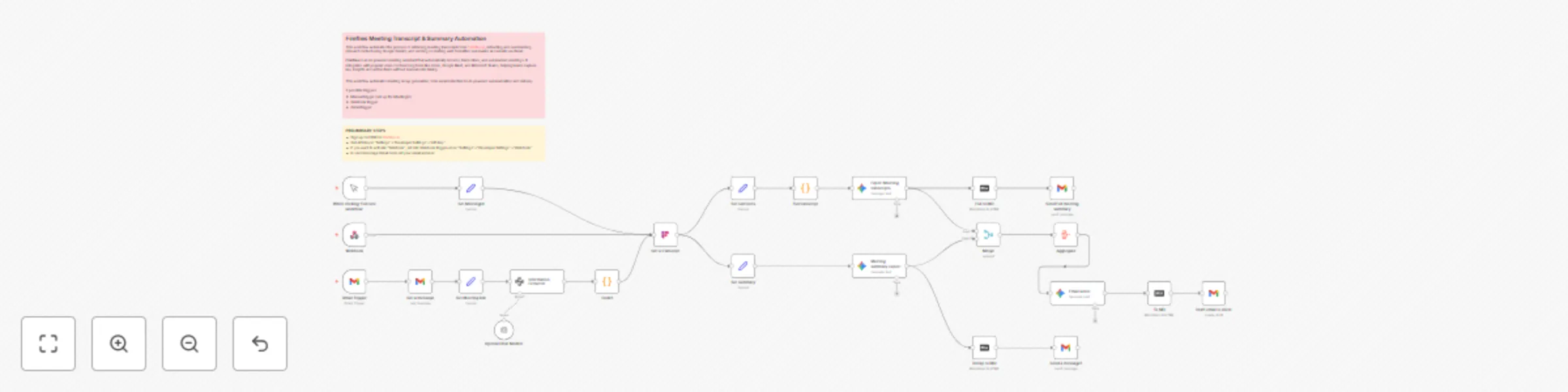
Automate meeting summaries from Fireflies transcripts with Gemini & Gmail

Workflow preview

Workflow preview
100%
Automate meeting summaries from Fireflies transcripts with Gemini & Gmail preview
Open on n8n.io

Important notice

This workflow is provided as-is. Please review and test before using in production.

1. Workflow Overview

️ This workflow automates the process of retrieving meeting transcripts from Fireflies.ai , extracting and summarizi...

Best for

  • Document Extraction automation workflows
  • AI Summarization automation workflows
  • advanced n8n builders looking for reusable templates

Tools used

n8n-nodes-base.webhook, @firefliesai/n8n-nodes-fireflies.fireflies, n8n-nodes-base.manualtrigger, n8n-nodes-base.gmailtrigger, n8n-nodes-base.gmail, @n8n/n8n-nodes-langchain.informationextractor, @n8n/n8n-nodes-langchain.lmchatopenai, n8n-nodes-base.code

Source and attribution

This workflow is cataloged by N8N Workflows and links back to its original n8n.io source page by Davide.

Original n8n.io source

1.1 Workflow description

Title
Automate meeting summaries from Fireflies transcripts with Gemini & Gmail
Workflow name
Automate meeting summaries from Fireflies transcripts with Gemini & Gmail

🤝🖊️🤖 This workflow automates the process of retrieving meeting transcripts from Fireflies.ai, extracting and summarizing relevant content using Google Gemini, and sending or drafting well-formatted summaries and emails via Gmail.

Fireflies is an AI-powered meeting assistant that automatically records, transcribes, and summarizes meetings. It integrates with popular video conferencing tools like Zoom, Google Meet, and Microsoft Teams, helping teams capture key insights and action items without manual note-taking.

This workflow automates meeting recap generation, from email detection to AI-powered summarization and delivery.


Key Benefits

  • 💡 Automated Insight Extraction: Uses AI (OpenAI & Gemini) to extract and summarize key insights from meetings automatically.
  • 📩 Instant Client Communication: Generates ready-to-send meeting summaries and drafts without human intervention.
  • 📥 Email Monitoring: Listens to Gmail for specific meeting recap messages and reacts accordingly.
  • 🔗 Seamless Fireflies Integration: Dynamically pulls transcript data
  • 🧠 Dual AI Models: Combines the strengths of OpenAI and Gemini for rich, contextual summaries in multiple formats.
  • 🛠 Modular Design: Easily customizable and extensible for adding more destinations (e.g., Slack, Notion, CRM).
  • 🧑‍💼 Ideal for Teams & Consultants: Great for sales teams, project managers, or consultants who handle multiple client meetings daily.

How It Works

  1. Trigger:

    • The workflow starts with a Gmail Trigger node that monitors incoming emails with the subject "Your meeting recap". It checks for new emails every hour.
    • Alternatively, it can be manually triggered using the "When clicking ‘Execute workflow’" node for testing.
    • Alternatively, via Webhook.
  2. Email Processing:

    • The "Get a message" node fetches the full email content.
    • The "Set Meeting link" node extracts the meeting link from the email.
    • The "Information Extractor" (powered by OpenAI) processes the email text to identify the meeting URL.
  3. Transcript Retrieval:

    • A Code node parses the meeting ID from the URL.
    • The "Get a transcript" node (Fireflies.ai integration) fetches the full meeting transcript using the extracted meeting ID.
  4. Transcript Processing:

    • The "Set sentences" and "Set summary" nodes extract structured data (sentences, short summary, overview) from the transcript.
    • The "Full transcript" node combines all transcript segments into a readable format.
  5. AI Summarization & Email Generation:

    • Google Gemini models analyze and summarize the transcript in Italian ("Expert Meeting transcripts") and generate a client-friendly recap ("Meeting summary expert").
    • The "Email writer" node combines summaries into a cohesive email draft.
    • The Markdown to HTML nodes format the content for email readability.
  6. Output:

    • A "Draft email to client" node prepares the final recap.
    • Two Gmail nodes ("Send Full meeting summary" and "Send a message1") dispatch the summaries to the specified recipient.

Set Up Steps

  1. Configure Credentials:

    • Ensure the following credentials are set up in n8n:
      • Fireflies.ai API (for transcript retrieval).
      • Gmail OAuth2 (for email triggering/sending).
      • OpenAI API (for initial text extraction).
      • Google Gemini (PaLM) (for summarization).
  2. Adjust Nodes:

    • Update the "Gmail Trigger" node with the correct email filter (subject:Your meeting recap).
    • Replace YOUR_EMAIL in the Gmail Send nodes with the recipient’s address.
    • Verify the Code nodes (e.g., meeting ID extraction) match your URL structure.
  3. Deploy:

    • Activate the workflow.
    • Test using the Manual Trigger or wait for the Gmail trigger to execute automatically.
  4. Optional Customization:

    • Modify the Google Gemini prompts for different summary styles.
    • Adjust the email templates in the final Gmail nodes.

Need help customizing?

Contact me for consulting and support or add me on Linkedin.

1.2 Logical Blocks

This catalog entry is organized from the workflow JSON. The node-level section below shows the executable blocks available for review before importing the template.

2. Block-by-Block Analysis

Block 1 - Webhook

Type / Role
n8n-nodes-base.webhook - webhook
Config choices
Version 2

Block 2 - Get a transcript

Type / Role
@firefliesai/n8n-nodes-fireflies.fireflies - fireflies
Config choices
Version 1

Block 3 - When clicking ‘Execute workflow’

Type / Role
n8n-nodes-base.manualTrigger - manualTrigger
Config choices
Version 1

Block 4 - Gmail Trigger

Type / Role
n8n-nodes-base.gmailTrigger - gmailTrigger
Config choices
Version 1.2

Block 5 - Get a message

Type / Role
n8n-nodes-base.gmail - gmail
Config choices
Version 2.1

Block 6 - Information Extractor

Type / Role
@n8n/n8n-nodes-langchain.informationExtractor - informationExtractor
Config choices
Version 1.2

Block 7 - OpenAI Chat Model2

Type / Role
@n8n/n8n-nodes-langchain.lmChatOpenAi - lmChatOpenAi
Config choices
Version 1.2

Block 8 - Code1

Type / Role
n8n-nodes-base.code - code
Config choices
Version 2

Block 9 - Set Meeting link

Type / Role
n8n-nodes-base.set - set
Config choices
Version 3.4

Block 10 - Set MeetingId

Type / Role
n8n-nodes-base.set - set
Config choices
Version 3.4

Block 11 - Send a message1

Type / Role
n8n-nodes-base.gmail - gmail
Config choices
Version 2.1

Block 12 - Merge

Type / Role
n8n-nodes-base.merge - merge
Config choices
Version 3.2

Block 13 - Aggregate

Type / Role
n8n-nodes-base.aggregate - aggregate
Config choices
Version 1

Block 14 - Set senteces

Type / Role
n8n-nodes-base.set - set
Config choices
Version 3.4

Block 15 - Set summary

Type / Role
n8n-nodes-base.set - set
Config choices
Version 3.4

Block 16 - Full transcript

Type / Role
n8n-nodes-base.code - code
Config choices
Version 2

Block 17 - Full to MD

Type / Role
n8n-nodes-base.markdown - markdown
Config choices
Version 1

Block 18 - Send Full meeting summary

Type / Role
n8n-nodes-base.gmail - gmail
Config choices
Version 2.1

Block 19 - Expert Meeting transcripts

Type / Role
@n8n/n8n-nodes-langchain.googleGemini - googleGemini
Config choices
Version 1

Block 20 - To MD

Type / Role
n8n-nodes-base.markdown - markdown
Config choices
Version 1

Block 21 - Email writer

Type / Role
@n8n/n8n-nodes-langchain.googleGemini - googleGemini
Config choices
Version 1

Block 22 - Meeting summary expert

Type / Role
@n8n/n8n-nodes-langchain.googleGemini - googleGemini
Config choices
Version 1

Block 23 - Draft email to client

Type / Role
n8n-nodes-base.gmail - gmail
Config choices
Version 2.1

Block 24 - Recap to MD

Type / Role
n8n-nodes-base.markdown - markdown
Config choices
Version 1

Showing the first 24 of 26 workflow blocks. Download the JSON for the full node graph.

3. Summary Table

Workflow Automate meeting summaries from Fireflies transcripts with Gemini & Gmail
Complexity advanced
Nodes 26
Categories Document Extraction, AI Summarization
Author Davide
Published 28 Jul 2025

4. Reproducing the Workflow from Scratch

  1. 1. Download the workflow JSON

    Use the JSON export at /data/workflows/6587/6587.json as the source template for this automation.

  2. 2. Import the template into n8n

    Open n8n, import the downloaded JSON, and review each node before activating the workflow.

  3. 3. Configure credentials and variables

    Replace placeholder credentials, API keys, webhook URLs, account IDs, and environment-specific values with your own settings.

  4. 4. Test with sample data

    Run the workflow manually or in a staging workspace, inspect node output, and confirm downstream systems receive the expected data.

  5. 5. Activate and monitor

    Enable the workflow only after testing, then monitor executions, errors, and rate limits during the first production runs.

5. General Notes & Resources

Review imported nodes carefully before activation. This catalog entry is intended to help you inspect the workflow structure, understand required services, and find related templates faster.

Node names, credentials, schedules, webhook paths, and external service limits may need adjustment for your workspace.

Frequently asked questions

What does Automate meeting summaries from Fireflies transcripts with Gemini & Gmail do?

️ This workflow automates the process of retrieving meeting transcripts from Fireflies.ai , extracting and summarizi...

What do I need before importing this workflow?

Review the workflow JSON, configure any required credentials in n8n, and test the automation in a safe workspace before using it in production.

Can I customize this workflow?

Yes. Use the block-by-block analysis and the downloadable JSON to inspect each node, then adjust credentials, prompts, schedules, filters, or destinations for your Document Extraction, AI Summarization use case.