Block 1 - Fetch MR Sheet
- Type / Role
- n8n-nodes-base.googleSheets - googleSheets
- Config choices
- Version 4.4


 Early Deal
This workflow is provided as-is. Please review and test before using in production.
MR Daily Visit Assignment, Reminder & AI Summary Reporting (Google Sheets + Gmail + OpenAI) This workflow automates the entire daily reporting cycle for field representatives. It assigns daily visi...
n8n-nodes-base.googlesheets, n8n-nodes-base.gmail, @n8n/n8n-nodes-langchain.agent, @n8n/n8n-nodes-langchain.lmchatopenai, n8n-nodes-base.scheduletrigger, n8n-nodes-base.stickynote
This workflow is cataloged by N8N Workflows and links back to its original n8n.io source page by WeblineIndia.
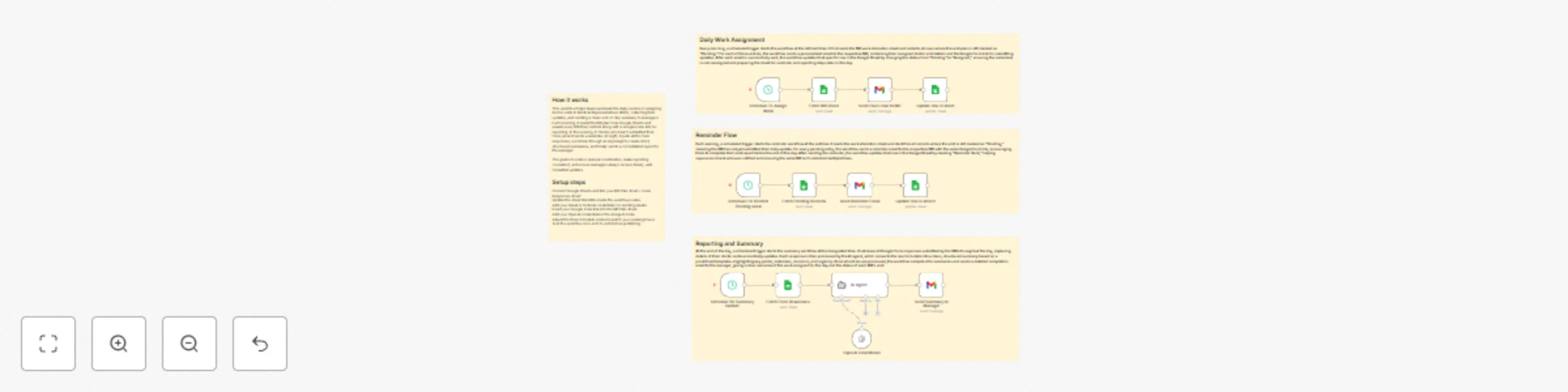
Original n8n.io sourceThis workflow automates the entire daily reporting cycle for field representatives. It assigns daily visits from Google Sheets, emails each MR their task details, sends reminders to those who haven't submitted updates and uses an AI agent to convert form responses into structured summaries. Finally, it sends a clear end-of-day report to the manager, reducing manual coordination and ensuring consistent reporting.
documentId and sheetName (gid) for MR Plan and Form Responses sheets. This workflow handles work assignment, reminders and summary reporting for daily field activities. Every morning, it reads Google Sheets data to determine which MRs have pending assignments and sends them their visit details along with the reporting form link. In the evening, it sends reminder emails to those who have not yet completed their visit updates.
At night, the workflow collects all form responses and uses the built-in AI agent to convert raw entries into structured summaries. These summaries are automatically emailed to the manager, giving a clear overview of each MR’s activity and outcomes.
This workflow minimizes manual follow-up, improves reporting consistency, and ensures managers always receive timely and organized updates.
Status = Pending. Status = Assigned.Status = Pending. Reminder = Yes and Status = Assigned (as per your sheet mapping).Status logic if your sheet uses different labels.Many additional use cases are possible with slight adjustments to sheets and form fields.
| Issue | Possible Cause | Solution |
|---|---|---|
| Emails not sending | Gmail OAuth expired or not connected | Reconnect Gmail credentials in n8n |
| Sheet data not loading | Wrong Sheet ID or GID | Confirm IDs directly from Google Sheets URL |
| Rows not updating | Sheet column names differ from workflow mapping | Align column names exactly as defined in Google Sheets node |
| AI summary missing | OpenAI credentials missing OR unexpected form structure | Check OpenAI credentials and ensure forms produce expected fields |
| Summary email blank | Parsed output may not include expected fields | Inspect AI Agent output in execution logs |
If you would like assistance setting up, testing or extending this workflow — including adapting it to your organization, enhancing AI summaries or connecting it with external systems, our n8n workflow development team at WeblineIndia can help.
Contact WeblineIndia for expert automation support, customizations and add-on development.
This catalog entry is organized from the workflow JSON. The node-level section below shows the executable blocks available for review before importing the template.
| Workflow | Automate medical rep visit workflow with Google Sheets, Gmail & OpenAI summaries |
|---|---|
| Complexity | advanced |
| Nodes | 17 |
| Categories | Project Management, AI Summarization |
| Author | WeblineIndia |
| Published | 11 Dec 2025 |
Use the JSON export at /data/workflows/11690/11690.json as the source template for this automation.
Open n8n, import the downloaded JSON, and review each node before activating the workflow.
Replace placeholder credentials, API keys, webhook URLs, account IDs, and environment-specific values with your own settings.
Run the workflow manually or in a staging workspace, inspect node output, and confirm downstream systems receive the expected data.
Enable the workflow only after testing, then monitor executions, errors, and rate limits during the first production runs.
Review imported nodes carefully before activation. This catalog entry is intended to help you inspect the workflow structure, understand required services, and find related templates faster.
Node names, credentials, schedules, webhook paths, and external service limits may need adjustment for your workspace.
MR Daily Visit Assignment, Reminder & AI Summary Reporting (Google Sheets + Gmail + OpenAI) This workflow automates the entire daily reporting cycle for field representatives. It assigns daily visi...
Review the workflow JSON, configure any required credentials in n8n, and test the automation in a safe workspace before using it in production.
Yes. Use the block-by-block analysis and the downloadable JSON to inspect each node, then adjust credentials, prompts, schedules, filters, or destinations for your Project Management, AI Summarization use case.