Block 1 - Get row(s) in sheet
- Type / Role
- n8n-nodes-base.googleSheets - googleSheets
- Config choices
- Version 4.7


 Early Deal
This workflow is provided as-is. Please review and test before using in production.
This n8n workflow automates the entire process of capturing leads, enriching their data with company information using an AI Agent, and then generating highly personalized introductory emails (usin...
n8n-nodes-base.googlesheets, @n8n/n8n-nodes-langchain.openai, n8n-nodes-base.gmail, n8n-nodes-base.formtrigger, @n8n/n8n-nodes-langchain.agent, @n8n/n8n-nodes-langchain.lmchatgooglegemini, n8n-nodes-base.httprequesttool, n8n-nodes-base.code
This workflow is cataloged by N8N Workflows and links back to its original n8n.io source page by Priyanka Rana.
Original n8n.io sourceThis n8n workflow automates the entire process of capturing leads, enriching their data with company information using an AI Agent, and then generating highly personalized introductory emails (using ChatGPT-4o) saved as drafts in your Gmail account. This prepares your sales team for a high-quality outreach with minimal manual effort.
To use this workflow, you need the following accounts and credentials:
To store and track lead information (the workflow uses a sheet with ID). Below are the columns of the sheet First name Last name Email ID Company Name Company Information Designation Message Location Status Intro email Date Reminder 1 needed? Reminder 1 Email Date
For drafting the personalized introductory emails.
For the AI Agent to perform online company research.
To save the final personalized emails as drafts.
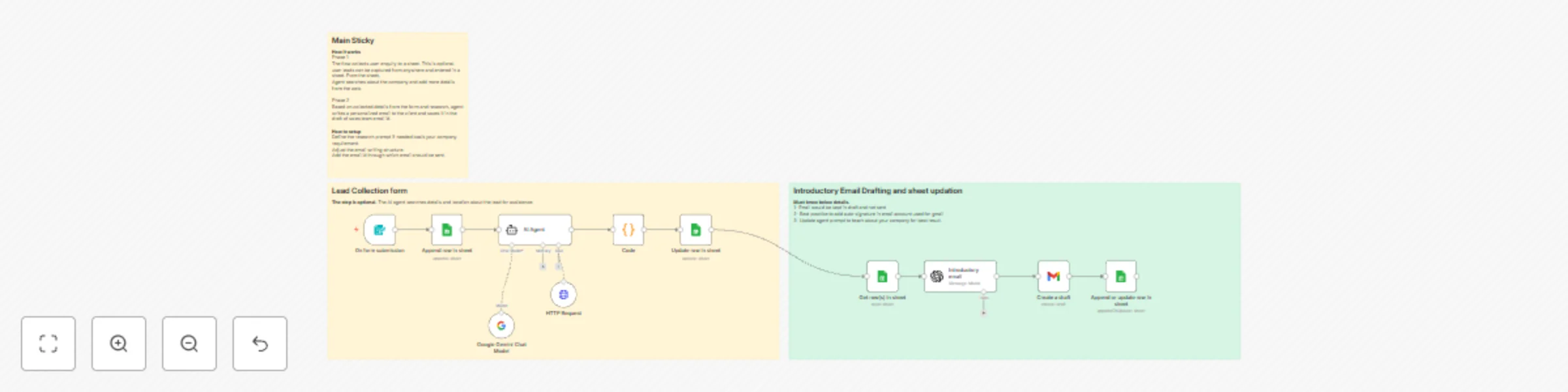
The workflow is structured into two main phases: Lead Capture & Enrichment, and Personalized Email Drafting.
This phase collects user inquiries and uses an AI Agent to search the web for additional company details to enrich the lead profile.
On form submission (Form Trigger): The workflow starts when a potential lead fills out the embedded lead capture form, which collects details like First Name, Last Name, Company Name, Email ID, Designation, and a Message/inquiry. This is optional as many company may have other ways to capture leads.
Append row in sheet (Google Sheets): The initial lead data collected from the form is added to your Google Sheet tracker, setting the Status to To Send.
AI Agent: The AI Agent is prompted to search online for the client's company name to gather two pieces of information:
A 1-2 sentence Company Description (what they do).
The Company Location, categorized as Delhi/NCR, Bangalore, Mumbai, or Other. This should be changed basis your need.
Code: This node processes the structured text output from the AI Agent and separates the Company Description and Company Location into distinct fields.
Update row in sheet (Google Sheets): The newly researched Company Information and Location are updated and added to the lead's row in the Google Sheet, matching on Email ID.
This phase retrieves leads ready for outreach, drafts a personalized email using AI, and saves it for the sales team.
Get row(s) in sheet (Google Sheets): The workflow fetches all leads whose Status is either To send or To Send (using an OR filter).
Introductory email (OpenAI - ChatGPT-4o): For each lead, the OpenAI node is used as a B2B marketing assistant to write a personalized introductory email based on a predefined template.
The prompt uses the lead's data (First Name, Company Name, Message, etc.) and instructs the AI to:
Create a subject line: Following up on your interest in <your company name> for [shorter version of pain point].
Personalize the body by referencing their pain points and suggesting how <your company> has helped similar companies.
Include a call-to-action (CTA) for a quick 15-minute chat.
Provide a P.S. line about a relevant success story that your company has delivered.
The output is structured into EmailSubject, EmailContent, and Emailid variables.
Create a draft (Gmail): The personalized email is saved as a draft in the specified Gmail account, using the AI-generated Subject and Content.
Best Practice: It is recommended to add an auto-signature in the Gmail account used for the draft.
Append or update row in sheet (Google Sheets): The lead's row is updated to reflect the outreach effort. The Status is set to Drafted, and the current date is logged in the Intro email Date column.
Initial Data: You can replace the On form submission trigger with a Google Sheets Trigger or a Webhook to capture leads from other sources (e.g., a CRM or LinkedIn).
AI Prompt: To ensure the best results, update the agent prompt in the Introductory email node to make it more relevant for your company.
Sender: Ensure the email ID used for drafting corresponds to the sales team's email.
This catalog entry is organized from the workflow JSON. The node-level section below shows the executable blocks available for review before importing the template.
| Workflow | Automate lead nurturing with ChatGPT-4o & Gemini for personalized email drafting |
|---|---|
| Complexity | intermediate |
| Nodes | 14 |
| Categories | Lead Generation, Multimodal AI |
| Author | Priyanka Rana |
| Published | 27 Nov 2025 |
Use the JSON export at /data/workflows/11284/11284.json as the source template for this automation.
Open n8n, import the downloaded JSON, and review each node before activating the workflow.
Replace placeholder credentials, API keys, webhook URLs, account IDs, and environment-specific values with your own settings.
Run the workflow manually or in a staging workspace, inspect node output, and confirm downstream systems receive the expected data.
Enable the workflow only after testing, then monitor executions, errors, and rate limits during the first production runs.
Review imported nodes carefully before activation. This catalog entry is intended to help you inspect the workflow structure, understand required services, and find related templates faster.
Node names, credentials, schedules, webhook paths, and external service limits may need adjustment for your workspace.
This n8n workflow automates the entire process of capturing leads, enriching their data with company information using an AI Agent, and then generating highly personalized introductory emails (usin...
Review the workflow JSON, configure any required credentials in n8n, and test the automation in a safe workspace before using it in production.
Yes. Use the block-by-block analysis and the downloadable JSON to inspect each node, then adjust credentials, prompts, schedules, filters, or destinations for your Lead Generation, Multimodal AI use case.