Block 1 - Sticky Note
- Type / Role
- n8n-nodes-base.stickyNote - stickyNote
- Config choices
- Version 1


 Early Deal
This workflow is provided as-is. Please review and test before using in production.
How it works This workflow enriches and personalizes your lead profiles by integrating HubSpot contact data, scraping social media information, and using AI to generate tailored outreach emails. It...
n8n-nodes-base.stickynote, n8n-nodes-base.googlesheets, n8n-nodes-base.hubspot, n8n-nodes-base.webhook, n8n-nodes-base.if, n8n-nodes-base.httprequest, n8n-nodes-base.wait, n8n-nodes-base.code
This workflow is cataloged by N8N Workflows and links back to its original n8n.io source page by Avkash Kakdiya.
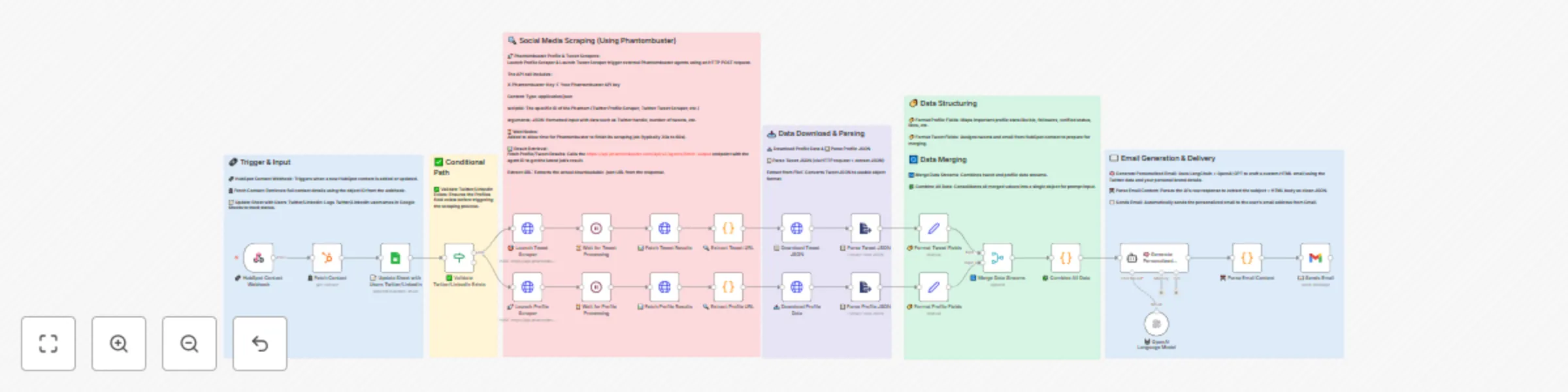
Original n8n.io sourceThis workflow enriches and personalizes your lead profiles by integrating HubSpot contact data, scraping social media information, and using AI to generate tailored outreach emails. It streamlines the process from contact capture to sending a personalized email — all automatically.
The system fetches new or updated HubSpot contacts, verifies and enriches their Twitter/LinkedIn data via Phantombuster, merges the profile and engagement insights, and finally generates a customized email ready for outreach.
1. Trigger & Input
HubSpot Contact Webhook: Fires when a contact is created or updated in HubSpot.
Fetch Contact: Pulls the full contact details (email, name, company, and social profiles).
Update Google Sheet: Logs Twitter/LinkedIn usernames and marks their tracking status.
2. Validation
3. Social Media Scraping (via Phantombuster)
Launch Profile Scraper & 🎯 Launch Tweet Scraper: Triggers Phantombuster agents to fetch profile details and recent tweets.
Wait Nodes: Ensures scraping completes (30–60 seconds).
Fetch Profile/Tweet Results: Retrieves output files from Phantombuster.
Extract URL: Parses the job output to extract the downloadable .json or .csv data file link.
4. Data Download & Parsing
Download Profile/Tweet Data: Downloads scraped JSON files.
Parse JSON: Converts the raw file into structured data for processing.
5. Data Structuring & Merging
Format Profile Fields: Maps stats like bio, followers, verified status, likes, etc.
Format Tweet Fields: Captures tweet data and associates it with the lead’s email.
Merge Data Streams: Combines tweet and profile datasets.
Combine All Data: Produces a single, clean object containing all relevant lead details.
6. AI Email Generation & Delivery
Generate Personalized Email: Feeds the merged data into OpenAI GPT (via LangChain) to craft a custom HTML email using your brand details.
Parse Email Content: Cleans AI output into structured subject and body fields.
Sends Email: Automatically delivers the personalized email to the lead via Gmail.
Automated Lead Enrichment — Combines CRM and real-time social media data with zero manual research.
Personalized Outreach at Scale — AI crafts unique, relevant emails for each contact.
Improved Engagement Rates — Targeted messages based on actual social activity and profile details.
Seamless Integration — Works directly with HubSpot, Google Sheets, Gmail, and Phantombuster.
Time & Effort Savings — Replaces hours of manual lookup and email drafting with an end-to-end automated flow.
This catalog entry is organized from the workflow JSON. The node-level section below shows the executable blocks available for review before importing the template.
Showing the first 24 of 30 workflow blocks. Download the JSON for the full node graph.
| Workflow | Automate lead enrichment & personalized outreach with HubSpot, Phantombuster & GPT |
|---|---|
| Complexity | advanced |
| Nodes | 30 |
| Categories | Lead Nurturing, Multimodal AI |
| Author | Avkash Kakdiya |
| Published | 11 Aug 2025 |
Use the JSON export at /data/workflows/7233/7233.json as the source template for this automation.
Open n8n, import the downloaded JSON, and review each node before activating the workflow.
Replace placeholder credentials, API keys, webhook URLs, account IDs, and environment-specific values with your own settings.
Run the workflow manually or in a staging workspace, inspect node output, and confirm downstream systems receive the expected data.
Enable the workflow only after testing, then monitor executions, errors, and rate limits during the first production runs.
Review imported nodes carefully before activation. This catalog entry is intended to help you inspect the workflow structure, understand required services, and find related templates faster.
Node names, credentials, schedules, webhook paths, and external service limits may need adjustment for your workspace.
How it works This workflow enriches and personalizes your lead profiles by integrating HubSpot contact data, scraping social media information, and using AI to generate tailored outreach emails. It...
Review the workflow JSON, configure any required credentials in n8n, and test the automation in a safe workspace before using it in production.
Yes. Use the block-by-block analysis and the downloadable JSON to inspect each node, then adjust credentials, prompts, schedules, filters, or destinations for your Lead Nurturing, Multimodal AI use case.