Automate job discovery & AI proposals across Upwork, Freelancer, Guru & PPH with OpenRouter

Workflow preview

Workflow preview
100%
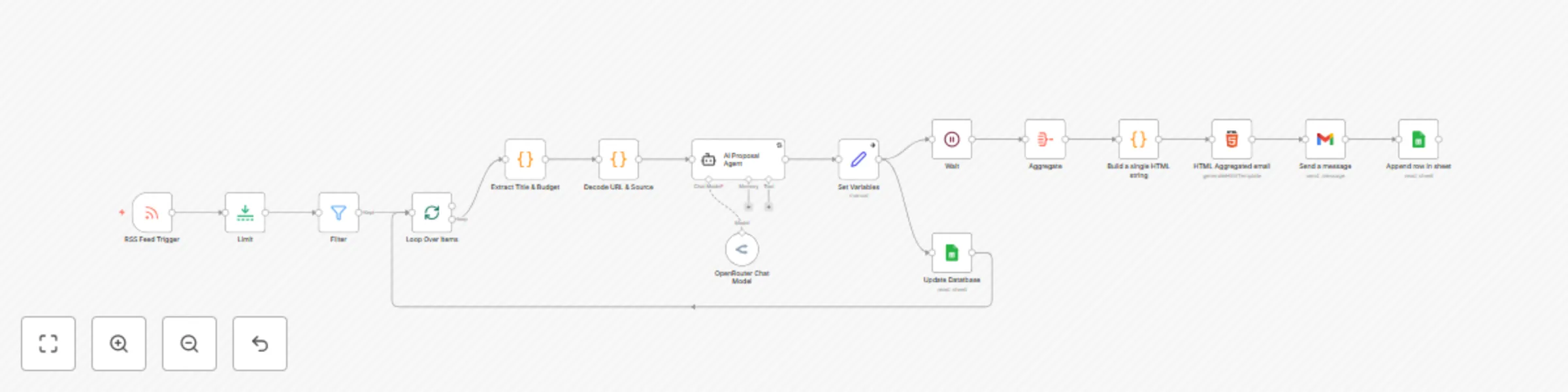
Automate job discovery & AI proposals across Upwork, Freelancer, Guru & PPH with OpenRouter preview
Open on n8n.io

Important notice

This workflow is provided as-is. Please review and test before using in production.

1. Workflow Overview

Upwork/Freelancer/Guru/PPH Job Automation + AI Proposal Generator Overview This comprehensive n8n workflow automates freelance job discovery and application processes across four major platforms: U...

Best for

  • Lead Generation automation workflows
  • Multimodal AI automation workflows
  • advanced n8n builders looking for reusable templates

Tools used

n8n-nodes-base.rssfeedreadtrigger, n8n-nodes-base.splitinbatches, n8n-nodes-base.code, n8n-nodes-base.set, @n8n/n8n-nodes-langchain.lmchatopenrouter, n8n-nodes-base.filter, n8n-nodes-base.gmail, n8n-nodes-base.googlesheets

Source and attribution

This workflow is cataloged by N8N Workflows and links back to its original n8n.io source page by Gerald Denor.

Original n8n.io source

1.1 Workflow description

Title
Automate job discovery & AI proposals across Upwork, Freelancer, Guru & PPH with OpenRouter
Workflow name
Automate job discovery & AI proposals across Upwork, Freelancer, Guru & PPH with OpenRouter

Upwork/Freelancer/Guru/PPH Job Automation + AI Proposal Generator

Overview

This comprehensive n8n workflow automates freelance job discovery and application processes across four major platforms: Upwork.com, Freelancer.com, PeoplePerHour.com, and Guru.com. The system monitors RSS feeds, extracts job details, generates personalized AI proposals, and tracks everything in Google Sheets with email notifications.

Supported Platforms

Complete Market Coverage

Upwork.com

  • World's largest freelance marketplace
  • High-value projects and enterprise clients
  • Competitive bidding environment requiring fast responses

Freelancer.com

  • Global platform with diverse project types
  • International client base across all industries
  • Contest and fixed-price project opportunities

PeoplePerHour.com

  • UK-focused professional services platform
  • Hourly and project-based work
  • Business and creative services emphasis

Guru.com

  • Premium freelance marketplace for skilled professionals
  • Work room collaboration features
  • Recurring client relationship focus

Use Cases

Primary Use Cases

Multi-Platform Lead Generation

  • Monitor Upwork, Freelancer, PeoplePerHour, and Guru simultaneously
  • Receive instant notifications for relevant opportunities across all platforms
  • Never miss time-sensitive job postings from any major marketplace

Cross-Platform Proposal Automation

  • Generate platform-specific, personalized proposals using AI
  • Adapt proposal style to each platform's requirements and culture
  • Maintain consistent quality across all applications and platforms

Comprehensive Opportunity Tracking

  • Automatically log jobs from all four platforms in Google Sheets
  • Track application status and platform performance

Competitive Market Advantage

  • Respond to jobs within minutes across multiple platforms
  • Maintain 24/7 monitoring without manual intervention
  • Access broader market opportunities while competitors focus on single platforms

Industry Applications

Digital Marketing Agencies

  • Monitor automation projects across Upwork and Freelancer
  • Track competitor applications on multiple platforms
  • Access European clients through PeoplePerHour and international through Guru

Software Development Teams

  • Find API integration projects on Upwork and technical contests on Freelancer
  • Monitor PeoplePerHour for UK-based development work
  • Track long-term client relationships on Guru

Virtual Assistant Services

  • Discover automation opportunities across all four platforms
  • Monitor recurring service requests and business support roles
  • Scale operations by accessing different market segments

Consulting Practices

  • Track business automation requests on premium platforms like Guru
  • Monitor transformation projects across international markets
  • Access diverse client bases from startup (Freelancer) to enterprise (Upwork)

Technical Features

Technical Features

Multi-Platform RSS Monitoring

  • Configurable polling intervals (default: 5 minutes)
  • Processes Vollna API feeds for Upwork, Freelancer, PeoplePerHour, and Guru
  • Handles various platform-specific job feed formats automatically

Intelligent Data Extraction

  • Parses job titles to extract budget information across different platform formats
  • Supports multiple pricing formats (fixed, hourly, ranges) from all platforms
  • Cleans and structures job data with platform-specific considerations

Advanced URL Processing

  • Decodes nested URLs from feed redirects
  • Automatically identifies source platforms (Upwork, Freelancer, PeoplePerHour, Guru)
  • Validates and formats final job URLs for direct platform access

AI Integration with Platform Awareness

  • Uses OpenRouter for AI model access with platform-specific contexts
  • Implements advanced prompt engineering for different platform cultures
  • Generates contextual, personalized proposals adapted to each platform

Multi-Platform Support

  • Gmail integration for notifications
  • Google Sheets for data storage
  • HTML email formatting
  • Automated database updates

⚙️ Configuration Options

Filtering System

  • ASCII text filtering for English content
  • Custom budget range filtering
  • Platform-specific filtering rules
  • Keyword-based job matching

AI Customization

  • Customizable proposal templates
  • Variable experience levels
  • Industry-specific positioning
  • Personal branding integration

Notification Preferences

  • HTML-formatted email alerts
  • Mobile-friendly email templates
  • Batch processing options
  • Error handling and retry logic

Benefits

🚀 Operational Efficiency

Time Savings

  • Eliminates manual job checking (save 2-3 hours daily)
  • Automates proposal writing process
  • Reduces administrative overhead

Response Speed

  • 5-minute job discovery cycle
  • Instant proposal generation
  • Competitive response timing

Quality Consistency

  • Standardized proposal quality
  • Professional email formatting
  • Consistent brand presentation

📊 Business Intelligence

Market Analysis

  • Budget trend tracking
  • Platform performance comparison
  • Job volume analytics
  • Competitive landscape insights

Performance Tracking

  • Application success rates
  • Response time analysis
  • Platform-specific metrics
  • ROI measurement capabilities

🔄 Scalability Features

Multi-User Support

  • Team-based implementations
  • Role-specific customizations
  • Shared resource management

Integration Ready

  • CRM system compatibility
  • Project management tool integration
  • Calendar synchronization options
  • API extension capabilities

Requirements

🛠️ Technical Prerequisites

n8n Setup

  • n8n Cloud or self-hosted instance
  • Webhook capabilities enabled
  • Cron trigger support

External Services

  • Gmail account with API access
  • Google Sheets API credentials
  • OpenRouter API key
  • Vollna account for RSS feeds

Optional Enhancements

  • Custom domain for webhooks
  • SSL certificates for secure connections
  • Database storage for advanced analytics

Installation & Setup

Need Help?

Reach me: https://www.linkedin.com/in/gerald-akhidenor-1ab1a45/

Work with me: https://dominixai.com/

My website: https://jobmonkey.dev

My email: [email protected]

📘 Beginner Setup Guide

Workflow: Upwork Job Application Automation with Vollna API

This workflow automates the process of:

  • Reading new jobs from a Vollna RSS feed,
  • Extracting job title, budget, and source,
  • Using AI to generate a tailored proposal,
  • Sending the proposal to your email, and
  • Saving job details into a Google Sheet.

1. 📥 Import the Workflow

  1. Open your n8n dashboard.
  2. Click Import in the top-right.
  3. Upload the file: Upwork Job Application Automation with Vollna API Updated.json.

2. 🔑 Set Up Required Credentials

Before the workflow can run, connect your accounts.

  1. Gmail Credentials

    • Go to Credentials in n8n.
    • Create a new credential: Gmail OAuth2 API.
    • Follow the login prompt and grant access.
    • Save it, then select it in the Send a Message node.
  2. Google Sheets Credentials

    • Create a credential for Google Sheets OAuth2 API.
    • Connect it to your Google account.
    • Save it, then select it in the Update Database node.
  3. OpenRouter / AI API Key

    • Sign up at openrouter.ai.
    • Copy your API key.
    • In n8n, create a credential for OpenRouter API.
    • Select it in the OpenRouter Chat Model node.

3. ⚙️ Configure the RSS Feed

  1. Open the RSS Feed Trigger node.

  2. Replace https://www.vollna.com/rss/insertyourlinkhere with your personal Vollna RSS feed URL.

    • You can get this from your Vollna account (filtering for Upwork jobs).

4. 🌀 Understand the Loop

This workflow uses Loop Over Items to process multiple jobs one by one.

  • Loop branch (Output 1) → Processes each job (Extract, Decode, AI Proposal, Save to DB).
  • Done branch (Output 2) → Would normally run once all jobs are processed. (Here, it’s not used — instead, the loop cycles back until no jobs are left.)

So the workflow ensures every job from RSS is handled.


5. 📧 Email Setup

The Send a Message node will send proposals to your email.

  • Default recipient: [email protected].
  • Change this in the Send a Message → Send To field to your own email.

6. 📊 Google Sheets Setup

[Get Your Google Sheets Copy](Get your Google Sheets copy)

The Update Database node writes job data to your Google Sheet.

  • It’s already linked to this sheet: Upwork Jobs Automation → upwork_jobs

  • Replace with your own Google Sheet ID if you want.

    • Copy your sheet’s URL, e.g.:

      https://docs.google.com/spreadsheets/d/<YOUR_SHEET_ID>/edit#gid=0
      
    • Paste <YOUR_SHEET_ID> into the Document ID.

    • Update Sheet Name if needed (default is upwork_jobs).


7. ▶️ Test the Workflow

  1. Click Execute Workflow.

  2. The RSS Trigger will fetch jobs.

  3. You should see each job processed step by step:

    • Title & Budget extracted
    • URL decoded
    • Proposal generated by AI
    • Email sent
    • Row added to Google Sheet

8. 🔄 Activate Automation

  • When satisfied, toggle the workflow to Active.
  • It will check the RSS feed every 5 minutes (you can adjust this in the RSS Trigger).

Your Upwork Job Application Automation is now ready to help you discover and apply to more opportunities automatically. Remember to monitor the system regularly and adjust settings based on your results.

Happy freelancing! 🚀🚀

1.2 Logical Blocks

This catalog entry is organized from the workflow JSON. The node-level section below shows the executable blocks available for review before importing the template.

2. Block-by-Block Analysis

Block 1 - RSS Feed Trigger

Type / Role
n8n-nodes-base.rssFeedReadTrigger - rssFeedReadTrigger
Config choices
Version 1

Block 2 - Loop Over Items

Type / Role
n8n-nodes-base.splitInBatches - splitInBatches
Config choices
Version 3

Block 3 - Extract Title & Budget

Type / Role
n8n-nodes-base.code - code
Config choices
Version 2

Block 4 - Decode URL & Source

Type / Role
n8n-nodes-base.code - code
Config choices
Version 2

Block 5 - Set Variables

Type / Role
n8n-nodes-base.set - set
Config choices
Version 3

Block 6 - OpenRouter Chat Model

Type / Role
@n8n/n8n-nodes-langchain.lmChatOpenRouter - lmChatOpenRouter
Config choices
Version 1

Block 7 - Filter

Type / Role
n8n-nodes-base.filter - filter
Config choices
Version 2.2

Block 8 - Send a message

Type / Role
n8n-nodes-base.gmail - gmail
Config choices
Version 2.1

Block 9 - Update Datatbase

Type / Role
n8n-nodes-base.googleSheets - googleSheets
Config choices
Version 4

Block 10 - AI Proposal Agent

Type / Role
@n8n/n8n-nodes-langchain.agent - agent
Config choices
Version 2.2

Block 11 - Append row in sheet

Type / Role
n8n-nodes-base.googleSheets - googleSheets
Config choices
Version 4.7

Block 12 - Wait

Type / Role
n8n-nodes-base.wait - wait
Config choices
Version 1.1

Block 13 - Aggregate

Type / Role
n8n-nodes-base.aggregate - aggregate
Config choices
Version 1

Block 14 - HTML Aggregated email

Type / Role
n8n-nodes-base.html - html
Config choices
Version 1.2

Block 15 - Limit

Type / Role
n8n-nodes-base.limit - limit
Config choices
Version 1

Block 16 - Build a single HTML string

Type / Role
n8n-nodes-base.code - code
Config choices
Version 2

3. Summary Table

Workflow Automate job discovery & AI proposals across Upwork, Freelancer, Guru & PPH with OpenRouter
Complexity advanced
Nodes 16
Categories Lead Generation, Multimodal AI
Author Gerald Denor
Published 24 Aug 2025

4. Reproducing the Workflow from Scratch

  1. 1. Download the workflow JSON

    Use the JSON export at /data/workflows/7782/7782.json as the source template for this automation.

  2. 2. Import the template into n8n

    Open n8n, import the downloaded JSON, and review each node before activating the workflow.

  3. 3. Configure credentials and variables

    Replace placeholder credentials, API keys, webhook URLs, account IDs, and environment-specific values with your own settings.

  4. 4. Test with sample data

    Run the workflow manually or in a staging workspace, inspect node output, and confirm downstream systems receive the expected data.

  5. 5. Activate and monitor

    Enable the workflow only after testing, then monitor executions, errors, and rate limits during the first production runs.

5. General Notes & Resources

Review imported nodes carefully before activation. This catalog entry is intended to help you inspect the workflow structure, understand required services, and find related templates faster.

Node names, credentials, schedules, webhook paths, and external service limits may need adjustment for your workspace.

Frequently asked questions

What does Automate job discovery & AI proposals across Upwork, Freelancer, Guru & PPH with OpenRouter do?

Upwork/Freelancer/Guru/PPH Job Automation + AI Proposal Generator Overview This comprehensive n8n workflow automates freelance job discovery and application processes across four major platforms: U...

What do I need before importing this workflow?

Review the workflow JSON, configure any required credentials in n8n, and test the automation in a safe workspace before using it in production.

Can I customize this workflow?

Yes. Use the block-by-block analysis and the downloadable JSON to inspect each node, then adjust credentials, prompts, schedules, filters, or destinations for your Lead Generation, Multimodal AI use case.