Block 1 - Form Trigger
- Type / Role
- n8n-nodes-base.formTrigger - formTrigger
- Config choices
- Version 2.1


 Early Deal
This workflow is provided as-is. Please review and test before using in production.
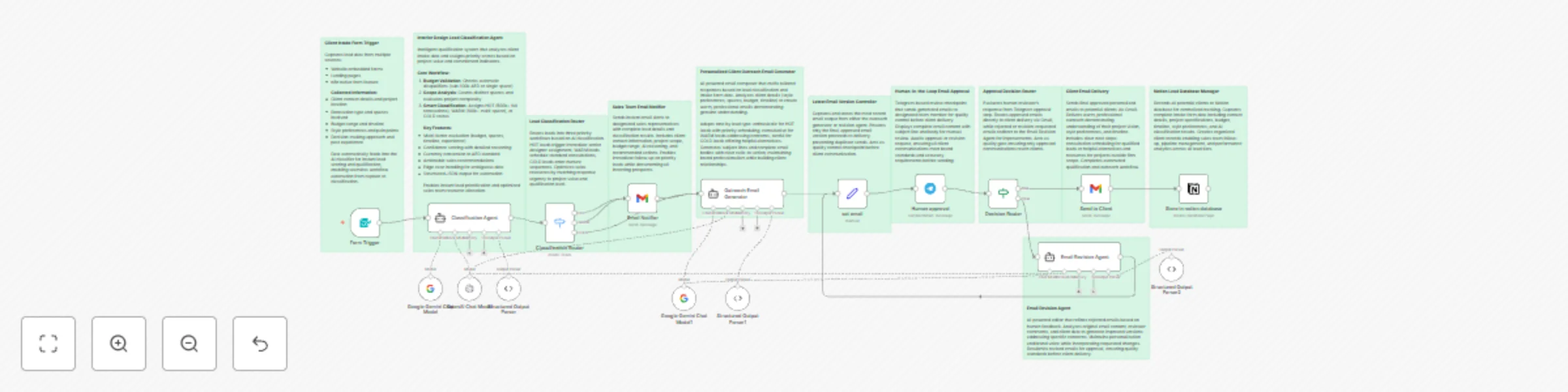
Overview This automated workflow intelligently qualifies interior design leads, generates personalized client emails, and manages follow up through a human approval process. Built with n8n, Claude ...
n8n-nodes-base.formtrigger, @n8n/n8n-nodes-langchain.lmchatgooglegemini, @n8n/n8n-nodes-langchain.outputparserstructured, n8n-nodes-base.set, @n8n/n8n-nodes-langchain.lmchatopenai, @n8n/n8n-nodes-langchain.agent, n8n-nodes-base.stickynote, n8n-nodes-base.switch
This workflow is cataloged by N8N Workflows and links back to its original n8n.io source page by Jameson Kanakulya.
Original n8n.io sourceThis automated workflow intelligently qualifies interior design leads, generates personalized client emails, and manages follow-up through a human-approval process. Built with n8n, Claude AI, Telegram approval, and Notion database integration.
This template works with both n8n Cloud and self-hosted instances. Most nodes are native to n8n, making it cloud-compatible out of the box.
Automated Lead Management Pipeline:
✅ Intelligent Lead Scoring: Analyzes 12+ data points including budget (AED), space count, project type, timeline, and style preferences
✅ Personalized Communication: AI-generated emails reference specific client details, demonstrating genuine understanding
✅ Quality Control: Human-in-the-loop approval via Telegram prevents errors before client contact
✅ Smart Routing: Different workflows for qualified leads (meeting invitations) vs. unqualified leads (respectful alternatives)
✅ Revision Loop: Rejected emails automatically route to revision agent for improvements
✅ Database Integration: All leads stored in Notion for pipeline tracking and analytics
Captures lead data from website forms or n8n native forms with all project details.
Analyzes intake data using structured logic: budget validation, space counting, and multi-factor evaluation. Returns HOT/WARM/COLD classification with confidence scores.
Routes leads into three priority workflows based on AI classification, optimizing resource allocation.
Sends instant alerts to sales representatives with complete lead details and AI reasoning for internal tracking.
AI-powered composer creating tailored responses demonstrating genuine understanding of client vision, adapted by lead type.
Captures most recent email output ensuring only final approved version proceeds to delivery.
Telegram-based review checkpoint sending generated emails to team member for quality control before client delivery.
Evaluates reviewer's response, routing approved emails to client delivery or rejected emails to revision agent.
AI-powered editor refining rejected emails based on feedback while maintaining personalization and brand voice.
Sends final approved personalized emails demonstrating understanding of project vision with clear next steps.
Records all potential clients with complete intake data, classification results, and tracking information for pipeline management.
Adjust Classification Thresholds: Modify budget ranges and space requirements in the AI Lead Scoring Engine prompt to match your market and service level.
Multi-Language Support: Update all AI agent prompts with instructions for your target language. Claude supports 100+ languages.
Additional Routing: Add branches for special cases like urgent projects, VIP clients, or specific geographic regions.
CRM Integration: Replace Notion with HubSpot, Salesforce, or Airtable using respective n8n nodes.
SMS Notifications: Add Twilio node for immediate HOT lead alerts to mobile devices.
Issue: Telegram approval not received
Issue: Claude API errors
Issue: Gmail not sending
Issue: Notion database not updating
This template is provided as-is under MIT license. Modify and adapt freely for your business needs.
Version: 1.0 Last Updated: October 2025 Compatibility: n8n v1.0+ (Cloud & Self-Hosted), Claude API v2024-10+
This catalog entry is organized from the workflow JSON. The node-level section below shows the executable blocks available for review before importing the template.
Showing the first 24 of 28 workflow blocks. Download the JSON for the full node graph.
| Workflow | Automate interior design lead qualification with AI & human approval to Notion |
|---|---|
| Complexity | advanced |
| Nodes | 28 |
| Categories | Lead Nurturing, AI Summarization |
| Author | Jameson Kanakulya |
| Published | 22 Oct 2025 |
Use the JSON export at /data/workflows/10025/10025.json as the source template for this automation.
Open n8n, import the downloaded JSON, and review each node before activating the workflow.
Replace placeholder credentials, API keys, webhook URLs, account IDs, and environment-specific values with your own settings.
Run the workflow manually or in a staging workspace, inspect node output, and confirm downstream systems receive the expected data.
Enable the workflow only after testing, then monitor executions, errors, and rate limits during the first production runs.
Review imported nodes carefully before activation. This catalog entry is intended to help you inspect the workflow structure, understand required services, and find related templates faster.
Node names, credentials, schedules, webhook paths, and external service limits may need adjustment for your workspace.
Overview This automated workflow intelligently qualifies interior design leads, generates personalized client emails, and manages follow up through a human approval process. Built with n8n, Claude ...
Review the workflow JSON, configure any required credentials in n8n, and test the automation in a safe workspace before using it in production.
Yes. Use the block-by-block analysis and the downloadable JSON to inspect each node, then adjust credentials, prompts, schedules, filters, or destinations for your Lead Nurturing, AI Summarization use case.