Block 1 - When clicking ‘Test workflow’
- Type / Role
- n8n-nodes-base.manualTrigger - manualTrigger
- Config choices
- Version 1


 Early Deal
This workflow is provided as-is. Please review and test before using in production.
This workflow is built for digital marketers, sales professionals, influencer agencies, and entrepreneurs who want to automate Instagram lead ...
n8n-nodes-base.manualtrigger, n8n-nodes-base.set, @n8n/n8n-nodes-langchain.agent, @n8n/n8n-nodes-langchain.lmchatopenai, n8n-nodes-base.httprequest, n8n-nodes-base.code, n8n-nodes-base.splitout, @n8n/n8n-nodes-langchain.informationextractor
This workflow is cataloged by N8N Workflows and links back to its original n8n.io source page by Fayzul Noor.
Original n8n.io sourceThis workflow is built for digital marketers, sales professionals, influencer agencies, and entrepreneurs who want to automate Instagram lead generation. If you’re tired of manually searching for profiles, copying email addresses, and updating spreadsheets, this automation will save you hours every week. It turns your process into a smart system that finds, extracts, and stores leads while you focus on growing your business.
How it works / What it does
This n8n automation completely transforms how you collect Instagram leads using AI and API integrations.
Here’s a simple breakdown of how it works:
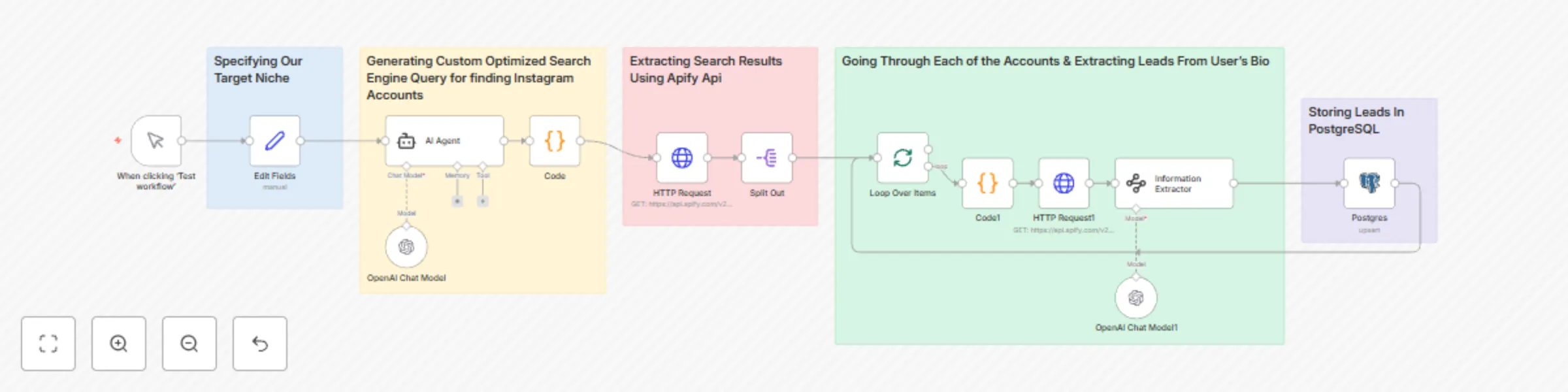
Set your targeting parameters using the Edit Fields node. You can specify your platform (Instagram), field of interest such as “beauty & hair,” and target country like “USA.”
Generate intelligent search queries with an AI Agent powered by GPT-4o-mini. It automatically creates optimized Google search queries to find relevant Instagram profiles in your chosen niche and location.
Extract results from Google using Apify’s Google Search Scraper, which collects hundreds of Instagram profile URLs that match your search criteria.
Fetch detailed Instagram profile data using Apify’s Instagram Scraper. This includes usernames, follower counts, and profile bios where contact information usually appears.
Use AI to extract emails from the profile biographies with the Information Extractor node powered by GPT-3.5-turbo. It identifies emails even when they are hidden or creatively formatted.
Store verified leads in a PostgreSQL database. The workflow automatically adds new leads or updates existing ones with fields like username, follower count, email, and niche.
Once everything is set up, the system runs on autopilot and keeps building your database of quality leads around the clock.
How to set up
Follow these steps to get your Instagram Lead Generation Machine running:
Import the JSON file into your n8n instance.
Add your API credentials:
Apify token for the Google and Instagram scrapers
OpenAI API key for the AI-powered nodes
PostgreSQL credentials for storing leads
Open the Edit Fields node and set your platform, field of interest, and target country.
Run the workflow manually using the Manual Trigger node to test it.
Once confirmed, replace the manual trigger with a schedule or webhook to run it automatically. Check your PostgreSQL database to ensure the leads are being saved correctly.
Requirements
Before running the workflow, make sure you have the following:
An n8n account or instance (self-hosted or n8n Cloud)
An Apify account for accessing the Google and Instagram scrapers
OpenAI API access for generating smart search queries and extracting emails
A PostgreSQL database to store your leads
Basic understanding of how n8n workflows and nodes operate
How to customize the workflow
This workflow is flexible and can be customized to fit your business goals. Here’s how you can tailor it:
Change your niche or location by updating the Edit Fields node. You can switch from “beauty influencers in the USA” to “fitness coaches in Canada” in seconds.
Add more data fields to collect additional information such as engagement rates, bio keywords, or profile categories. Just modify the PostgreSQL node and database schema.
Connect to your CRM or email system to automatically send introduction emails or add new leads to your marketing pipeline.
Use different triggers such as a scheduled cron trigger for daily runs or a webhook trigger to start the workflow through an API call.
Filter higher-quality leads by adding logic to capture only profiles with a minimum number of followers or verified emails.
This catalog entry is organized from the workflow JSON. The node-level section below shows the executable blocks available for review before importing the template.
| Workflow | Automate Instagram influencer lead collection with Apify, GPT and PostgreSQL |
|---|---|
| Complexity | advanced |
| Nodes | 18 |
| Categories | Lead Generation, AI RAG |
| Author | Fayzul Noor |
| Published | 19 Oct 2025 |
Use the JSON export at /data/workflows/9885/9885.json as the source template for this automation.
Open n8n, import the downloaded JSON, and review each node before activating the workflow.
Replace placeholder credentials, API keys, webhook URLs, account IDs, and environment-specific values with your own settings.
Run the workflow manually or in a staging workspace, inspect node output, and confirm downstream systems receive the expected data.
Enable the workflow only after testing, then monitor executions, errors, and rate limits during the first production runs.
Review imported nodes carefully before activation. This catalog entry is intended to help you inspect the workflow structure, understand required services, and find related templates faster.
Node names, credentials, schedules, webhook paths, and external service limits may need adjustment for your workspace.
This workflow is built for digital marketers, sales professionals, influencer agencies, and entrepreneurs who want to automate Instagram lead ...
Review the workflow JSON, configure any required credentials in n8n, and test the automation in a safe workspace before using it in production.
Yes. Use the block-by-block analysis and the downloadable JSON to inspect each node, then adjust credentials, prompts, schedules, filters, or destinations for your Lead Generation, AI RAG use case.