Block 1 - Fetch Recent Instagram Posts
- Type / Role
- n8n-nodes-base.facebookGraphApi - facebookGraphApi
- Config choices
- Version 1


 Early Deal
This workflow is provided as-is. Please review and test before using in production.
Description Automatically analyze your Instagram posts’ engagement and audience sentiment using GPT 4 to uncover top performing content and improvement opportunities. This workflow fetches ...
n8n-nodes-base.facebookgraphapi, n8n-nodes-base.scheduletrigger, @n8n/n8n-nodes-langchain.agent, @n8n/n8n-nodes-langchain.memorybufferwindow, n8n-nodes-base.stickynote, @n8n/n8n-nodes-langchain.outputparserstructured, @n8n/n8n-nodes-langchain.lmchatopenai, n8n-nodes-base.code
This workflow is cataloged by N8N Workflows and links back to its original n8n.io source page by Rahul Joshi.
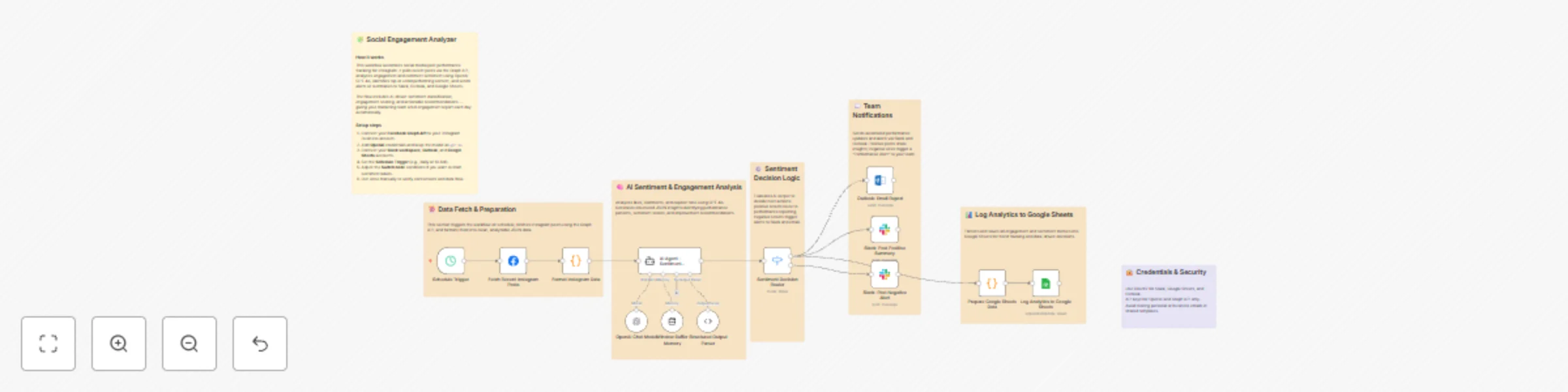
Original n8n.io sourceAutomatically analyze your Instagram posts’ engagement and audience sentiment using GPT-4 to uncover top-performing content and improvement opportunities. 💬📈 This workflow fetches your latest Instagram posts using the Facebook Graph API, evaluates likes, comments, and tone, then generates structured performance insights. The results are logged into Google Sheets, shared via Slack alerts, and emailed through Outlook — empowering your social media team with daily, AI-powered engagement intelligence. 🚀
1️⃣ Trigger – Runs daily at 10 AM to fetch the latest Instagram posts. ⏰ 2️⃣ Data Fetching – Uses the Facebook Graph API to extract post data, captions, likes, and comments. 📲 3️⃣ Formatting – Cleans and structures post and comment data for analysis. 🧩 4️⃣ AI Evaluation – GPT-4 analyzes engagement metrics and comment sentiment to score post performance. 🤖 5️⃣ Decision Routing – Flags high- and low-performing posts for separate processing. ⚙️ 6️⃣ Notifications – Sends positive performance summaries or negative alerts to Slack. 💬 7️⃣ Logging – Records engagement metrics, sentiment labels, and AI recommendations in Google Sheets. 📊 8️⃣ Reporting – Emails detailed performance summaries to the marketing team via Outlook. 💌
✅ Automates social performance tracking across Instagram posts ✅ Provides AI-driven sentiment and engagement insights ✅ Flags top or underperforming content for immediate action ✅ Delivers Slack and email reports for team visibility ✅ Centralizes analytics in Google Sheets for trend tracking
1️⃣ Connect your Facebook Graph API to your Instagram Business Account. 2️⃣ Add OpenAI API credentials (use GPT-4 model for best results). 3️⃣ Configure Slack for team notifications and specify the channel ID. 4️⃣ Link Google Sheets and set your sheet ID for data logging. 5️⃣ Connect Microsoft Outlook for daily performance email reports. 6️⃣ Adjust the schedule (default: 10 AM daily) to suit your workflow. 7️⃣ Run a test once, verify data mapping, and enable automation. ✅
This catalog entry is organized from the workflow JSON. The node-level section below shows the executable blocks available for review before importing the template.
| Workflow | Automate Instagram engagement & sentiment analysis with GPT-4 and Slack reports |
|---|---|
| Complexity | advanced |
| Nodes | 20 |
| Categories | Market Research, AI Summarization |
| Author | Rahul Joshi |
| Published | 14 Nov 2025 |
Use the JSON export at /data/workflows/10824/10824.json as the source template for this automation.
Open n8n, import the downloaded JSON, and review each node before activating the workflow.
Replace placeholder credentials, API keys, webhook URLs, account IDs, and environment-specific values with your own settings.
Run the workflow manually or in a staging workspace, inspect node output, and confirm downstream systems receive the expected data.
Enable the workflow only after testing, then monitor executions, errors, and rate limits during the first production runs.
Review imported nodes carefully before activation. This catalog entry is intended to help you inspect the workflow structure, understand required services, and find related templates faster.
Node names, credentials, schedules, webhook paths, and external service limits may need adjustment for your workspace.
Description Automatically analyze your Instagram posts’ engagement and audience sentiment using GPT 4 to uncover top performing content and improvement opportunities. This workflow fetches ...
Review the workflow JSON, configure any required credentials in n8n, and test the automation in a safe workspace before using it in production.
Yes. Use the block-by-block analysis and the downloadable JSON to inspect each node, then adjust credentials, prompts, schedules, filters, or destinations for your Market Research, AI Summarization use case.