Block 1 - Monitor Google Reviews
- Type / Role
- n8n-nodes-base.googleBusinessProfileTrigger - googleBusinessProfileTrigger
- Config choices
- Version 1


 Early Deal
This workflow is provided as-is. Please review and test before using in production.
How it works This workflow automatically monitors your Google Business Profile for new reviews and uses AI to generate personalized response suggestions. When a review is detected, the system forma...
n8n-nodes-base.googlebusinessprofiletrigger, n8n-nodes-base.set, n8n-nodes-base.aitransform, n8n-nodes-base.if, n8n-nodes-base.httprequest, n8n-nodes-base.googlesheets, n8n-nodes-base.stickynote
This workflow is cataloged by N8N Workflows and links back to its original n8n.io source page by Grace Gbadamosi.
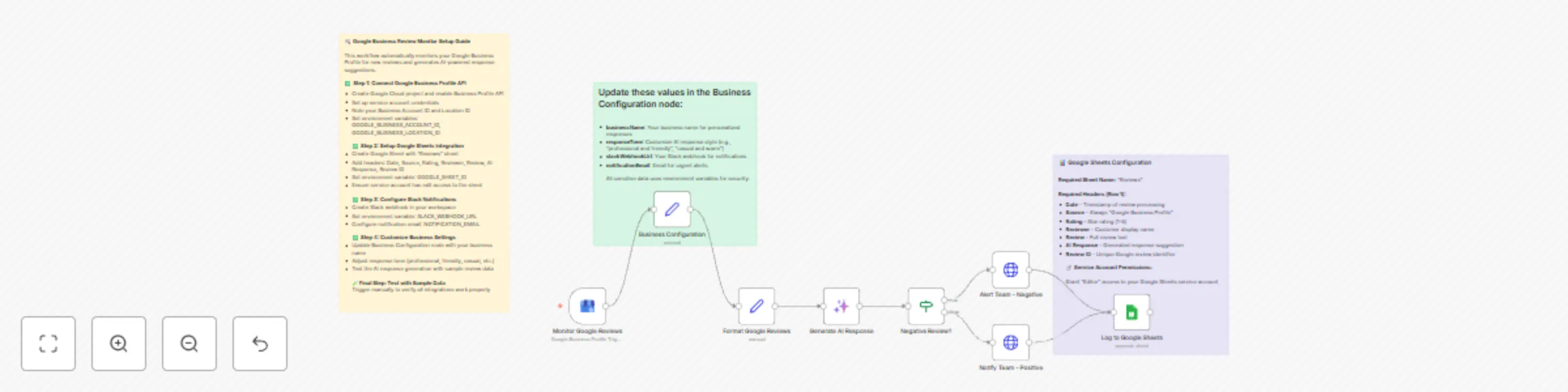
Original n8n.io sourceThis workflow automatically monitors your Google Business Profile for new reviews and uses AI to generate personalized response suggestions. When a review is detected, the system formats the review data, generates an appropriate AI response based on the rating and content, sends differentiated Slack notifications (urgent alerts for negative reviews, celebration messages for positive ones), and logs everything to Google Sheets for tracking and analysis.
Local business owners, restaurant managers, retail store operators, service providers, and reputation management teams who want to stay on top of customer feedback and respond promptly with thoughtful, AI-generated responses. Perfect for businesses that receive regular reviews and want to maintain consistent, professional customer engagement without manually monitoring multiple platforms.
Modify the Business Configuration node to change your business name, adjust the AI response tone (professional, friendly, casual), customize Slack notification messages in the HTTP Request nodes, or add additional review sources by duplicating the trigger structure.
This catalog entry is organized from the workflow JSON. The node-level section below shows the executable blocks available for review before importing the template.
| Workflow | Automate Google Business reviews with AI responses, Slack alerts & sheets logging |
|---|---|
| Complexity | intermediate |
| Nodes | 11 |
| Categories | Ticket Management, Multimodal AI |
| Author | Grace Gbadamosi |
| Published | 28 Jul 2025 |
Use the JSON export at /data/workflows/6590/6590.json as the source template for this automation.
Open n8n, import the downloaded JSON, and review each node before activating the workflow.
Replace placeholder credentials, API keys, webhook URLs, account IDs, and environment-specific values with your own settings.
Run the workflow manually or in a staging workspace, inspect node output, and confirm downstream systems receive the expected data.
Enable the workflow only after testing, then monitor executions, errors, and rate limits during the first production runs.
Review imported nodes carefully before activation. This catalog entry is intended to help you inspect the workflow structure, understand required services, and find related templates faster.
Node names, credentials, schedules, webhook paths, and external service limits may need adjustment for your workspace.
How it works This workflow automatically monitors your Google Business Profile for new reviews and uses AI to generate personalized response suggestions. When a review is detected, the system forma...
Review the workflow JSON, configure any required credentials in n8n, and test the automation in a safe workspace before using it in production.
Yes. Use the block-by-block analysis and the downloadable JSON to inspect each node, then adjust credentials, prompts, schedules, filters, or destinations for your Ticket Management, Multimodal AI use case.