Block 1 - Sun 9 PM Trigger
- Type / Role
- n8n-nodes-base.cron - cron
- Config choices
- Version 1.1


 Early Deal
This workflow is provided as-is. Please review and test before using in production.
Feel like your inbox is a junk drawer you’re scared to open? Meet the Sunday Sweep Gmail Zero workflow—the soft tech hug your Gmail has been waiting for. ️ What it does (in plain English) • Ev...
n8n-nodes-base.cron, n8n-nodes-base.gmail
This workflow is cataloged by N8N Workflows and links back to its original n8n.io source page by Shelly-Ann Davy.
Original n8n.io sourceFeel like your inbox is a junk drawer you’re scared to open? 📧
Meet the Sunday Sweep Gmail Zero workflow—the soft-tech hug your Gmail has been waiting for. 🕊️
What it does (in plain English)
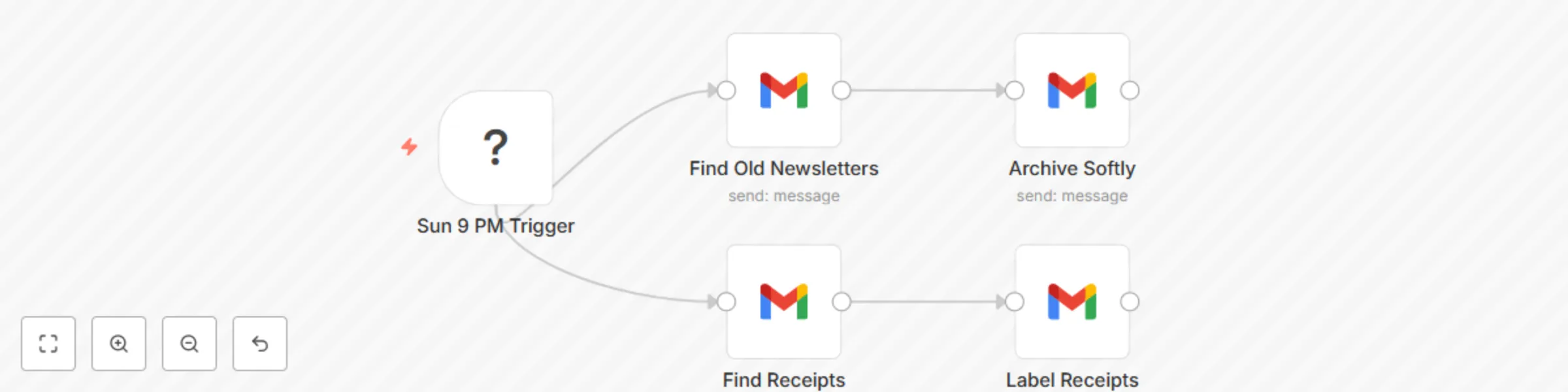
• Every Sunday at 9 PM it quietly hunts down newsletters older than 30 days and gently archives them—no scary deletions, just a neat sweep.
• Fresh receipts, invoices or order confirmations from the past 24 hours are instantly labeled 🧾 “Receipts” so you can find them at tax time without digging.
• You wake up Monday to a crystal-clear inbox, zero overwhelm, and one big check-mark off your to-do list. ✅
Who it’s perfect for:
✨ Etsy shop owners, virtual assistants, wellness coaches, and any homemaker-preneur who wants automation that feels like a friend, not a robot takeover. No coding skills, no jargon—just plug in your Gmail account and let the calm routine run on autopilot.
Bonus goodies • Emoji-coded labels ready to go • Works with free Gmail accounts
Stop living in inbox chaos. Start your week lighter—with Sunday Sweep Gmail Zero.
This catalog entry is organized from the workflow JSON. The node-level section below shows the executable blocks available for review before importing the template.
| Workflow | Automate Gmail organization: weekly newsletter archiving and receipt labeling |
|---|---|
| Complexity | intermediate |
| Nodes | 5 |
| Categories | Personal Productivity, Multimodal AI |
| Author | Shelly-Ann Davy |
| Published | 28 Aug 2025 |
Use the JSON export at /data/workflows/7980/7980.json as the source template for this automation.
Open n8n, import the downloaded JSON, and review each node before activating the workflow.
Replace placeholder credentials, API keys, webhook URLs, account IDs, and environment-specific values with your own settings.
Run the workflow manually or in a staging workspace, inspect node output, and confirm downstream systems receive the expected data.
Enable the workflow only after testing, then monitor executions, errors, and rate limits during the first production runs.
Review imported nodes carefully before activation. This catalog entry is intended to help you inspect the workflow structure, understand required services, and find related templates faster.
Node names, credentials, schedules, webhook paths, and external service limits may need adjustment for your workspace.
Feel like your inbox is a junk drawer you’re scared to open? Meet the Sunday Sweep Gmail Zero workflow—the soft tech hug your Gmail has been waiting for. ️ What it does (in plain English) • Ev...
Review the workflow JSON, configure any required credentials in n8n, and test the automation in a safe workspace before using it in production.
Yes. Use the block-by-block analysis and the downloadable JSON to inspect each node, then adjust credentials, prompts, schedules, filters, or destinations for your Personal Productivity, Multimodal AI use case.