Block 1 - Event Registration Webhook
- Type / Role
- n8n-nodes-base.webhook - webhook
- Config choices
- Version 1


 Early Deal
This workflow is provided as-is. Please review and test before using in production.
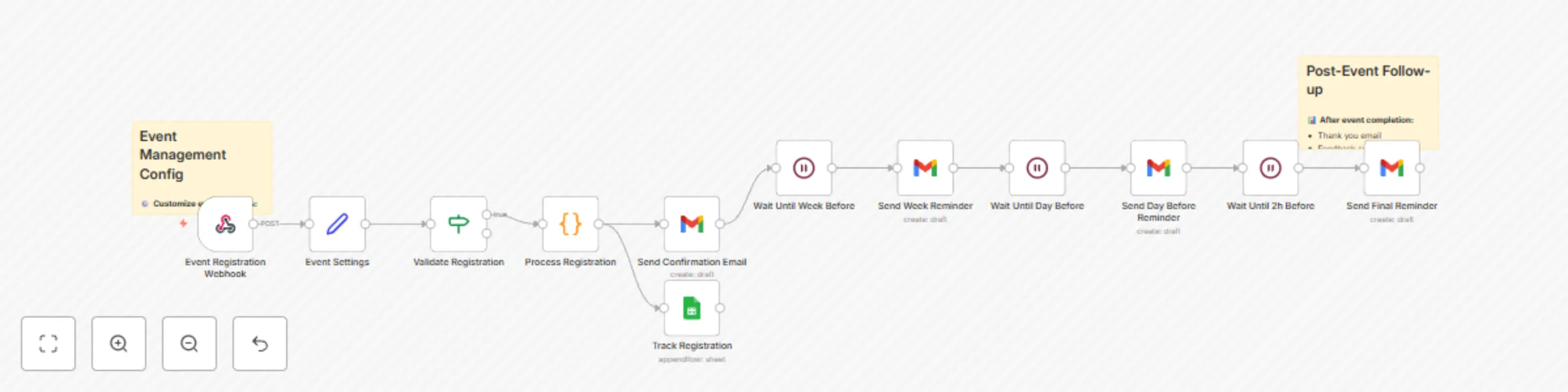
How it works Simplified registration : Automatically captures sign ups via optimized web forms. Instant confirmations : Immediately sends confirmation emails with event details and calendar invites...
n8n-nodes-base.webhook, n8n-nodes-base.stickynote, n8n-nodes-base.set, n8n-nodes-base.if, n8n-nodes-base.code, n8n-nodes-base.gmail, n8n-nodes-base.wait, n8n-nodes-base.googlesheets
This workflow is cataloged by N8N Workflows and links back to its original n8n.io source page by Rodrigue Gbadou.
Original n8n.io sourceSimplified registration: Automatically captures sign-ups via optimized web forms.
Instant confirmations: Immediately sends confirmation emails with event details and calendar invites.
Scheduled reminders: Automatic reminder sequence before the event to maximize attendance.
Post-event follow-up: Automatically collects feedback and nurtures participants.
Registration form: Create or connect your event registration form.
Calendar system: Integrate with Google Calendar or Outlook to manage time slots.
Email service: Set up your sending platform (Gmail, SendGrid, Mailchimp).
CRM integration: Sync with your CRM for participant tracking.
Feedback survey: Prepare your post-event satisfaction questionnaire.
Personalized sequences: Tailor messages based on event type.
🎯 Optimized registration: Responsive forms with real-time validation
📅 Automatic calendar management: Instantly adds to calendars and manages time slots
⏰ Smart reminders: Progressive sequence (D-7, D-1, H-2) with personalized content
📊 Complete tracking: Monitors sign-ups, attendance, and participation rates
🎤 Multi-event support: Manage multiple events and formats simultaneously
📱 Mobile notifications: Push alerts and SMS for urgent reminders
🔄 Automatic feedback: Collects and analyzes participant feedback automatically
📈 Detailed analytics: Performance reports and improvement insights
This catalog entry is organized from the workflow JSON. The node-level section below shows the executable blocks available for review before importing the template.
| Workflow | Automate event registration & follow-ups with Gmail reminders & Google Sheets |
|---|---|
| Complexity | intermediate |
| Nodes | 14 |
| Categories | Social Media |
| Author | Rodrigue Gbadou |
| Published | 16 Jul 2025 |
Use the JSON export at /data/workflows/6069/6069.json as the source template for this automation.
Open n8n, import the downloaded JSON, and review each node before activating the workflow.
Replace placeholder credentials, API keys, webhook URLs, account IDs, and environment-specific values with your own settings.
Run the workflow manually or in a staging workspace, inspect node output, and confirm downstream systems receive the expected data.
Enable the workflow only after testing, then monitor executions, errors, and rate limits during the first production runs.
Review imported nodes carefully before activation. This catalog entry is intended to help you inspect the workflow structure, understand required services, and find related templates faster.
Node names, credentials, schedules, webhook paths, and external service limits may need adjustment for your workspace.
How it works Simplified registration : Automatically captures sign ups via optimized web forms. Instant confirmations : Immediately sends confirmation emails with event details and calendar invites...
Review the workflow JSON, configure any required credentials in n8n, and test the automation in a safe workspace before using it in production.
Yes. Use the block-by-block analysis and the downloadable JSON to inspect each node, then adjust credentials, prompts, schedules, filters, or destinations for your Social Media use case.