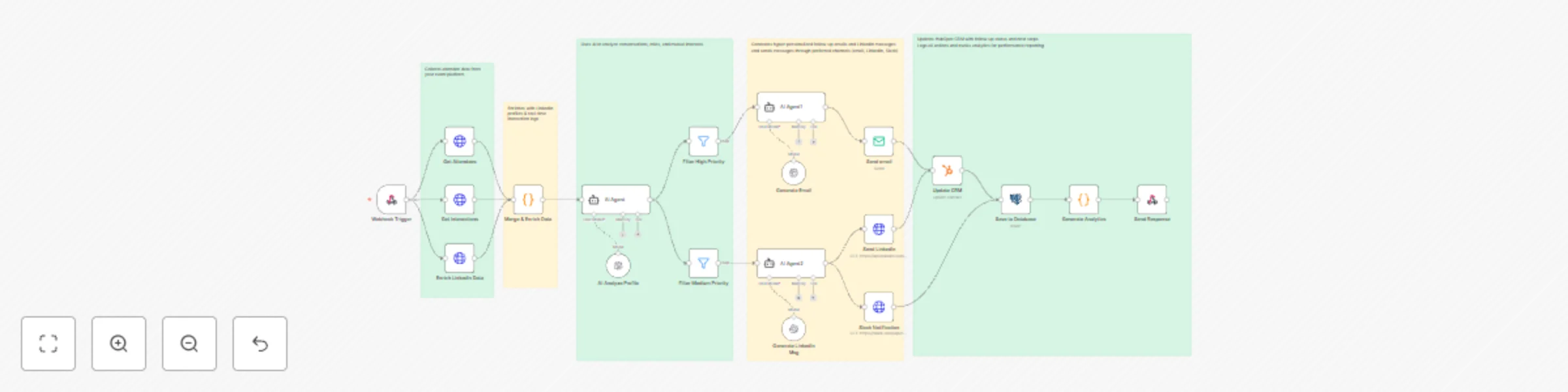
Automate event follow-ups with GPT-4, LinkedIn & HubSpot multi-channel outreach

Workflow preview

Workflow preview
100%
Automate event follow-ups with GPT-4, LinkedIn & HubSpot multi-channel outreach preview
Open on n8n.io

Important notice

This workflow is provided as-is. Please review and test before using in production.

1. Workflow Overview

Automate your post event networking with this intelligent n8n workflow. Triggered instantly after an event, it collects attendee and interaction data, enriches profiles with LinkedIn insights, and ...

Best for

  • Lead Nurturing automation workflows
  • Multimodal AI automation workflows
  • advanced n8n builders looking for reusable templates

Tools used

n8n-nodes-base.webhook, n8n-nodes-base.httprequest, n8n-nodes-base.code, @n8n/n8n-nodes-langchain.lmchatopenai, n8n-nodes-base.filter, n8n-nodes-base.hubspot, n8n-nodes-base.postgres, n8n-nodes-base.respondtowebhook

Source and attribution

This workflow is cataloged by N8N Workflows and links back to its original n8n.io source page by Oneclick AI Squad.

Original n8n.io source

1.1 Workflow description

Title
Automate event follow-ups with GPT-4, LinkedIn & HubSpot multi-channel outreach
Workflow name
Automate event follow-ups with GPT-4, LinkedIn & HubSpot multi-channel outreach

Automate your post-event networking with this intelligent n8n workflow. Triggered instantly after an event, it collects attendee and interaction data, enriches profiles with LinkedIn insights, and uses GPT-4 to analyze engagement and generate tailored follow-up messages. High-value leads are prioritized, messages are sent via email, LinkedIn, or Slack, and all activity is logged in your CRM and database. Save hours of manual follow-up while boosting relationship-building and ROI. 🤝✨


Advanced Features

  • Webhook automation – Starts instantly on event completion
  • Multi-Source Enrichment – Combines event data, interactions, and LinkedIn profiles
  • AI-Powered Insights – GPT-4 analyzes behavior and suggests personalized talking points
  • Smart Priority Filtering – Routes leads into High, Medium, and Low priority paths
  • Personalized Content Generation – AI crafts custom emails and LinkedIn messages
  • Multi-Channel Outreach – Sends via Email, LinkedIn DM, and Slack
  • CRM Integration – Automatically updates HubSpot with contact notes and engagement
  • PostgreSQL Logging – Stores full interaction history and analytics
  • ROI Dashboard – Tracks response rates, meetings booked, and pipeline impact

What It Does

  • Collects attendee data from your event platform
  • Enriches with LinkedIn profiles & real-time interaction logs
  • Scores networking potential using engagement algorithms
  • Uses AI to analyze conversations, roles, and mutual interests
  • Generates hyper-personalized follow-up emails and LinkedIn messages
  • Sends messages through preferred channels (email, LinkedIn, Slack)
  • Updates HubSpot CRM with follow-up status and next steps
  • Logs all actions and tracks analytics for performance reporting

Workflow Process

  • The Webhook Trigger initiates the workflow via POST request with event and attendee data.
  • Get Attendees fetches participant list from the event platform.
  • Get Interactions pulls Q&A, chat, poll, and networking activity logs.
  • Enrich LinkedIn Data retrieves professional profiles, job titles, and company details via LinkedIn API.
  • Merge & Enrich Data combines all sources into a unified lead profile.
  • AI Analyze Profile uses GPT-4 to evaluate interaction depth, role relevance, and conversation context.
  • Filter High Priority routes top-tier leads (e.g., decision-makers with strong engagement).
  • Filter Medium Priority handles warm prospects for lighter follow-up.
  • AI Agent1 generates personalized email content using chat model and memory.
  • Generate Email creates a professional, context-aware follow-up email.
  • Send Email delivers the message to the lead’s inbox.
  • AI Agent2 crafts a concise, friendly LinkedIn connection message.
  • Generate LinkedIn Msg produces a tailored outreach note.
  • Send LinkedIn posts the message via LinkedIn API.
  • Slack Notification alerts your team in real-time about high-priority outreach.
  • Update CRM (HubSpot) adds contact, tags, and follow-up tasks automatically.
  • Save to Database (Insert) logs full lead journey and message content in PostgreSQL.
  • Generate Analytics compiles engagement metrics and success rates.
  • Send Response confirms completion back to the event system.

Setup Instructions

  • Import the workflow JSON into n8n
  • Configure credentials:
    • Event Platform API (for attendees & interactions)
    • LinkedIn API (OAuth2)
    • OpenAI (GPT-4)
    • SMTP (for email) or Email Service (SendGrid, etc.)
    • HubSpot API Key
    • PostgreSQL Database
    • Slack Webhook URL
  • Trigger with a webhook POST containing event ID and settings
  • Watch personalized outreach happen automatically!

Prerequisites

  • Event platform with webhook + attendee/interaction API
  • LinkedIn Developer App with API access
  • OpenAI API key with GPT-4 access
  • HubSpot account with API enabled
  • PostgreSQL database (table for leads & logs)
  • Slack workspace (optional, for team alerts)

Example Webhook Payload

{
  "eventId": "evt_spring2025",
  "eventName": "Annual Growth Summit",
  "triggerFollowUp": true,
  "priorityThreshold": {
    "high": 75,
    "medium": 50
  }
}

Modification Options

  • Adjust scoring logic in AI Analyze Profile (e.g., weight Q&A participation higher)
  • Add custom email templates in Generate Email with your brand voice
  • Include meeting booking links (Calendly) in high-priority messages
  • Route VIP leads to Send SMS via Twilio
  • Export analytics to Google Sheets or BI tools (Looker, Tableau)
  • Add approval step before sending LinkedIn messages

Ready to 10x your event ROI?
Get in touch with us for custom n8n automation!

1.2 Logical Blocks

This catalog entry is organized from the workflow JSON. The node-level section below shows the executable blocks available for review before importing the template.

2. Block-by-Block Analysis

Block 1 - Webhook Trigger

Type / Role
n8n-nodes-base.webhook - webhook
Config choices
Version 1

Block 2 - Get Attendees

Type / Role
n8n-nodes-base.httpRequest - httpRequest
Config choices
Version 4.1

Block 3 - Get Interactions

Type / Role
n8n-nodes-base.httpRequest - httpRequest
Config choices
Version 4.1

Block 4 - Enrich LinkedIn Data

Type / Role
n8n-nodes-base.httpRequest - httpRequest
Config choices
Version 4.1

Block 5 - Merge & Enrich Data

Type / Role
n8n-nodes-base.code - code
Config choices
Version 2

Block 6 - AI Analyze Profile

Type / Role
@n8n/n8n-nodes-langchain.lmChatOpenAi - lmChatOpenAi
Config choices
Version 1

Block 7 - Filter High Priority

Type / Role
n8n-nodes-base.filter - filter
Config choices
Version 2

Block 8 - Filter Medium Priority

Type / Role
n8n-nodes-base.filter - filter
Config choices
Version 2

Block 9 - Generate Email

Type / Role
@n8n/n8n-nodes-langchain.lmChatOpenAi - lmChatOpenAi
Config choices
Version 1

Block 10 - Generate LinkedIn Msg

Type / Role
@n8n/n8n-nodes-langchain.lmChatOpenAi - lmChatOpenAi
Config choices
Version 1

Block 11 - Send LinkedIn

Type / Role
n8n-nodes-base.httpRequest - httpRequest
Config choices
Version 4.1

Block 12 - Slack Notification

Type / Role
n8n-nodes-base.httpRequest - httpRequest
Config choices
Version 4.1

Block 13 - Update CRM

Type / Role
n8n-nodes-base.hubspot - hubspot
Config choices
Version 2

Block 14 - Save to Database

Type / Role
n8n-nodes-base.postgres - postgres
Config choices
Version 2.4

Block 15 - Generate Analytics

Type / Role
n8n-nodes-base.code - code
Config choices
Version 2

Block 16 - Send Response

Type / Role
n8n-nodes-base.respondToWebhook - respondToWebhook
Config choices
Version 1

Block 17 - AI Agent

Type / Role
@n8n/n8n-nodes-langchain.agent - agent
Config choices
Version 2.2

Block 18 - AI Agent1

Type / Role
@n8n/n8n-nodes-langchain.agent - agent
Config choices
Version 2.2

Block 19 - AI Agent2

Type / Role
@n8n/n8n-nodes-langchain.agent - agent
Config choices
Version 2.2

Block 20 - Sticky Note

Type / Role
n8n-nodes-base.stickyNote - stickyNote
Config choices
Version 1

Block 21 - Sticky Note1

Type / Role
n8n-nodes-base.stickyNote - stickyNote
Config choices
Version 1

Block 22 - Sticky Note2

Type / Role
n8n-nodes-base.stickyNote - stickyNote
Config choices
Version 1

Block 23 - Sticky Note3

Type / Role
n8n-nodes-base.stickyNote - stickyNote
Config choices
Version 1

Block 24 - Sticky Note4

Type / Role
n8n-nodes-base.stickyNote - stickyNote
Config choices
Version 1

Showing the first 24 of 25 workflow blocks. Download the JSON for the full node graph.

3. Summary Table

Workflow Automate event follow-ups with GPT-4, LinkedIn & HubSpot multi-channel outreach
Complexity advanced
Nodes 25
Categories Lead Nurturing, Multimodal AI
Author Oneclick AI Squad
Published 29 Oct 2025

4. Reproducing the Workflow from Scratch

  1. 1. Download the workflow JSON

    Use the JSON export at /data/workflows/10282/10282.json as the source template for this automation.

  2. 2. Import the template into n8n

    Open n8n, import the downloaded JSON, and review each node before activating the workflow.

  3. 3. Configure credentials and variables

    Replace placeholder credentials, API keys, webhook URLs, account IDs, and environment-specific values with your own settings.

  4. 4. Test with sample data

    Run the workflow manually or in a staging workspace, inspect node output, and confirm downstream systems receive the expected data.

  5. 5. Activate and monitor

    Enable the workflow only after testing, then monitor executions, errors, and rate limits during the first production runs.

5. General Notes & Resources

Review imported nodes carefully before activation. This catalog entry is intended to help you inspect the workflow structure, understand required services, and find related templates faster.

Node names, credentials, schedules, webhook paths, and external service limits may need adjustment for your workspace.

Frequently asked questions

What does Automate event follow-ups with GPT-4, LinkedIn & HubSpot multi-channel outreach do?

Automate your post event networking with this intelligent n8n workflow. Triggered instantly after an event, it collects attendee and interaction data, enriches profiles with LinkedIn insights, and ...

What do I need before importing this workflow?

Review the workflow JSON, configure any required credentials in n8n, and test the automation in a safe workspace before using it in production.

Can I customize this workflow?

Yes. Use the block-by-block analysis and the downloadable JSON to inspect each node, then adjust credentials, prompts, schedules, filters, or destinations for your Lead Nurturing, Multimodal AI use case.