Automate employee trip expense processing with Jotform, OpenAI and Google Sheets
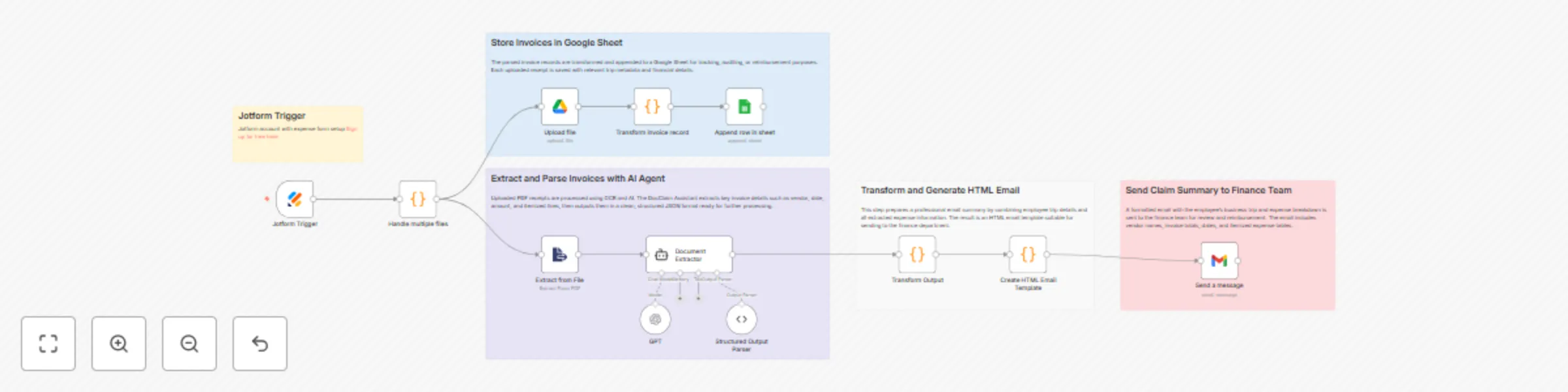
Workflow preview

$20/month : Unlimited workflows
2500 executions/month

THE #1 IN WEB SCRAPING
Scrape any website without limits
HOSTINGER  Early Deal
DISCOUNT 20% Try free
Early DealDISCOUNT 20%
Self-hosted n8n
Unlimited workflows - from $4.99/mo

#1 hub for scraping, AI & automation
6000+ actors - $5 credits/mo
Important notice
This workflow is provided as-is. Please review and test before using in production.
Overview
👤 Who’s it for
This workflow is designed for employees who need to submit expense claims for business trips. It automates the process of extracting data from receipts/invoices, logging it to a Google Sheet, and notifying the finance team via email.
Ideal users:
- Employees submitting business trip expense claims
- HR or Admins reviewing travel-related reimbursements
- Finance teams responsible for processing claims
⚙️ How it works / What it does
- Employee submits a form with trip information (name, department, purpose, dates) and uploads one or more receipts/invoices (PDF).
- Uploaded files are saved to Google Drive for record-keeping.
- Each PDF is passed to a DocClaim Assistant agent, which uses GPT-4o and a structured parser to extract structured invoice data.
- The data is transformed and formatted into a standard JSON structure.
- Two parallel paths are followed:
- Invoice records are appended to a Google Sheet for centralized tracking.
- A detailed HTML email summarizing the trip and expenses is generated and sent to the finance department for claim processing.
🛠 How to set up
Create a form to capture:
- Employee Name
- Department
- Trip Purpose
- From Date / To Date
- Receipt/Invoice File Upload (multiple PDFs)
Configure file upload node to store files in a specific Google Drive folder.
Set up DocClaim Agent using:
- GPT-4o or any LLM with document analysis capability
- Output parser for standardizing extracted receipt data (e.g., vendor, total, tax, date)
Transform extracted data into a structured claim record (Code Node).
Path 1: Save records to a Google Sheet (one row per expense).
Path 2:
- Format the employee + claim data into a dynamic HTML email
- Use
Send Emailnode to notify the finance department (e.g.,[email protected])
✅ Requirements
- Jotform account with expense form setup Sign up for free here
- n8n running with access to:
- Google Drive API (for file uploads)
- Google Sheets API (for logging expenses)
- Email node (SMTP or Gmail for sending)
- GPT-4o or equivalent LLM with document parsing ability
- PDF invoices with clear formatting
- Shared Google Sheet for claim tracking
- Optional: Shared inbox for finance team
🧩 How to customize the workflow
- Add approval steps: route the email to a manager before finance
- Attach original PDFs: include uploaded files in the email as attachments
- Localize for other languages: adapt form labels, email content, or parser prompts
- Sync to ERP or accounting system: replace Google Sheet with QuickBooks, Xero, etc.
- Set limits/validation: enforce max claim per trip or required fields before submission
- Auto-tag expenses: add categories (e.g., travel, accommodation) for better reporting