Block 1 - Test Note
- Type / Role
- n8n-nodes-base.stickyNote - stickyNote
- Config choices
- Version 1


 Early Deal
This workflow is provided as-is. Please review and test before using in production.
Good to know: This workflow automatically processes incoming emails (you can filter them base on your needs) and creates concise AI powered summaries, then logs them to a ...
n8n-nodes-base.stickynote, n8n-nodes-base.googlesheets, @n8n/n8n-nodes-langchain.agent, n8n-nodes-base.gmailtrigger, n8n-nodes-base.if, @n8n/n8n-nodes-langchain.lmchatgroq, n8n-nodes-base.code
This workflow is cataloged by N8N Workflows and links back to its original n8n.io source page by ARRE.
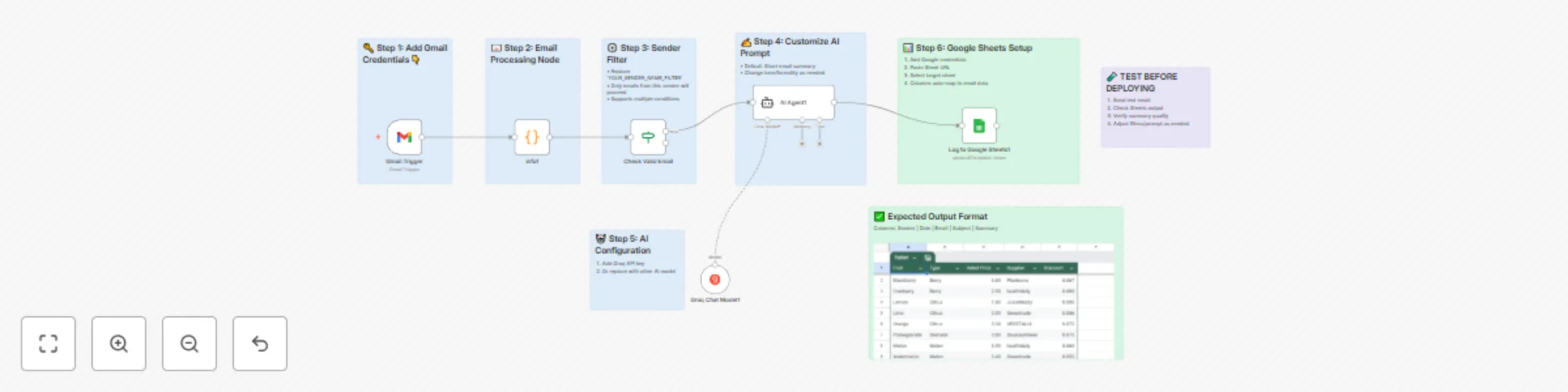
Original n8n.io sourceThis workflow automatically processes incoming emails (you can filter them base on your needs) and creates concise AI-powered summaries, then logs them to a Google Sheets spreadsheet for easy tracking and analysis.
➖Business professionals who receive many emails and need quick summaries ➖Customer service teams tracking email communications ➖Project managers monitoring email correspondence ➖Anyone who wants to automatically organize and summarize their email communications
This workflow solves the problem of email overload by automatically reading incoming emails, generating concise summaries using AI, and organizing them in a structured format. It eliminates the need to manually read through every email to understand the key points and maintains a searchable record of communications.
✅Monitors your Gmail inbox for new emails ✅Filters emails based on specific criteria (sender validation) ✅Extracts key information (sender, date, subject, content) ✅Uses AI to generate concise summaries of email content ✅Automatically logs all data including the AI summary to a Google Sheets spreadsheet
1️⃣Gmail trigger monitors for new emails at specified intervals 2️⃣Email data is processed and formatted using JavaScript 3️⃣A conditional check validates the sender 4️⃣AI agent (powered by Groq's language model) reads the email content and generates a summary 5️⃣All information is automatically appended to a Google Sheets document
Set up Gmail OAuth2 credentials in n8n Configure Google Sheets OAuth2 credentials Set up Groq API credentials for AI processing Create a Google Sheets document and update the document ID Customize the sender validation criteria as needed Activate the workflow
✅n8n instance (cloud or self-hosted) ✅Gmail account with OAuth2 access ✅Google Sheets account ✅AI API ✅Basic understanding of n8n workflow
🟢Modify the Gmail trigger filters to target specific labels or criteria 🟢Adjust the sender validation logic in the conditional node 🟢Customize the AI prompt to change summary style or focus 🟢Add additional data fields to the Google Sheets output 🟢Change the polling frequency for checking new emails 🟢Switch to different AI models by replacing the Groq node
This catalog entry is organized from the workflow JSON. The node-level section below shows the executable blocks available for review before importing the template.
| Workflow | Automate email filtering & AI summarization. 100% free & effective, works 7/24 |
|---|---|
| Complexity | intermediate |
| Nodes | 14 |
| Categories | Ticket Management, AI Summarization |
| Author | ARRE |
| Published | 04 Jul 2025 |
Use the JSON export at /data/workflows/5678/5678.json as the source template for this automation.
Open n8n, import the downloaded JSON, and review each node before activating the workflow.
Replace placeholder credentials, API keys, webhook URLs, account IDs, and environment-specific values with your own settings.
Run the workflow manually or in a staging workspace, inspect node output, and confirm downstream systems receive the expected data.
Enable the workflow only after testing, then monitor executions, errors, and rate limits during the first production runs.
Review imported nodes carefully before activation. This catalog entry is intended to help you inspect the workflow structure, understand required services, and find related templates faster.
Node names, credentials, schedules, webhook paths, and external service limits may need adjustment for your workspace.
Good to know: This workflow automatically processes incoming emails (you can filter them base on your needs) and creates concise AI powered summaries, then logs them to a ...
Review the workflow JSON, configure any required credentials in n8n, and test the automation in a safe workspace before using it in production.
Yes. Use the block-by-block analysis and the downloadable JSON to inspect each node, then adjust credentials, prompts, schedules, filters, or destinations for your Ticket Management, AI Summarization use case.