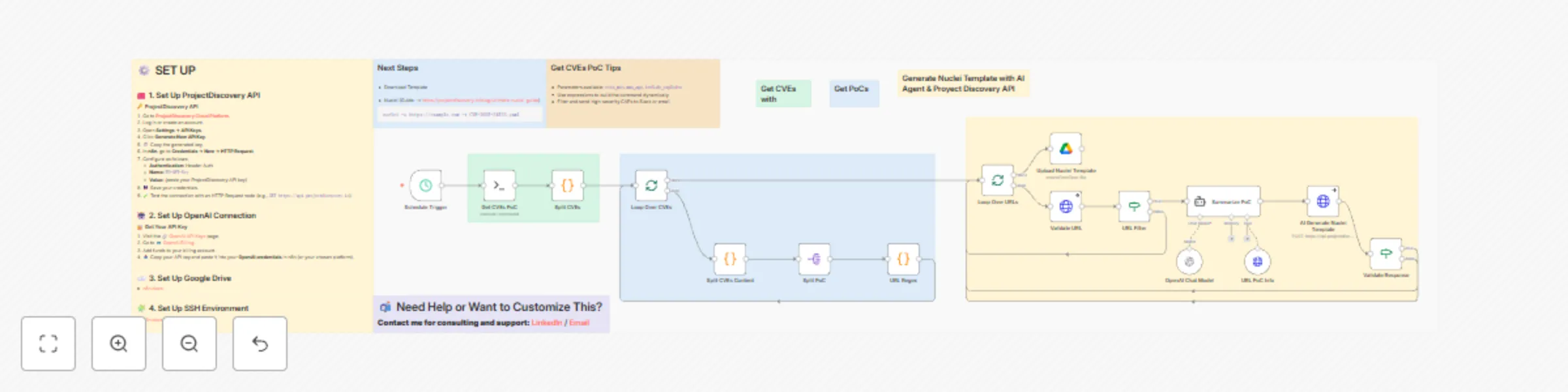
Automate CVE detection with AI-powered Nuclei template generation & Google Drive

Workflow preview

Workflow preview
100%
Automate CVE detection with AI-powered Nuclei template generation & Google Drive preview
Open on n8n.io

Important notice

This workflow is provided as-is. Please review and test before using in production.

1. Workflow Overview

Short description Automates collection, technical extraction, and automatic generation of Nuclei templates from public CVE PoCs. Converts verified PoCs into reproducible detection templates ready f...

Best for

  • SecOps automation workflows
  • Multimodal AI automation workflows
  • advanced n8n builders looking for reusable templates

Tools used

n8n-nodes-base.scheduletrigger, n8n-nodes-base.ssh, n8n-nodes-base.code, n8n-nodes-base.splitinbatches, n8n-nodes-base.splitout, n8n-nodes-base.httprequest, n8n-nodes-base.if, @n8n/n8n-nodes-langchain.agent

Source and attribution

This workflow is cataloged by N8N Workflows and links back to its original n8n.io source page by Javier Rieiro.

Original n8n.io source

1.1 Workflow description

Title
Automate CVE detection with AI-powered Nuclei template generation & Google Drive
Workflow name
Automate CVE detection with AI-powered Nuclei template generation & Google Drive

Short description

Automates collection, technical extraction, and automatic generation of Nuclei templates from public CVE PoCs.
Converts verified PoCs into reproducible detection templates ready for testing and distribution.

Purpose

Provide a reliable pipeline that turns public proof-of-concept data into usable detection artifacts.
Reduce manual work involved in finding PoCs, extracting exploit details, validating sources, and building Nuclei templates.

How it works (technical summary)

  1. Runs a scheduled SSH job that executes vulnx with filters for recent, high-severity PoCs.
  2. Parses the raw vulnx output and splits it into individual CVE entries.
  3. Extracts structured fields: CVE ID, severity, title, summary, risk, remediation, affected products, POCs, and references.
  4. Extracts URLs from PoC sections using regex.
  5. Validates each URL with HTTP requests. Invalid or unreachable links are logged and skipped.
  6. Uses an AI agent (OpenAI via LangChain) to extract technical artifacts: exploit steps, payloads, endpoints, raw HTTP requests/responses, parameters, and reproduction notes. The prompt forces technical-only output.
  7. Sends the extracted technical content to ProjectDiscovery Cloud API to generate Nuclei templates.
  8. Validates AI and API responses. Accepted templates are saved to a configured Google Drive folder.
  9. Produces JSON records and logs for each processed CVE and URL.

Output

  • Nuclei templates in ProjectDiscovery format (YAML) stored in Google Drive.
  • Structured JSON per CVE with metadata and extracted technical details.
  • Validation logs for URL checks, AI extraction, and template generation.

Intended audience

  • Bug bounty hunters.
  • Security researchers and threat intel teams.
  • Automation engineers who need reproducible detection templates.

Setup & requirements

  • n8n instance with workflow imported.
  • SSH access to a host with vulnx installed.
  • OpenAI API key for technical extraction.
  • ProjectDiscovery API key for template generation.
  • Google Drive OAuth2 credentials for storing templates.
  • Configure schedule trigger and target Google Drive folder ID.

Security and usage notes

  • Performs static extraction and validation only. No active exploitation.
  • Processes only PoCs that meet configured filters (e.g., CVSS > 6).
  • Use responsibly. Do not target systems you do not own or have explicit permission to test.

1.2 Logical Blocks

This catalog entry is organized from the workflow JSON. The node-level section below shows the executable blocks available for review before importing the template.

2. Block-by-Block Analysis

Block 1 - Schedule Trigger

Type / Role
n8n-nodes-base.scheduleTrigger - scheduleTrigger
Config choices
Version 1.2

Block 2 - Get CVEs PoC

Type / Role
n8n-nodes-base.ssh - ssh
Config choices
Version 1

Block 3 - Split CVEs

Type / Role
n8n-nodes-base.code - code
Config choices
Version 2

Block 4 - Loop Over CVEs

Type / Role
n8n-nodes-base.splitInBatches - splitInBatches
Config choices
Version 3

Block 5 - Split CVEs Content

Type / Role
n8n-nodes-base.code - code
Config choices
Version 2

Block 6 - Split PoC

Type / Role
n8n-nodes-base.splitOut - splitOut
Config choices
Version 1

Block 7 - URL Regex

Type / Role
n8n-nodes-base.code - code
Config choices
Version 2

Block 8 - Loop Over URLs

Type / Role
n8n-nodes-base.splitInBatches - splitInBatches
Config choices
Version 3

Block 9 - Validate URL

Type / Role
n8n-nodes-base.httpRequest - httpRequest
Config choices
Version 4.2

Block 10 - URL Filter

Type / Role
n8n-nodes-base.if - if
Config choices
Version 2.2

Block 11 - Summarize PoC

Type / Role
@n8n/n8n-nodes-langchain.agent - agent
Config choices
Version 2.2

Block 12 - URL PoC Info

Type / Role
n8n-nodes-base.httpRequestTool - httpRequestTool
Config choices
Version 4.2

Block 13 - AI Generate Nuclei Template

Type / Role
n8n-nodes-base.httpRequest - httpRequest
Config choices
Version 4.2

Block 14 - Validate Response

Type / Role
n8n-nodes-base.if - if
Config choices
Version 2.2

Block 15 - OpenAI Chat Model

Type / Role
@n8n/n8n-nodes-langchain.lmChatOpenAi - lmChatOpenAi
Config choices
Version 1.2

Block 16 - Upload Nuclei Template

Type / Role
n8n-nodes-base.googleDrive - googleDrive
Config choices
Version 3

Block 17 - Sticky Note

Type / Role
n8n-nodes-base.stickyNote - stickyNote
Config choices
Version 1

Block 18 - Sticky Note9

Type / Role
n8n-nodes-base.stickyNote - stickyNote
Config choices
Version 1

Block 19 - Sticky Note5

Type / Role
n8n-nodes-base.stickyNote - stickyNote
Config choices
Version 1

Block 20 - Sticky Note6

Type / Role
n8n-nodes-base.stickyNote - stickyNote
Config choices
Version 1

Block 21 - Sticky Note7

Type / Role
n8n-nodes-base.stickyNote - stickyNote
Config choices
Version 1

Block 22 - Sticky Note1

Type / Role
n8n-nodes-base.stickyNote - stickyNote
Config choices
Version 1

Block 23 - Sticky Note2

Type / Role
n8n-nodes-base.stickyNote - stickyNote
Config choices
Version 1

Block 24 - Sticky Note3

Type / Role
n8n-nodes-base.stickyNote - stickyNote
Config choices
Version 1

Showing the first 24 of 27 workflow blocks. Download the JSON for the full node graph.

3. Summary Table

Workflow Automate CVE detection with AI-powered Nuclei template generation & Google Drive
Complexity advanced
Nodes 27
Categories SecOps, Multimodal AI
Author Javier Rieiro
Published 02 Nov 2025

4. Reproducing the Workflow from Scratch

  1. 1. Download the workflow JSON

    Use the JSON export at /data/workflows/10446/10446.json as the source template for this automation.

  2. 2. Import the template into n8n

    Open n8n, import the downloaded JSON, and review each node before activating the workflow.

  3. 3. Configure credentials and variables

    Replace placeholder credentials, API keys, webhook URLs, account IDs, and environment-specific values with your own settings.

  4. 4. Test with sample data

    Run the workflow manually or in a staging workspace, inspect node output, and confirm downstream systems receive the expected data.

  5. 5. Activate and monitor

    Enable the workflow only after testing, then monitor executions, errors, and rate limits during the first production runs.

5. General Notes & Resources

Review imported nodes carefully before activation. This catalog entry is intended to help you inspect the workflow structure, understand required services, and find related templates faster.

Node names, credentials, schedules, webhook paths, and external service limits may need adjustment for your workspace.

Frequently asked questions

What does Automate CVE detection with AI-powered Nuclei template generation & Google Drive do?

Short description Automates collection, technical extraction, and automatic generation of Nuclei templates from public CVE PoCs. Converts verified PoCs into reproducible detection templates ready f...

What do I need before importing this workflow?

Review the workflow JSON, configure any required credentials in n8n, and test the automation in a safe workspace before using it in production.

Can I customize this workflow?

Yes. Use the block-by-block analysis and the downloadable JSON to inspect each node, then adjust credentials, prompts, schedules, filters, or destinations for your SecOps, Multimodal AI use case.