Automate customer retention with AI risk prediction, Stripe coupons & personalized Gmail

Workflow preview

Workflow preview
100%
Automate customer retention with AI risk prediction, Stripe coupons & personalized Gmail preview
Open on n8n.io

Important notice

This workflow is provided as-is. Please review and test before using in production.

1. Workflow Overview

Predict churn risk from customer data and send retention emails via OpenAI Who’s it for This workflow is designed for Customer Success Managers , Growth Teams , and SaaS Business Owners who want...

Best for

  • Lead Nurturing automation workflows
  • AI Summarization automation workflows
  • advanced n8n builders looking for reusable templates

Tools used

n8n-nodes-base.stickynote, n8n-nodes-base.scheduletrigger, n8n-nodes-base.httprequest, n8n-nodes-base.code, n8n-nodes-base.postgres, n8n-nodes-base.merge, n8n-nodes-base.openai, n8n-nodes-base.if

Source and attribution

This workflow is cataloged by N8N Workflows and links back to its original n8n.io source page by HayatoFujita/藤田隼人.

Original n8n.io source

1.1 Workflow description

Title
Automate customer retention with AI risk prediction, Stripe coupons & personalized Gmail
Workflow name
Automate customer retention with AI risk prediction, Stripe coupons & personalized Gmail

Predict churn risk from customer data and send retention emails via OpenAI

👥 Who’s it for

This workflow is designed for Customer Success Managers, Growth Teams, and SaaS Business Owners who want to proactively reduce churn using AI. It automates the analysis of customer health and the delivery of personalized retention offers without manual intervention.

🚀 What it does

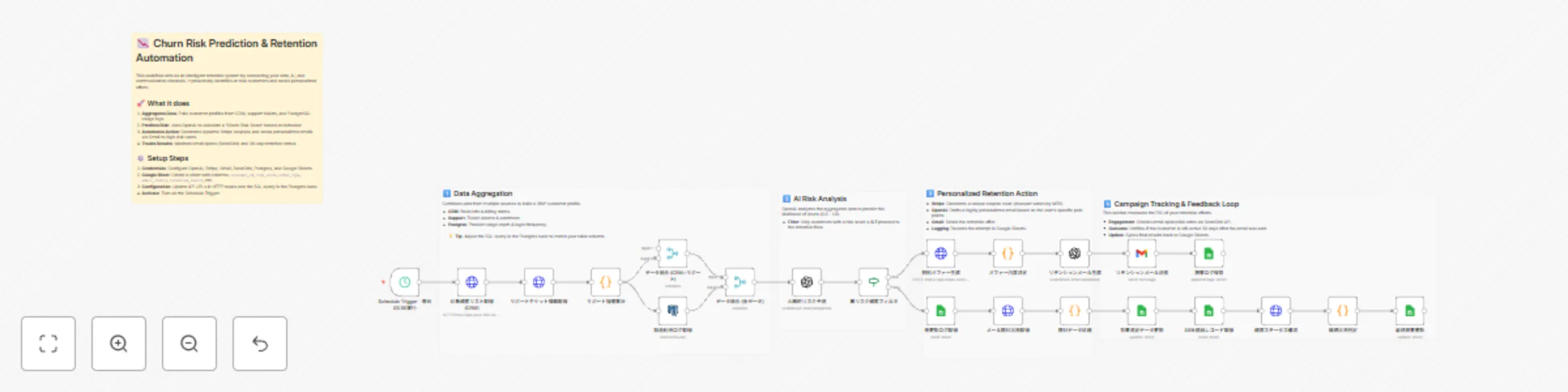
This template acts as an intelligent retention system that connects your data, AI, and communication channels.

  1. Aggregates Data: Pulls customer profiles from your CRM, support ticket history via API, and product usage logs from PostgreSQL.
  2. Predicts Risk: Uses OpenAI to analyze the combined data and calculate a "Churn Risk Score" for each customer.
  3. Automates Action: For customers identified as high-risk (score > 0.7):
    • Generates a unique, dynamic discount coupon via Stripe.
    • Drafts a highly personalized retention email using OpenAI.
    • Sends the email via Gmail.
  4. Tracks Effectiveness: Logs all actions to Google Sheets. It also checks back (via SendGrid and CRM data) to track email opens and verify if the customer was retained after 30 days.

⚙️ How to set up

  1. Prepare Google Sheet: Create a sheet with columns for customer_id, risk_score, offer_type, email_status, and retention_result.
  2. Configure Credentials: Set up your credentials for OpenAI, Stripe, Gmail, Google Sheets, SendGrid, and PostgreSQL.
  3. API Endpoints: Update the HTTP Request nodes to point to your specific CRM and Support tool APIs (replace the placeholder URLs).
  4. Customize Logic:
    • In the Postgres node, adjust the SQL query to match your product's event table.
    • In the Code node (Offer Decision), define your rules for discounts (e.g., "Give 20% off if MRR > $10k").
  5. Activate: The workflow is set to run daily at 3:00 AM. Toggle the Schedule Trigger to Active when ready.

📦 Requirements

  • n8n (v1.0 or later)
  • OpenAI API Key
  • Google Workspace (Gmail, Sheets)
  • Stripe Account (for coupon generation)
  • SendGrid Account (for email tracking)
  • PostgreSQL (or similar database)
  • Access to CRM and Support Tool APIs

🎨 How to customize the workflow

  • Adjust the AI Prompt: Edit the OpenAI node system message to match your brand's tone of voice.
  • Change the Threshold: Modify the If node to target customers with a risk score higher or lower than 0.7.
  • Internal Alerts: Instead of emailing the customer directly, replace the Gmail node with a Slack node to notify your CSM team to reach out manually.
  • Swap Database: If you use MySQL or Snowflake, simply replace the PostgreSQL node with the corresponding n8n node.

1.2 Logical Blocks

This catalog entry is organized from the workflow JSON. The node-level section below shows the executable blocks available for review before importing the template.

2. Block-by-Block Analysis

Block 1 - Workflow Overview

Type / Role
n8n-nodes-base.stickyNote - stickyNote
Config choices
Version 1

Block 2 - Schedule Trigger - 毎日03:00実行

Type / Role
n8n-nodes-base.scheduleTrigger - scheduleTrigger
Config choices
Version 1.2

Block 3 - Note - Schedule

Type / Role
n8n-nodes-base.stickyNote - stickyNote
Config choices
Version 1

Block 4 - 対象顧客リスト取得 (CRM)

Type / Role
n8n-nodes-base.httpRequest - httpRequest
Config choices
Version 4.2

Block 5 - サポートチケット情報取得

Type / Role
n8n-nodes-base.httpRequest - httpRequest
Config choices
Version 4.2

Block 6 - サポート指標集計

Type / Role
n8n-nodes-base.code - code
Config choices
Version 2

Block 7 - 製品利用ログ取得

Type / Role
n8n-nodes-base.postgres - postgres
Config choices
Version 2.5

Block 8 - データ統合 (CRM+サポート)

Type / Role
n8n-nodes-base.merge - merge
Config choices
Version 3

Block 9 - データ統合 (全データ)

Type / Role
n8n-nodes-base.merge - merge
Config choices
Version 3

Block 10 - AI解約リスク予測

Type / Role
n8n-nodes-base.openAi - openAi
Config choices
Version 1.1

Block 11 - 高リスク顧客フィルタ

Type / Role
n8n-nodes-base.if - if
Config choices
Version 2

Block 12 - 特別オファー生成

Type / Role
n8n-nodes-base.httpRequest - httpRequest
Config choices
Version 4.2

Block 13 - オファー内容決定

Type / Role
n8n-nodes-base.code - code
Config choices
Version 2

Block 14 - リテンションメール生成

Type / Role
n8n-nodes-base.openAi - openAi
Config choices
Version 1.1

Block 15 - リテンションメール送信

Type / Role
n8n-nodes-base.gmail - gmail
Config choices
Version 2.1

Block 16 - 施策ログ保存

Type / Role
n8n-nodes-base.googleSheets - googleSheets
Config choices
Version 4.5

Block 17 - 未更新ログ取得

Type / Role
n8n-nodes-base.googleSheets - googleSheets
Config choices
Version 4.5

Block 18 - メール開封状況取得

Type / Role
n8n-nodes-base.httpRequest - httpRequest
Config choices
Version 4.2

Block 19 - 開封データ処理

Type / Role
n8n-nodes-base.code - code
Config choices
Version 2

Block 20 - 効果測定データ更新

Type / Role
n8n-nodes-base.googleSheets - googleSheets
Config choices
Version 4.5

Block 21 - 30日経過レコード取得

Type / Role
n8n-nodes-base.googleSheets - googleSheets
Config choices
Version 4.5

Block 22 - 顧客ステータス確認

Type / Role
n8n-nodes-base.httpRequest - httpRequest
Config choices
Version 4.2

Block 23 - 継続状況判定

Type / Role
n8n-nodes-base.code - code
Config choices
Version 2

Block 24 - 最終結果更新

Type / Role
n8n-nodes-base.googleSheets - googleSheets
Config choices
Version 4.5

Showing the first 24 of 27 workflow blocks. Download the JSON for the full node graph.

3. Summary Table

Workflow Automate customer retention with AI risk prediction, Stripe coupons & personalized Gmail
Complexity advanced
Nodes 27
Categories Lead Nurturing, AI Summarization
Author HayatoFujita/藤田隼人
Published 20 Dec 2025

4. Reproducing the Workflow from Scratch

  1. 1. Download the workflow JSON

    Use the JSON export at /data/workflows/11977/11977.json as the source template for this automation.

  2. 2. Import the template into n8n

    Open n8n, import the downloaded JSON, and review each node before activating the workflow.

  3. 3. Configure credentials and variables

    Replace placeholder credentials, API keys, webhook URLs, account IDs, and environment-specific values with your own settings.

  4. 4. Test with sample data

    Run the workflow manually or in a staging workspace, inspect node output, and confirm downstream systems receive the expected data.

  5. 5. Activate and monitor

    Enable the workflow only after testing, then monitor executions, errors, and rate limits during the first production runs.

5. General Notes & Resources

Review imported nodes carefully before activation. This catalog entry is intended to help you inspect the workflow structure, understand required services, and find related templates faster.

Node names, credentials, schedules, webhook paths, and external service limits may need adjustment for your workspace.

Frequently asked questions

What does Automate customer retention with AI risk prediction, Stripe coupons & personalized Gmail do?

Predict churn risk from customer data and send retention emails via OpenAI Who’s it for This workflow is designed for Customer Success Managers , Growth Teams , and SaaS Business Owners who want...

What do I need before importing this workflow?

Review the workflow JSON, configure any required credentials in n8n, and test the automation in a safe workspace before using it in production.

Can I customize this workflow?

Yes. Use the block-by-block analysis and the downloadable JSON to inspect each node, then adjust credentials, prompts, schedules, filters, or destinations for your Lead Nurturing, AI Summarization use case.