Block 1 - Receive Consent Complaint
- Type / Role
- n8n-nodes-base.webhook - webhook
- Config choices
- Version 2.1


 Early Deal
This workflow is provided as-is. Please review and test before using in production.
Description This workflow automates the full lifecycle of a data consent complaint: receiving the complaint, validating the payload, normalizing the data into a clean ticket format, storing it i...
n8n-nodes-base.webhook, n8n-nodes-base.if, n8n-nodes-base.code, n8n-nodes-base.googlesheets, @n8n/n8n-nodes-langchain.agent, @n8n/n8n-nodes-langchain.lmchatazureopenai, n8n-nodes-base.gmail, n8n-nodes-base.slack
This workflow is cataloged by N8N Workflows and links back to its original n8n.io source page by Rahul Joshi.
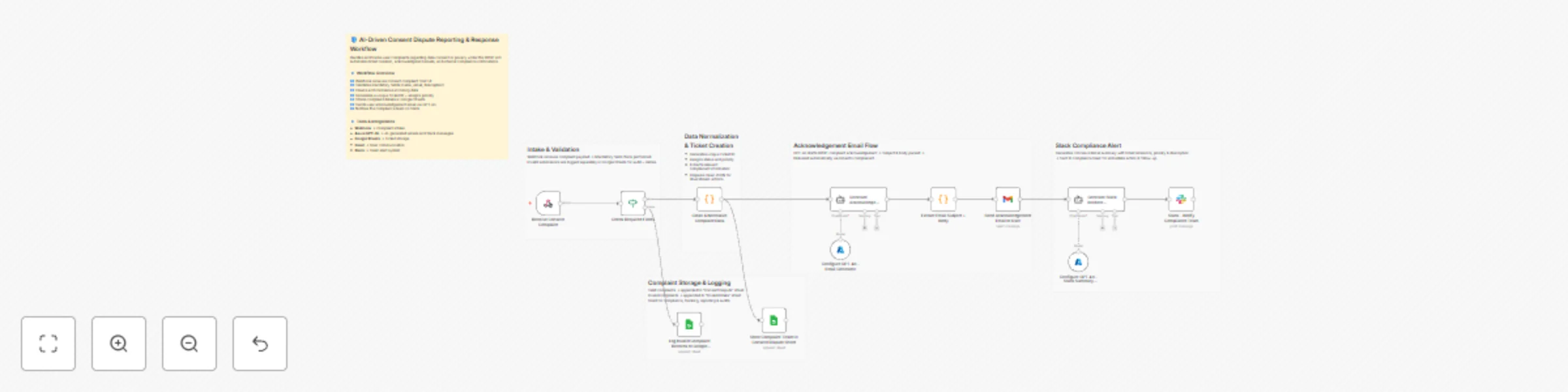
Original n8n.io sourceThis workflow automates the full lifecycle of a data-consent complaint: receiving the complaint, validating the payload, normalizing the data into a clean ticket format, storing it in a compliance sheet, generating a formal acknowledgement email for the user, and sending an internal Slack alert for the compliance team. Everything moves from intake → classification → communication → escalation with zero manual handling. AI-generated messages follow DPDP-compliant tone and structure.
▶️ Receive Consent Complaint (Webhook) Accepts a POST request containing complaint details: name, email, issue type, description, and metadata.
🔍 Check Required Fields (IF) Validates that the complaint includes a non-empty description. Valid → processed Invalid → logged to a separate sheet.
🧹 Clean & Normalize Complaint Data (Code) Constructs a unified ticket object with: auto-generated ticketId normalized fields (action, email, issueType, description) priority scoring timestamp source metadata Sets default status to Open.
📄 Log Invalid Complaint Records (Google Sheets) Stores incomplete submissions for later review.
📥 Store Complaint Ticket in Consent Dispute Sheet (Google Sheets) Appends the cleaned ticket into the Consent Dispute sheet including all metadata for traceability.
🧠 Generate Acknowledgement Email (AI) Creates a DPDP-compliant support email: mentions user name references ticket ID summarizes issue sets response window (48–72 hours) avoids legal or internal disclosures uses formal, respectful tone
⚙️ Configure GPT-4o – Email Generator Supplies the AI model for email generation.
📝 Extract Email Subject + Body (Code) Splits the AI-generated email into structured fields: subject and message.
📧 Send Acknowledgement Email to User (Gmail) Delivers the formatted acknowledgement directly to the user who filed the complaint.
⚙️ Configure GPT-4o – Slack Summary Model Supplies the AI model for internal Slack summary generation.
🔔 Generate Slack Incident Summary (AI) Produces an internal, action-focused Slack message containing:
📡 Slack – Notify Compliance Team Sends the incident summary to the assigned Slack user or channel for quick action by compliance.
Live webhook endpoint Google Sheets OAuth (Techdome) Gmail OAuth Slack API credentials Azure OpenAI GPT-4o enabled
✅ Zero-touch intake → acknowledgement → escalation ✅ DPDP-compliant communication with users ✅ Structured ticket normalization and prioritization ✅ Instant Slack alerts for compliance action ✅ Full audit trail in Google Sheets
This catalog entry is organized from the workflow JSON. The node-level section below shows the executable blocks available for review before importing the template.
| Workflow | Automate consent dispute handling with GPT-4o, Google Sheets, Gmail & Slack |
|---|---|
| Complexity | advanced |
| Nodes | 18 |
| Categories | Ticket Management, Multimodal AI |
| Author | Rahul Joshi |
| Published | 21 Nov 2025 |
Use the JSON export at /data/workflows/11084/11084.json as the source template for this automation.
Open n8n, import the downloaded JSON, and review each node before activating the workflow.
Replace placeholder credentials, API keys, webhook URLs, account IDs, and environment-specific values with your own settings.
Run the workflow manually or in a staging workspace, inspect node output, and confirm downstream systems receive the expected data.
Enable the workflow only after testing, then monitor executions, errors, and rate limits during the first production runs.
Review imported nodes carefully before activation. This catalog entry is intended to help you inspect the workflow structure, understand required services, and find related templates faster.
Node names, credentials, schedules, webhook paths, and external service limits may need adjustment for your workspace.
Description This workflow automates the full lifecycle of a data consent complaint: receiving the complaint, validating the payload, normalizing the data into a clean ticket format, storing it i...
Review the workflow JSON, configure any required credentials in n8n, and test the automation in a safe workspace before using it in production.
Yes. Use the block-by-block analysis and the downloadable JSON to inspect each node, then adjust credentials, prompts, schedules, filters, or destinations for your Ticket Management, Multimodal AI use case.