Automate commercial real estate monitoring with ScrapeGraphAI, Notion and Mailchimp

Workflow preview

Workflow preview
100%
Automate commercial real estate monitoring with ScrapeGraphAI, Notion and Mailchimp preview
Open on n8n.io

Important notice

This workflow is provided as-is. Please review and test before using in production.

1. Workflow Overview

Property Listing Aggregator with Mailchimp and Notion ️ COMMUNITY TEMPLATE DISCLAIMER: This is a community contributed template that uses ScrapeGraphAI (a community node). Please ensure you have t...

Best for

  • Market Research automation workflows
  • AI Summarization automation workflows
  • advanced n8n builders looking for reusable templates

Tools used

n8n-nodes-base.manualtrigger, n8n-nodes-base.code, n8n-nodes-base.splitinbatches, n8n-nodes-scrapegraphai.scrapegraphai, n8n-nodes-base.if, n8n-nodes-base.notion, n8n-nodes-base.set, n8n-nodes-base.mailchimp

Source and attribution

This workflow is cataloged by N8N Workflows and links back to its original n8n.io source page by vinci-king-01.

Original n8n.io source

1.1 Workflow description

Title
Automate commercial real estate monitoring with ScrapeGraphAI, Notion and Mailchimp
Workflow name
Automate commercial real estate monitoring with ScrapeGraphAI, Notion and Mailchimp

Property Listing Aggregator with Mailchimp and Notion

⚠️ COMMUNITY TEMPLATE DISCLAIMER: This is a community-contributed template that uses ScrapeGraphAI (a community node). Please ensure you have the ScrapeGraphAI community node installed in your n8n instance before using this template.

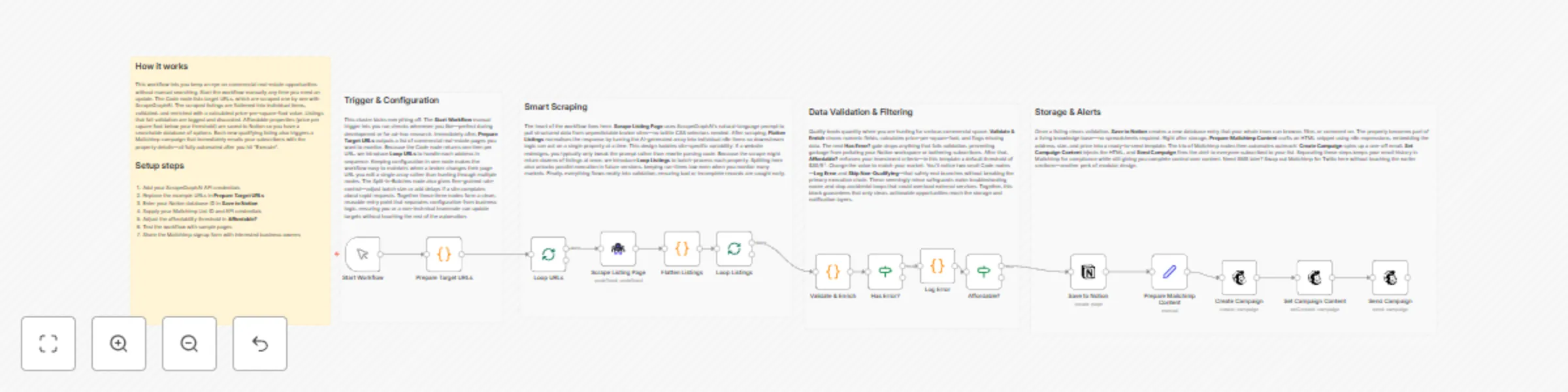
This workflow scrapes multiple commercial-real-estate websites, consolidates new property listings into Notion, and emails weekly availability updates or immediate space alerts to a Mailchimp audience. It automates the end-to-end process so business owners can stay on top of the latest spaces without manual searching.

Pre-conditions/Requirements

Prerequisites

  • n8n instance (self-hosted or n8n.cloud)
  • ScrapeGraphAI community node installed
  • Active Notion workspace with permission to create/read databases
  • Mailchimp account with at least one Audience list
  • Basic understanding of JSON; ability to add API credentials in n8n

Required Credentials

  • ScrapeGraphAI API Key – Enables web scraping functionality
  • Notion OAuth2 / Integration Token – Writes data into Notion database
  • Mailchimp API Key – Sends campaigns and individual emails
  • (Optional) Proxy credentials – If target real-estate sites block your IP

Specific Setup Requirements

Resource Requirement Example
Notion Database with property fields (Address, Price, SqFt, URL, Availability) Database ID: abcd1234efgh
Mailchimp Audience list where alerts are sent Audience ID: f3a2b6c7d8
ScrapeGraphAI YAML/JSON config per site Stored inside the ScrapeGraphAI node

How it works

This workflow scrapes multiple commercial-real-estate websites, consolidates new property listings into Notion, and emails weekly availability updates or immediate space alerts to a Mailchimp audience. It automates the end-to-end process so business owners can stay on top of the latest spaces without manual searching.

Key Steps:

  • Manual Trigger / CRON: Starts the workflow weekly or on-demand.
  • Code (Site List Builder): Generates an array of target URLs for ScrapeGraphAI.
  • Split In Batches: Processes URLs in manageable groups to avoid rate limits.
  • ScrapeGraphAI: Extracts property details from each site.
  • IF (New vs Existing): Checks whether the listing already exists in Notion.
  • Notion: Inserts new listings or updates existing records.
  • Set: Formats email content (HTML & plaintext).
  • Mailchimp: Sends a campaign or automated alert to subscribers.
  • Sticky Notes: Provide documentation and future-enhancement pointers.

Set up steps

Setup Time: 15-25 minutes

  1. Install Community Node
    Navigate to Settings → Community Nodes and install “ScrapeGraphAI”.
  2. Create Notion Integration
    • Go to Notion Settings → Integrations → Develop your own integration.
    • Copy the integration token and share your target database with the integration.
  3. Add Mailchimp API Key
    • In Mailchimp: Account → Extras → API keys.
    • Copy an existing key or create a new one, then add it to n8n credentials.
  4. Build Scrape Config
    In the ScrapeGraphAI node, paste a YAML/JSON selector config for each website (address, price, sqft, url, availability).
  5. Configure the URL List
    Open the first Code node. Replace the placeholder array with your target listing URLs.
  6. Map Notion Fields
    Open the Notion node and map scraped fields to your database properties. Save.
  7. Design Email Template
    In the Set node, tweak the HTML and plaintext blocks to match your brand.
  8. Test the Workflow
    Trigger manually, check that Notion rows are created and Mailchimp sends the message.
  9. Schedule
    Add a CRON node (weekly) or leave the Manual Trigger for ad-hoc runs.

Node Descriptions

Core Workflow Nodes:

  • Manual Trigger / CRON – Kicks off the workflow either on demand or on a schedule.
  • Code (Site List Builder) – Holds an array of commercial real-estate URLs and outputs one item per URL.
  • Split In Batches – Prevents hitting anti-bot limits by processing URLs in groups (default: 5).
  • ScrapeGraphAI – Crawls each URL, parses DOM with CSS/XPath selectors, returns structured JSON.
  • IF (New Listing?) – Compares scraped listing IDs against existing Notion database rows.
  • Notion – Creates or updates pages representing property listings.
  • Set (Email Composer) – Builds dynamic email subject, body, and merge tags for Mailchimp.
  • Mailchimp – Uses the Send Campaign endpoint to email your audience.
  • Sticky Note – Contains inline documentation and customization reminders.

Data Flow:

  1. Manual Trigger/CRONCode (URLs)Split In BatchesScrapeGraphAIIF (New?)
  2. True path → Notion (Create)Set (Email)Mailchimp
  3. False path → (skip)

Customization Examples

Filter Listings by Maximum Budget

// Inside the IF node (custom expression)
{{$json["price"] <= 3500}}

Change Email Frequency to Daily Digests

{
  "nodes": [
    {
      "name": "Daily CRON",
      "type": "n8n-nodes-base.cron",
      "parameters": {
        "triggerTimes": [
          {
            "hour": 8,
            "minute": 0
          }
        ]
      }
    }
  ]
}

Data Output Format

The workflow outputs structured JSON data:

{
  "address": "123 Market St, Suite 400",
  "price": 3200,
  "sqft": 950,
  "url": "https://examplebroker.com/listing/123",
  "availability": "Immediate",
  "new": true
}

Troubleshooting

Common Issues

  1. Scraper returns empty objects – Verify selectors in ScrapeGraphAI config; inspect the site’s HTML for changes.
  2. Duplicate entries in Notion – Ensure the “IF” node checks a unique ID (e.g., listing URL) before creating a page.

Performance Tips

  • Reduce batch size or add delays in ScrapeGraphAI to avoid site blocking.
  • Cache previously scraped URLs in an external file or database for faster runs.

Pro Tips:

  • Rotate proxies in ScrapeGraphAI for heavily protected sites.
  • Use Notion rollups to calculate total available square footage automatically.
  • Leverage Mailchimp merge tags (*|FNAME|*) in the Set node for personalized alerts.

1.2 Logical Blocks

This catalog entry is organized from the workflow JSON. The node-level section below shows the executable blocks available for review before importing the template.

2. Block-by-Block Analysis

Block 1 - Start Workflow

Type / Role
n8n-nodes-base.manualTrigger - manualTrigger
Config choices
Version 1

Block 2 - Prepare Target URLs

Type / Role
n8n-nodes-base.code - code
Config choices
Version 2

Block 3 - Loop URLs

Type / Role
n8n-nodes-base.splitInBatches - splitInBatches
Config choices
Version 3

Block 4 - Scrape Listing Page

Type / Role
n8n-nodes-scrapegraphai.scrapegraphAi - scrapegraphAi
Config choices
Version 1

Block 5 - Flatten Listings

Type / Role
n8n-nodes-base.code - code
Config choices
Version 2

Block 6 - Loop Listings

Type / Role
n8n-nodes-base.splitInBatches - splitInBatches
Config choices
Version 3

Block 7 - Validate & Enrich

Type / Role
n8n-nodes-base.code - code
Config choices
Version 2

Block 8 - Has Error?

Type / Role
n8n-nodes-base.if - if
Config choices
Version 2

Block 9 - Log Error

Type / Role
n8n-nodes-base.code - code
Config choices
Version 2

Block 10 - Affordable?

Type / Role
n8n-nodes-base.if - if
Config choices
Version 2

Block 11 - Save to Notion

Type / Role
n8n-nodes-base.notion - notion
Config choices
Version 2

Block 12 - Prepare Mailchimp Content

Type / Role
n8n-nodes-base.set - set
Config choices
Version 3

Block 13 - Create Campaign

Type / Role
n8n-nodes-base.mailchimp - mailchimp
Config choices
Version 1

Block 14 - Set Campaign Content

Type / Role
n8n-nodes-base.mailchimp - mailchimp
Config choices
Version 1

Block 15 - Send Campaign

Type / Role
n8n-nodes-base.mailchimp - mailchimp
Config choices
Version 1

Block 16 - Workflow Overview

Type / Role
n8n-nodes-base.stickyNote - stickyNote
Config choices
Version 1

Block 17 - Section – Trigger & Config

Type / Role
n8n-nodes-base.stickyNote - stickyNote
Config choices
Version 1

Block 18 - Section – Scraping

Type / Role
n8n-nodes-base.stickyNote - stickyNote
Config choices
Version 1

Block 19 - Section – Validation & Rules

Type / Role
n8n-nodes-base.stickyNote - stickyNote
Config choices
Version 1

Block 20 - Section – Storage & Notification

Type / Role
n8n-nodes-base.stickyNote - stickyNote
Config choices
Version 1

3. Summary Table

Workflow Automate commercial real estate monitoring with ScrapeGraphAI, Notion and Mailchimp
Complexity advanced
Nodes 20
Categories Market Research, AI Summarization
Author vinci-king-01
Published 18 Dec 2025

4. Reproducing the Workflow from Scratch

  1. 1. Download the workflow JSON

    Use the JSON export at /data/workflows/11927/11927.json as the source template for this automation.

  2. 2. Import the template into n8n

    Open n8n, import the downloaded JSON, and review each node before activating the workflow.

  3. 3. Configure credentials and variables

    Replace placeholder credentials, API keys, webhook URLs, account IDs, and environment-specific values with your own settings.

  4. 4. Test with sample data

    Run the workflow manually or in a staging workspace, inspect node output, and confirm downstream systems receive the expected data.

  5. 5. Activate and monitor

    Enable the workflow only after testing, then monitor executions, errors, and rate limits during the first production runs.

5. General Notes & Resources

Review imported nodes carefully before activation. This catalog entry is intended to help you inspect the workflow structure, understand required services, and find related templates faster.

Node names, credentials, schedules, webhook paths, and external service limits may need adjustment for your workspace.

Frequently asked questions

What does Automate commercial real estate monitoring with ScrapeGraphAI, Notion and Mailchimp do?

Property Listing Aggregator with Mailchimp and Notion ️ COMMUNITY TEMPLATE DISCLAIMER: This is a community contributed template that uses ScrapeGraphAI (a community node). Please ensure you have t...

What do I need before importing this workflow?

Review the workflow JSON, configure any required credentials in n8n, and test the automation in a safe workspace before using it in production.

Can I customize this workflow?

Yes. Use the block-by-block analysis and the downloadable JSON to inspect each node, then adjust credentials, prompts, schedules, filters, or destinations for your Market Research, AI Summarization use case.