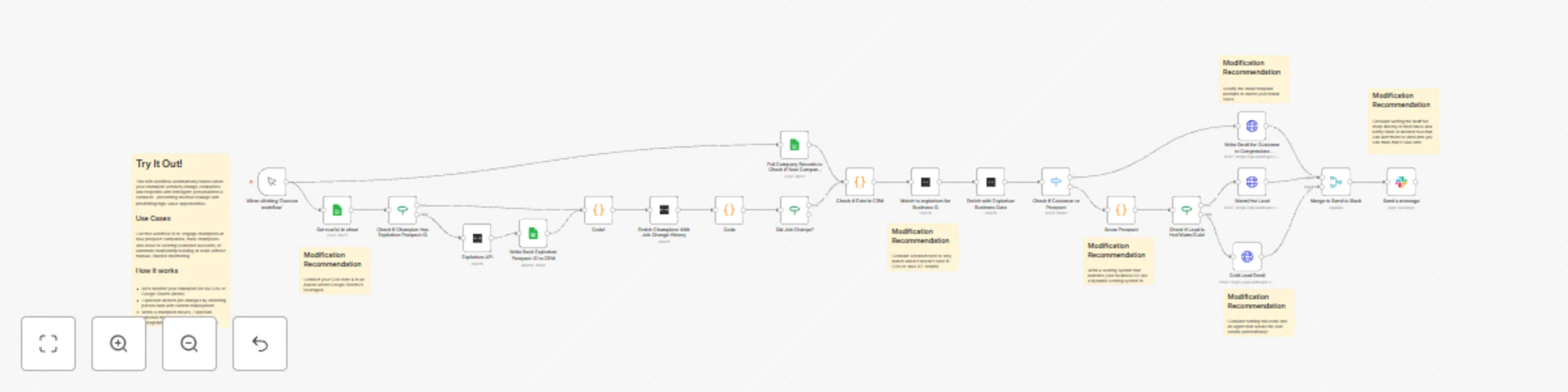
Automate champion migration detection & personalized outreach with Explorium & Claude

Workflow preview

Workflow preview
100%
Automate champion migration detection & personalized outreach with Explorium & Claude preview
Open on n8n.io

Important notice

This workflow is provided as-is. Please review and test before using in production.

1. Workflow Overview

Champion Migration Tracker Automatically detect when your champion contacts change companies and respond with intelligent, personalized AI outreach before your competitors do. THE PROBLEM When cham...

Best for

  • Lead Nurturing automation workflows
  • AI Summarization automation workflows
  • advanced n8n builders looking for reusable templates

Tools used

n8n-nodes-base.manualtrigger, n8n-nodes-base.googlesheets, n8n-nodes-base.if, @exploriumai/n8n-nodes-explorium-ai.exploriumapinode, n8n-nodes-base.code, n8n-nodes-base.switch, n8n-nodes-base.httprequest, n8n-nodes-base.slack

Source and attribution

This workflow is cataloged by N8N Workflows and links back to its original n8n.io source page by Kendra McClanahan.

Original n8n.io source

1.1 Workflow description

Title
Automate champion migration detection & personalized outreach with Explorium & Claude
Workflow name
Automate champion migration detection & personalized outreach with Explorium & Claude

Champion Migration Tracker

Automatically detect when your champion contacts change companies and respond with intelligent, personalized AI outreach before your competitors do.

THE PROBLEM

When champions move to new companies, sales teams lose track and miss high-value opportunities. Manual LinkedIn monitoring doesn't scale, and by the time you notice, the relationship has gone cold.

THE SOLUTION

This workflow automates champion migration tracking end-to-end, combining Explorium's data intelligence with Claude AI agents to maintain relationships and prioritize opportunities.

HOW IT WORKS

1. Automated Job Change Detection

  • Uses Explorium person enrichment to detect when champions move companies
  • Eliminates manual LinkedIn monitoring
  • Triggers immediately when employment changes

2. Intelligent Company Enrichment

  • Enriches new companies with Explorium data: firmographics, funding, tech stack, hiring velocity
  • Checks if company already exists in your CRM (Customer vs Prospect)
  • Identifies open opportunities and account owners

3. Multi-Dimensional Opportunity Scoring (0-100)

  • ICP Fit (40%): Company size, funding stage, revenue, tech stack alignment
  • Relationship Strength (40%): Past deals influenced, relationship warmth, CRM status
  • Timing (20%): Days at new company, recent funding/acquisition signals
  • Results in Hot/Warm/Cold priority classification

4. Smart Routing by Context

  • Customers: Notify account manager with congratulations message
  • Hot Prospects (75+ score): Draft detailed strategic outreach for rep review

5. AI-Powered Personalization

  • Claude AI agents generate contextually relevant emails
  • References past relationship, deals influenced, and company intelligence
  • Adapts tone and content based on opportunity priority and CRM status

DEMO SETUP (Google Sheets)

This demo uses Google Sheets for simplicity. For production use, replace with your actual CRM:

  • Salesforce
  • HubSpot
  • Pipedrive
  • Any CRM with n8n integration

Important Fields to Consider:

Champions:

  • champion_id, name, email, company, title, last_checked_date
  • relationship_strength (Hot/Warm/Cold), last_contact_date, deals_influenced
  • relationship_notes, isChampion (TRUE/FALSE), linkedin_url, explorium_prospect_id

Companies:

  • company_ID, companyName, domain, relationship_type (Customer/Prospect/None)
  • open_opportunity (TRUE/FALSE), opportunity_stage, account_owner, account_owner_email
  • contractValue, notes, ExploriumBusinessID

REQUIRED CREDENTIALS

  1. Anthropic API Key - Powers Claude AI agents for email generation
  2. Explorium API Key - Provides person and company enrichment data
  3. Google Sheets or Your CRM (production) - Data source and logging

SETUP INSTRUCTIONS

  1. Connect Credentials in n8n Settings → Credentials
  2. Update Data Sources: Replace Google Sheets nodes with your CRM nodes (or create demo sheets with structure above)
  3. Configure Scoring: Adjust ICP scoring criteria in "Score Company" node to match your ideal customer profile
  4. Test with Sample Data: Run with 2-3 test champions to verify routing and email generation
  5. Schedule Trigger: Set to run daily or weekly based on your needs

CUSTOMIZATION TIPS

Scoring Weights: Adjust the 40/40/20 weighting in the scoring node to prioritize what matters most to your business

Tech Stack Matching: Update the relevantTech array with tools your champions likely use

Email Tone: Modify Claude prompts to match your brand voice (formal, casual, technical, etc.)

Routing Logic: Add additional branches for specific scenarios (e.g., churned customers, enterprise accounts)

**Agentic Experience: Consider adding an agent that sends the email for Cold prospects automatically.

Integrations: Add Slack notifications, CRM updates, or calendar booking links to the output

BUSINESS VALUE

  • Prevent Revenue Leakage: Never lose track of champion relationships
  • Prioritize Intelligently: Focus on opportunities with highest potential
  • Scale Relationship Building: Automate what used to require manual effort
  • Act Before Competitors: Reach out while champions are still settling into new roles
  • Data-Driven Decisions: Quantifiable scores replace gut feelings

USE CASES

  • Sales Teams: Re-engage champions at new prospect companies
  • Customer Success: Track champions who move to existing accounts
  • Account-Based Marketing: Identify high-fit accounts through champion networks
  • Revenue Operations: Automate champion tracking at scale

NOTES

  • Production Recommendation: Replace Google Sheets with your production CRM for real-time data
  • Privacy: All API keys are credential-referenced (not hardcoded) for security
  • Explorium Credits: Person + company enrichment uses ~2-3 credits per champion

1.2 Logical Blocks

This catalog entry is organized from the workflow JSON. The node-level section below shows the executable blocks available for review before importing the template.

2. Block-by-Block Analysis

Block 1 - When clicking ‘Execute workflow’

Type / Role
n8n-nodes-base.manualTrigger - manualTrigger
Config choices
Version 1

Block 2 - Get row(s) in sheet

Type / Role
n8n-nodes-base.googleSheets - googleSheets
Config choices
Version 4.6

Block 3 - Check if Champion Has Explorium Prospect ID

Type / Role
n8n-nodes-base.if - if
Config choices
Version 2.2

Block 4 - Explorium API

Type / Role
@exploriumai/n8n-nodes-explorium-ai.exploriumApiNode - exploriumApiNode
Config choices
Version 1

Block 5 - Write Back Explorium Prospect ID to CRM

Type / Role
n8n-nodes-base.googleSheets - googleSheets
Config choices
Version 4.6

Block 6 - Enrich Champions With Job Change History

Type / Role
@exploriumai/n8n-nodes-explorium-ai.exploriumApiNode - exploriumApiNode
Config choices
Version 1

Block 7 - Code

Type / Role
n8n-nodes-base.code - code
Config choices
Version 2

Block 8 - Code1

Type / Role
n8n-nodes-base.code - code
Config choices
Version 2

Block 9 - Did Job Change?

Type / Role
n8n-nodes-base.if - if
Config choices
Version 2.2

Block 10 - Pull Company Records to Check if New Company in CRM

Type / Role
n8n-nodes-base.googleSheets - googleSheets
Config choices
Version 4.6

Block 11 - Check if Customer or Prospect

Type / Role
n8n-nodes-base.switch - switch
Config choices
Version 3.2

Block 12 - Match to explorium for Business ID

Type / Role
@exploriumai/n8n-nodes-explorium-ai.exploriumApiNode - exploriumApiNode
Config choices
Version 1

Block 13 - Enrich with Explorium Business Data

Type / Role
@exploriumai/n8n-nodes-explorium-ai.exploriumApiNode - exploriumApiNode
Config choices
Version 1

Block 14 - Check if Exist in CRM

Type / Role
n8n-nodes-base.code - code
Config choices
Version 2

Block 15 - Write Email for Customer to Congratulate Champion on New Role

Type / Role
n8n-nodes-base.httpRequest - httpRequest
Config choices
Version 4.2

Block 16 - Score Prospect

Type / Role
n8n-nodes-base.code - code
Config choices
Version 2

Block 17 - Warm/Hot Lead

Type / Role
n8n-nodes-base.httpRequest - httpRequest
Config choices
Version 4.2

Block 18 - Check if Lead is Hot/Warm/Cold

Type / Role
n8n-nodes-base.if - if
Config choices
Version 2.2

Block 19 - Cold Lead Email

Type / Role
n8n-nodes-base.httpRequest - httpRequest
Config choices
Version 4.2

Block 20 - Send a message

Type / Role
n8n-nodes-base.slack - slack
Config choices
Version 2.3

Block 21 - Merge to Send to Slack

Type / Role
n8n-nodes-base.merge - merge
Config choices
Version 3.2

Block 22 - Sticky Note

Type / Role
n8n-nodes-base.stickyNote - stickyNote
Config choices
Version 1

Block 23 - Sticky Note1

Type / Role
n8n-nodes-base.stickyNote - stickyNote
Config choices
Version 1

Block 24 - Sticky Note2

Type / Role
n8n-nodes-base.stickyNote - stickyNote
Config choices
Version 1

Showing the first 24 of 28 workflow blocks. Download the JSON for the full node graph.

3. Summary Table

Workflow Automate champion migration detection & personalized outreach with Explorium & Claude
Complexity advanced
Nodes 28
Categories Lead Nurturing, AI Summarization
Author Kendra McClanahan
Published 05 Dec 2025

4. Reproducing the Workflow from Scratch

  1. 1. Download the workflow JSON

    Use the JSON export at /data/workflows/11517/11517.json as the source template for this automation.

  2. 2. Import the template into n8n

    Open n8n, import the downloaded JSON, and review each node before activating the workflow.

  3. 3. Configure credentials and variables

    Replace placeholder credentials, API keys, webhook URLs, account IDs, and environment-specific values with your own settings.

  4. 4. Test with sample data

    Run the workflow manually or in a staging workspace, inspect node output, and confirm downstream systems receive the expected data.

  5. 5. Activate and monitor

    Enable the workflow only after testing, then monitor executions, errors, and rate limits during the first production runs.

5. General Notes & Resources

Review imported nodes carefully before activation. This catalog entry is intended to help you inspect the workflow structure, understand required services, and find related templates faster.

Node names, credentials, schedules, webhook paths, and external service limits may need adjustment for your workspace.

Frequently asked questions

What does Automate champion migration detection & personalized outreach with Explorium & Claude do?

Champion Migration Tracker Automatically detect when your champion contacts change companies and respond with intelligent, personalized AI outreach before your competitors do. THE PROBLEM When cham...

What do I need before importing this workflow?

Review the workflow JSON, configure any required credentials in n8n, and test the automation in a safe workspace before using it in production.

Can I customize this workflow?

Yes. Use the block-by-block analysis and the downloadable JSON to inspect each node, then adjust credentials, prompts, schedules, filters, or destinations for your Lead Nurturing, AI Summarization use case.