Automate beta tester verification & onboarding with Trello, Gmail and QR codes

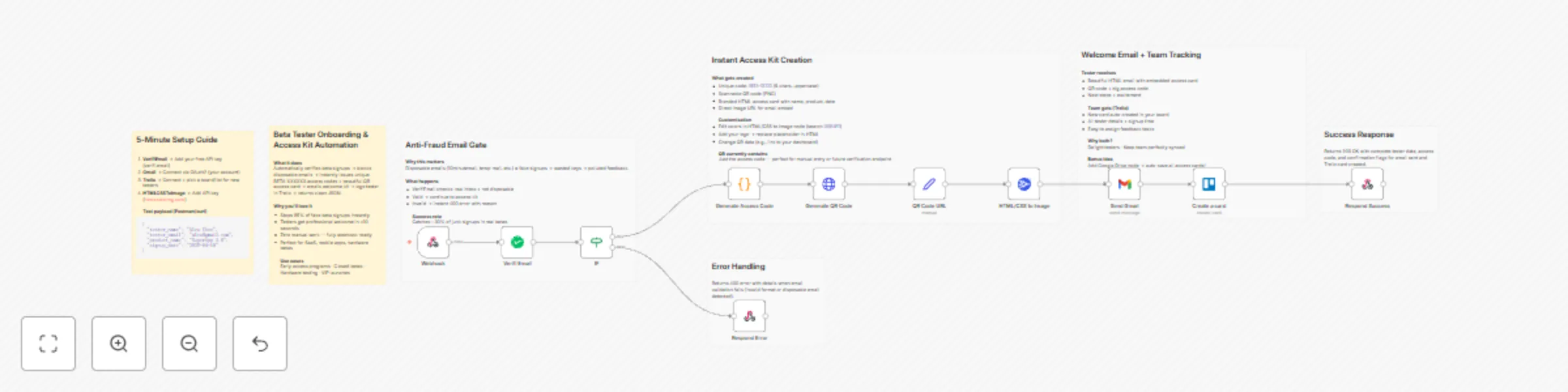
Workflow preview

Workflow preview
100%
Automate beta tester verification & onboarding with Trello, Gmail and QR codes preview
Open on n8n.io

Important notice

This workflow is provided as-is. Please review and test before using in production.

1. Workflow Overview

Verified Beta Tester Access Kit Automated Onboarding System Transform Your Beta Testing Program Automate your entire beta tester onboarding process from signup to tracking with this comprehensive, ...

Best for

  • Lead Nurturing automation workflows
  • advanced n8n builders looking for reusable templates

Tools used

n8n-nodes-base.webhook, n8n-nodes-base.if, n8n-nodes-base.respondtowebhook, n8n-nodes-base.code, n8n-nodes-base.httprequest, n8n-nodes-base.gmail, n8n-nodes-verifiemail.verifiemail, n8n-nodes-htmlcsstoimage.htmlcsstoimage

Source and attribution

This workflow is cataloged by N8N Workflows and links back to its original n8n.io source page by Jitesh Dugar.

Original n8n.io source

1.1 Workflow description

Title
Automate beta tester verification & onboarding with Trello, Gmail and QR codes
Workflow name
Automate beta tester verification & onboarding with Trello, Gmail and QR codes

Verified Beta Tester Access Kit - Automated Onboarding System

Transform Your Beta Testing Program

Automate your entire beta tester onboarding process from signup to tracking with this comprehensive, production-ready n8n workflow.


๐Ÿ“š CATEGORY TAGS

Primary Category:

  • โœ… Marketing & Sales

Additional Tags:

  • Automation
  • Email Marketing
  • User Management
  • Onboarding
  • SaaS
  • Product Launch
  • Beta Testing
  • Access Control

What This Workflow Does

When a beta tester signs up through your form or API, this workflow automatically:

โœ… Verifies Email Authenticity - Uses VerifiEmail API to validate addresses and block disposable emails โœ… Generates Unique Access Codes - Creates secure BETA-XXXXXX codes with timestamps โœ… Creates QR Codes - Generates scannable codes for quick mobile activation โœ… Builds Branded Access Cards - Produces professional HTML/CSS cards with tester details โœ… Converts to Images - Transforms cards into shareable PNGs โœ… Sends Welcome Emails - Delivers beautifully formatted emails via Gmail โœ… Logs in Trello - Creates organized tracking cards automatically โœ… Returns API Responses - Sends success/error responses with complete data

Complete execution time: 5-10 seconds per signup


Perfect For

๐Ÿš€ SaaS startups launching beta programs ๐Ÿ“ฑ Mobile app developers managing beta testers ๐ŸŽฎ Game studios running closed beta tests ๐Ÿข Enterprise teams controlling early access ๐Ÿ’ผ Product managers organizing user testing ๐Ÿ”ฌ Research projects managing participants


Key Features

Security First

  • Real-time email validation
  • Blocks disposable email addresses
  • Unique, non-guessable access codes
  • Webhook authentication ready

Professional Branding

  • Customizable HTML/CSS templates
  • Embedded QR codes
  • Responsive email design
  • High-quality PNG generation

Team Collaboration

  • Automatic Trello card creation
  • Organized tracking boards
  • Checklist items for follow-ups
  • Easy team assignments

Production Ready

  • Comprehensive error handling
  • Detailed logging
  • Scalable architecture
  • Easy integration

What You'll Need

Required API Keys (All Have Free Tiers):

  1. VerifiEmail - Email verification at https://verifi.email
  2. HTMLCSSToImage - Image generation at https://htmlcsstoimg.com
  3. Gmail Account - Email delivery
  4. Trello Account - Project tracking at https://trello.com/app-key

Workflow Steps

  1. Webhook receives POST request with tester data
  2. VerifiEmail validates email authenticity
  3. Conditional logic routes valid/invalid emails
  4. Function generates unique BETA-XXXXXX access codes
  5. HTTP Request creates QR code image
  6. Set node stores QR code URL
  7. HTMLCSSToImage converts access card to PNG
  8. Gmail sends branded welcome email with kit
  9. Trello creates tracking card in board
  10. Webhook responds with success/error status

Sample Request

POST to webhook:

{
  "tester_name": "Aarav Mehta",
  "tester_email": "[email protected]",
  "product_name": "YourApp v1.0",
  "signup_date": "2025-11-05"
}

Success Response (200):

{
  "status": "success",
  "message": "Beta tester verified and access kit delivered",
  "data": {
    "tester_name": "Aarav Mehta",
    "access_code": "BETA-A7K9M2",
    "trello_card_created": true,
    "email_sent": true,
    "qr_code_generated": true
  }
}

Error Response (400):

{
  "status": "error",
  "message": "Invalid or disposable email address detected",
  "reason": "Disposable email"
}

Customization Options

Email Template

  • Modify HTML in Gmail node
  • Add company logo
  • Change colors and fonts

Access Card Design

  • Edit CSS in HTMLCSSToImage node
  • Adjust QR code size
  • Match your brand

Access Code Format

  • Change prefix from "BETA-" to your choice
  • Modify length and characters

Trello Integration

  • Add custom fields
  • Include labels
  • Set due dates
  • Assign team members

Use Cases

Mobile App Beta Launch User fills form โ†’ Email verified โ†’ Code sent โ†’ App activated โ†’ Team tracks in Trello

SaaS Early Access User signs up โ†’ Email validated โ†’ Access kit received โ†’ Product team manages

Game Testing Campaign Player requests access โ†’ Email verified โ†’ Unique key generated โ†’ Community team tracks


What Makes This Special

Unlike simple email workflows, this is a complete system that handles:

  • Security (email verification)
  • Branding (custom access cards)
  • Communication (professional emails)
  • Tracking (team collaboration)
  • Integration (webhook API)

All in one cohesive, production-ready workflow!


Troubleshooting

Common Issues & Solutions:

  • Webhook not receiving data โ†’ Check URL and POST method
  • Email verification fails โ†’ Verify API key and rate limits
  • Gmail not sending โ†’ Reconnect OAuth2
  • Trello card fails โ†’ Confirm List ID is correct
  • Image not generating โ†’ Check HTMLCSSToImage credentials

๐Ÿท๏ธ ADDITIONAL METADATA

Difficulty Level:

  • โญโญโญ Intermediate (requires API key setup)

Time to Setup:

  • ๐Ÿ• 10-15 minutes

1.2 Logical Blocks

This catalog entry is organized from the workflow JSON. The node-level section below shows the executable blocks available for review before importing the template.

2. Block-by-Block Analysis

Block 1 - Webhook

Type / Role
n8n-nodes-base.webhook - webhook
Config choices
Version 1

Block 2 - IF

Type / Role
n8n-nodes-base.if - if
Config choices
Version 1

Block 3 - Respond Error

Type / Role
n8n-nodes-base.respondToWebhook - respondToWebhook
Config choices
Version 1

Block 4 - Generate Access Code

Type / Role
n8n-nodes-base.code - code
Config choices
Version 2

Block 5 - Generate QR Code

Type / Role
n8n-nodes-base.httpRequest - httpRequest
Config choices
Version 4.1

Block 6 - Send Gmail

Type / Role
n8n-nodes-base.gmail - gmail
Config choices
Version 2.1

Block 7 - Respond Success

Type / Role
n8n-nodes-base.respondToWebhook - respondToWebhook
Config choices
Version 1

Block 8 - Verifi Email

Type / Role
n8n-nodes-verifiemail.verifiEmail - verifiEmail
Config choices
Version 1

Block 9 - HTML/CSS to Image

Type / Role
n8n-nodes-htmlcsstoimage.htmlCssToImage - htmlCssToImage
Config choices
Version 1

Block 10 - Create a card

Type / Role
n8n-nodes-base.trello - trello
Config choices
Version 1

Block 11 - QR Code URL

Type / Role
n8n-nodes-base.set - set
Config choices
Version 3.2

Block 12 - Section: Input & Validation

Type / Role
n8n-nodes-base.stickyNote - stickyNote
Config choices
Version 1

Block 13 - Section: Error

Type / Role
n8n-nodes-base.stickyNote - stickyNote
Config choices
Version 1

Block 14 - Section: Kit Generation

Type / Role
n8n-nodes-base.stickyNote - stickyNote
Config choices
Version 1

Block 15 - Section: Notifications

Type / Role
n8n-nodes-base.stickyNote - stickyNote
Config choices
Version 1

Block 16 - Section: Success

Type / Role
n8n-nodes-base.stickyNote - stickyNote
Config choices
Version 1

Block 17 - Sticky Note

Type / Role
n8n-nodes-base.stickyNote - stickyNote
Config choices
Version 1

Block 18 - Sticky Note1

Type / Role
n8n-nodes-base.stickyNote - stickyNote
Config choices
Version 1

3. Summary Table

Workflow Automate beta tester verification & onboarding with Trello, Gmail and QR codes
Complexity advanced
Nodes 18
Categories Lead Nurturing
Author Jitesh Dugar
Published 03 Nov 2025

4. Reproducing the Workflow from Scratch

  1. 1. Download the workflow JSON

    Use the JSON export at /data/workflows/10470/10470.json as the source template for this automation.

  2. 2. Import the template into n8n

    Open n8n, import the downloaded JSON, and review each node before activating the workflow.

  3. 3. Configure credentials and variables

    Replace placeholder credentials, API keys, webhook URLs, account IDs, and environment-specific values with your own settings.

  4. 4. Test with sample data

    Run the workflow manually or in a staging workspace, inspect node output, and confirm downstream systems receive the expected data.

  5. 5. Activate and monitor

    Enable the workflow only after testing, then monitor executions, errors, and rate limits during the first production runs.

5. General Notes & Resources

Review imported nodes carefully before activation. This catalog entry is intended to help you inspect the workflow structure, understand required services, and find related templates faster.

Node names, credentials, schedules, webhook paths, and external service limits may need adjustment for your workspace.

Frequently asked questions

What does Automate beta tester verification & onboarding with Trello, Gmail and QR codes do?

Verified Beta Tester Access Kit Automated Onboarding System Transform Your Beta Testing Program Automate your entire beta tester onboarding process from signup to tracking with this comprehensive, ...

What do I need before importing this workflow?

Review the workflow JSON, configure any required credentials in n8n, and test the automation in a safe workspace before using it in production.

Can I customize this workflow?

Yes. Use the block-by-block analysis and the downloadable JSON to inspect each node, then adjust credentials, prompts, schedules, filters, or destinations for your Lead Nurturing use case.