Auto-upload Instagram videos to YouTube with GPT-4o and Google Sheets tracking

Workflow preview

Workflow preview
100%
Auto-upload Instagram videos to YouTube with GPT-4o and Google Sheets tracking preview
Open on n8n.io

Important notice

This workflow is provided as-is. Please review and test before using in production.

1. Workflow Overview

Description Automate your cross platform publishing workflow by automatically uploading Instagram videos to YouTube with AI optimized titles and tags. This workflow runs every six hours, fe...

Best for

  • Social Media automation workflows
  • Multimodal AI automation workflows
  • advanced n8n builders looking for reusable templates

Tools used

n8n-nodes-base.stickynote, n8n-nodes-base.scheduletrigger, n8n-nodes-base.if, n8n-nodes-base.splitinbatches, n8n-nodes-base.httprequest, n8n-nodes-base.facebookgraphapi, n8n-nodes-base.splitout, @n8n/n8n-nodes-langchain.agent

Source and attribution

This workflow is cataloged by N8N Workflows and links back to its original n8n.io source page by Rahul Joshi.

Original n8n.io source

1.1 Workflow description

Title
Auto-upload Instagram videos to YouTube with GPT-4o and Google Sheets tracking
Workflow name
Auto-upload Instagram videos to YouTube with GPT-4o and Google Sheets tracking

📊 Description

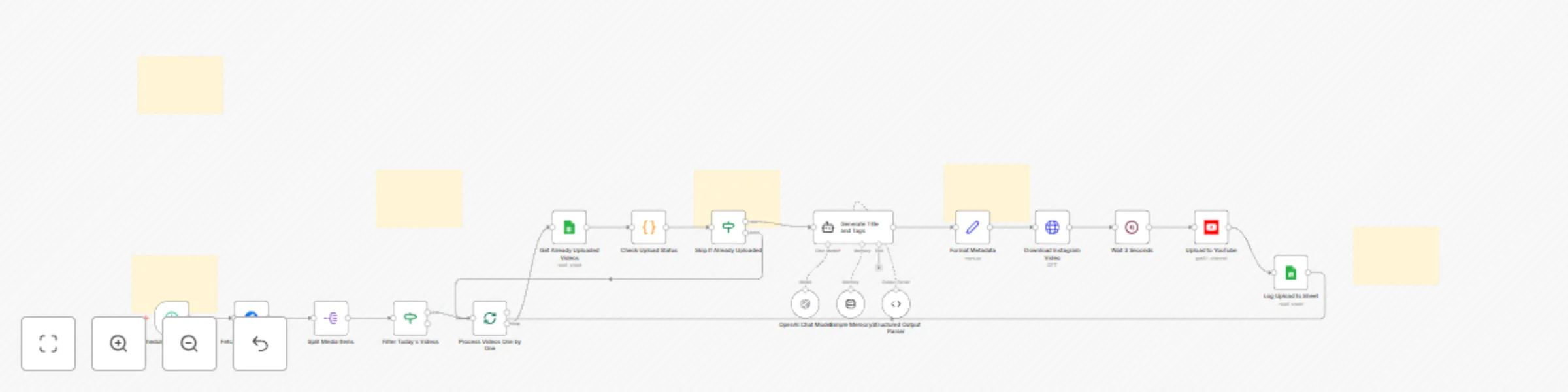
Automate your cross-platform publishing workflow by automatically uploading Instagram videos to YouTube with AI-optimized titles and tags. 🚀🎬 This workflow runs every six hours, fetches newly posted Instagram videos, checks Google Sheets to avoid duplicate uploads, generates SEO-ready YouTube metadata using GPT-4o, downloads the video in high quality, uploads it to YouTube, and logs the full upload details for tracking. Perfect for creators, agencies, and businesses managing multi-platform content distribution at scale. 📈✨

🔁 What This Template Does

1️⃣ Runs every 6 hours to fetch recent Instagram media via Graph API. ⏰ 2️⃣ Splits the media list and filters for today’s video posts only. 🎥 3️⃣ Checks Google Sheets to see if the video was already uploaded. 🔎 4️⃣ Sends Instagram caption to AI to generate: — a YouTube-optimized title (max 60 chars) — SEO-friendly tags extracted from text + hashtags 5️⃣ Downloads the Instagram video binary file. ⬇️ 6️⃣ Waits 3 seconds to avoid YouTube rate limits. ⏳ 7️⃣ Uploads the video to YouTube with: — title — tags — caption as description 8️⃣ Logs the upload details into Google Sheets (ID, title, link, date, status). 📊 9️⃣ Prevents future duplicate uploads using a spreadsheet lookup. ✔️

⭐ Key Benefits

✅ Fully automates Instagram → YouTube video publishing ✅ AI-generated metadata increases YouTube visibility & search ranking ✅ Duplicate upload prevention ensures clean channel management ✅ Tracks upload history in a Google Sheet for transparency ✅ Requires zero manual downloading, editing, or re-uploading ✅ Ideal for creators, brands, community managers & agencies

🧩 Features

  • Instagram Business API media fetch
  • Filter for today’s videos using timestamps
  • Google Sheets duplicate checker
  • GPT-4o caption analysis for metadata generation
  • Structured JSON output for reliable AI parsing
  • YouTube video upload with custom metadata
  • Spreadsheet logging with append/update
  • Automatic scheduling with cron trigger
  • Full workflow batching & safe retry logic

🔐 Requirements

  • Facebook Graph API credentials (Instagram Business Account)
  • YouTube OAuth2 credentials
  • OpenAI API key (GPT-4o)
  • Google Sheets OAuth2 credentials
  • A Google Spreadsheet for tracking uploaded videos
  • Instagram Business Account ID + Access Token

🎯 Target Audience

  • Social media creators & influencers
  • Digital marketing agencies
  • YouTube automation teams
  • Brands repurposing Instagram content for YouTube
  • Content managers handling multiple accounts
  • Community managers needing hands-free cross-posting

1.2 Logical Blocks

This catalog entry is organized from the workflow JSON. The node-level section below shows the executable blocks available for review before importing the template.

2. Block-by-Block Analysis

Block 1 - Sticky Note

Type / Role
n8n-nodes-base.stickyNote - stickyNote
Config choices
Version 1

Block 2 - Sticky Note1

Type / Role
n8n-nodes-base.stickyNote - stickyNote
Config choices
Version 1

Block 3 - Sticky Note2

Type / Role
n8n-nodes-base.stickyNote - stickyNote
Config choices
Version 1

Block 4 - Sticky Note3

Type / Role
n8n-nodes-base.stickyNote - stickyNote
Config choices
Version 1

Block 5 - Sticky Note4

Type / Role
n8n-nodes-base.stickyNote - stickyNote
Config choices
Version 1

Block 6 - Sticky Note5

Type / Role
n8n-nodes-base.stickyNote - stickyNote
Config choices
Version 1

Block 7 - Schedule Every 6 Hours

Type / Role
n8n-nodes-base.scheduleTrigger - scheduleTrigger
Config choices
Version 1.2

Block 8 - Filter Today's Videos

Type / Role
n8n-nodes-base.if - if
Config choices
Version 2

Block 9 - Process Videos One by One

Type / Role
n8n-nodes-base.splitInBatches - splitInBatches
Config choices
Version 3

Block 10 - Download Instagram Video

Type / Role
n8n-nodes-base.httpRequest - httpRequest
Config choices
Version 4.2

Block 11 - Fetch Instagram Media

Type / Role
n8n-nodes-base.facebookGraphApi - facebookGraphApi
Config choices
Version 1

Block 12 - Split Media Items

Type / Role
n8n-nodes-base.splitOut - splitOut
Config choices
Version 1

Block 13 - Generate Title and Tags

Type / Role
@n8n/n8n-nodes-langchain.agent - agent
Config choices
Version 2

Block 14 - Structured Output Parser

Type / Role
@n8n/n8n-nodes-langchain.outputParserStructured - outputParserStructured
Config choices
Version 1.3

Block 15 - OpenAI Chat Model

Type / Role
@n8n/n8n-nodes-langchain.lmChatOpenAi - lmChatOpenAi
Config choices
Version 1.3

Block 16 - Simple Memory

Type / Role
@n8n/n8n-nodes-langchain.memoryBufferWindow - memoryBufferWindow
Config choices
Version 1.3

Block 17 - Upload to YouTube

Type / Role
n8n-nodes-base.youTube - youTube
Config choices
Version 1

Block 18 - Format Metadata

Type / Role
n8n-nodes-base.set - set
Config choices
Version 3.4

Block 19 - Wait 3 Seconds

Type / Role
n8n-nodes-base.wait - wait
Config choices
Version 1.1

Block 20 - Log Upload to Sheet

Type / Role
n8n-nodes-base.googleSheets - googleSheets
Config choices
Version 4.7

Block 21 - Get Already Uploaded Videos

Type / Role
n8n-nodes-base.googleSheets - googleSheets
Config choices
Version 4.7

Block 22 - Skip If Already Uploaded

Type / Role
n8n-nodes-base.if - if
Config choices
Version 2.2

Block 23 - Check Upload Status

Type / Role
n8n-nodes-base.code - code
Config choices
Version 2

3. Summary Table

Workflow Auto-upload Instagram videos to YouTube with GPT-4o and Google Sheets tracking
Complexity advanced
Nodes 23
Categories Social Media, Multimodal AI
Author Rahul Joshi
Published 15 Dec 2025

4. Reproducing the Workflow from Scratch

  1. 1. Download the workflow JSON

    Use the JSON export at /data/workflows/11830/11830.json as the source template for this automation.

  2. 2. Import the template into n8n

    Open n8n, import the downloaded JSON, and review each node before activating the workflow.

  3. 3. Configure credentials and variables

    Replace placeholder credentials, API keys, webhook URLs, account IDs, and environment-specific values with your own settings.

  4. 4. Test with sample data

    Run the workflow manually or in a staging workspace, inspect node output, and confirm downstream systems receive the expected data.

  5. 5. Activate and monitor

    Enable the workflow only after testing, then monitor executions, errors, and rate limits during the first production runs.

5. General Notes & Resources

Review imported nodes carefully before activation. This catalog entry is intended to help you inspect the workflow structure, understand required services, and find related templates faster.

Node names, credentials, schedules, webhook paths, and external service limits may need adjustment for your workspace.

Frequently asked questions

What does Auto-upload Instagram videos to YouTube with GPT-4o and Google Sheets tracking do?

Description Automate your cross platform publishing workflow by automatically uploading Instagram videos to YouTube with AI optimized titles and tags. This workflow runs every six hours, fe...

What do I need before importing this workflow?

Review the workflow JSON, configure any required credentials in n8n, and test the automation in a safe workspace before using it in production.

Can I customize this workflow?

Yes. Use the block-by-block analysis and the downloadable JSON to inspect each node, then adjust credentials, prompts, schedules, filters, or destinations for your Social Media, Multimodal AI use case.