Block 1 - Workflow Overview
- Type / Role
- n8n-nodes-base.stickyNote - stickyNote
- Config choices
- Version 1


 Early Deal
This workflow is provided as-is. Please review and test before using in production.
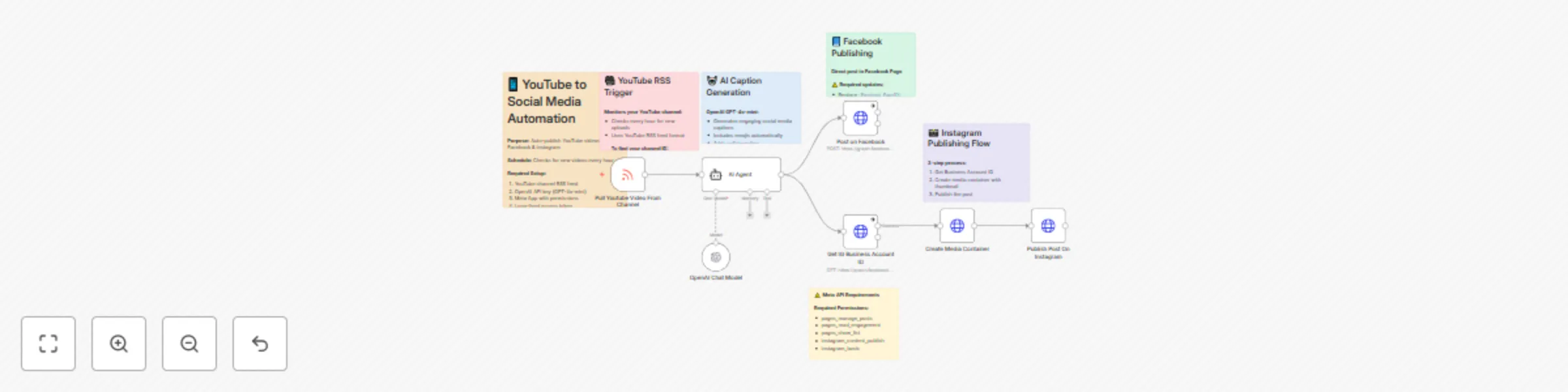
Automatically turn your YouTube videos into engaging Facebook and Instagram posts with AI generated captions. This powerful workflow monitors your YouTube channel for new uploads, generates engagin...
n8n-nodes-base.stickynote, @n8n/n8n-nodes-langchain.agent, @n8n/n8n-nodes-langchain.lmchatopenai, n8n-nodes-base.httprequest, n8n-nodes-base.rssfeedreadtrigger
This workflow is cataloged by N8N Workflows and links back to its original n8n.io source page by Yaron Been.
Original n8n.io sourceAutomatically turn your YouTube videos into engaging Facebook and Instagram posts with AI-generated captions.
This powerful workflow monitors your YouTube channel for new uploads, generates engaging social media captions using AI, and automatically publishes to both Facebook pages and Instagram business accounts - maximizing your content reach across all major platforms.
YouTube Channel Monitoring: Watches your YouTube RSS feed hourly for new video uploads and triggers cross-platform publishing
AI Caption Generation: Uses GPT-4 to create engaging, platform-optimized social media captions with emojis and calls-to-action
Facebook Auto-Publishing: Posts directly to your Facebook page with AI-generated captions and video links
Instagram Business Posting: Creates Instagram posts using YouTube thumbnails as images with custom captions
Smart Error Handling: Continues workflow even if one platform fails, ensuring maximum post distribution
✅ 3x Content Reach: Automatically distribute YouTube content across major social platforms
✅ Save 5+ Hours Weekly: Eliminate manual cross-posting and caption writing
✅ AI-Optimized Captions: Professional, engaging content tailored for social media
✅ Instant Publishing: New YouTube videos become social posts within 1 hour
✅ Professional Thumbnails: Uses high-quality YouTube thumbnails for Instagram
✅ Set & Forget: Complete automation once configured
Complete Cross-Platform Workflow: Ready-to-deploy multi-platform publishing system YouTube RSS Integration: Automatic monitoring of your channel for new uploads AI Caption Engine: GPT-4 powered social media caption generation Facebook Publishing: Direct integration with Facebook Pages API Instagram Business Integration: Full Instagram Business account posting capability Error-Resistant Design: Robust system continues working even if one platform fails
Required Permissions:
✅ pages_manage_posts
✅ pages_read_engagement
✅ pages_show_list
✅ instagram_content_publish
✅ instagram_basic

Token Type: Long-lived access token
API Version: v22.0
YouTube Video: "10 Tips for Better Photography"
Generated Social Caption:
📸 Just dropped my latest photography tutorial!

Discover 10 game-changing tips that will transform your photos from amateur to professional. Whether you're just starting out or looking to level up your skills, these techniques will make a huge difference!

✨ What you'll learn:
• Composition secrets the pros use
• Lighting techniques for any situation
• Camera settings that actually matter

Which tip surprised you the most? Drop a comment below! 👇

Watch the full tutorial: [YouTube Link]

#Photography #Tutorial #PhotoTips #ContentCreator #Learn
Caption Personalization: Adjust AI prompts for your brand voice, hashtags, and audience Platform-Specific Formatting: Different caption styles for Facebook vs Instagram Posting Schedule: Modify monitoring frequency (hourly, daily, custom intervals) Multiple Channels: Monitor multiple YouTube channels with different posting strategies Content Filtering: Add filters for specific video types or topics Brand Integration: Include consistent branding elements and calls-to-action
#youtube-automation #social-media-publishing #cross-platform-marketing #facebook-automation #instagram-business #content-distribution #ai-caption-generation #social-media-management #multi-platform-posting #youtube-marketing #content-amplification #social-media-automation #creator-tools #video-marketing #workflow-automation
Educational Creator: Automatically share tutorial videos across platforms to reach students on different social networks
Product Review Channel: Distribute review videos to Facebook and Instagram to drive traffic and affiliate sales
Business Coach: Share valuable content across platforms to build authority and attract consulting clients
Entertainment Channel: Maximize viral potential by instantly distributing funny videos across all major platforms
Quick Configuration: Complete setup in 45 minutes with Meta Developer account and API tokens Template Access Tokens: Instructions for generating long-lived Facebook/Instagram tokens Channel Integration: Simple YouTube RSS feed configuration for any channel Testing Protocol: Built-in error handling and testing procedures
YouTube: https://www.youtube.com/@YaronBeen/videos
💼 Social Media Automation Support
LinkedIn: https://www.linkedin.com/in/yaronbeen/
📧 Technical Configuration Help
Email: [email protected] - Response within 24 hours
This catalog entry is organized from the workflow JSON. The node-level section below shows the executable blocks available for review before importing the template.
| Workflow | Auto-publish YouTube videos to Facebook & Instagram with AI-generated captions |
|---|---|
| Complexity | intermediate |
| Nodes | 13 |
| Categories | Social Media, Multimodal AI |
| Author | Yaron Been |
| Published | 29 May 2025 |
Use the JSON export at /data/workflows/4478/4478.json as the source template for this automation.
Open n8n, import the downloaded JSON, and review each node before activating the workflow.
Replace placeholder credentials, API keys, webhook URLs, account IDs, and environment-specific values with your own settings.
Run the workflow manually or in a staging workspace, inspect node output, and confirm downstream systems receive the expected data.
Enable the workflow only after testing, then monitor executions, errors, and rate limits during the first production runs.
Review imported nodes carefully before activation. This catalog entry is intended to help you inspect the workflow structure, understand required services, and find related templates faster.
Node names, credentials, schedules, webhook paths, and external service limits may need adjustment for your workspace.
Automatically turn your YouTube videos into engaging Facebook and Instagram posts with AI generated captions. This powerful workflow monitors your YouTube channel for new uploads, generates engagin...
Review the workflow JSON, configure any required credentials in n8n, and test the automation in a safe workspace before using it in production.
Yes. Use the block-by-block analysis and the downloadable JSON to inspect each node, then adjust credentials, prompts, schedules, filters, or destinations for your Social Media, Multimodal AI use case.