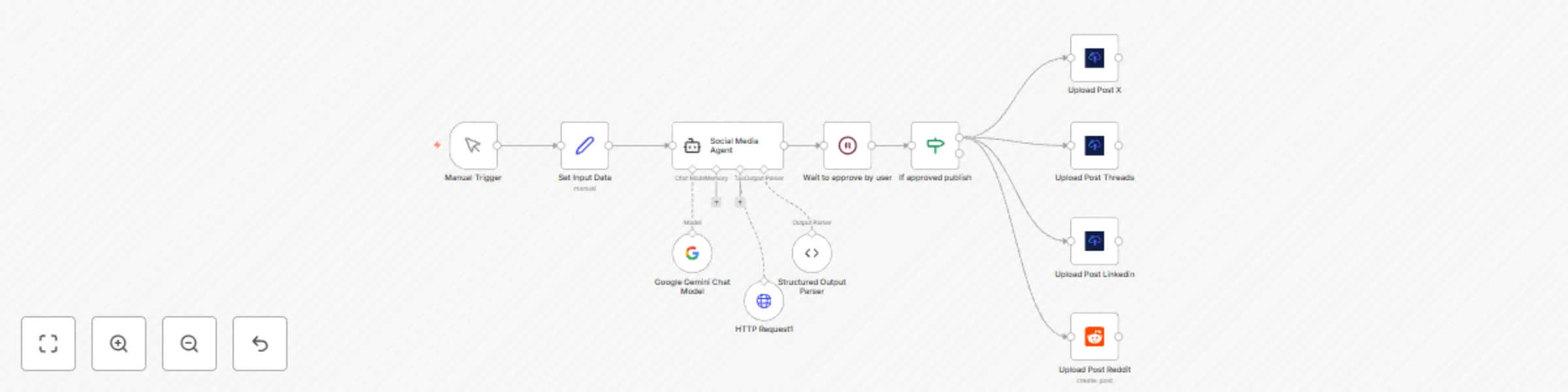
Auto-publish web articles as social posts for X, LinkedIn, Reddit & Threads with Gemini AI

Workflow preview

Workflow preview
100%
Auto-publish web articles as social posts for X, LinkedIn, Reddit & Threads with Gemini AI preview
Open on n8n.io

Important notice

This workflow is provided as-is. Please review and test before using in production.

1. Workflow Overview

This workflow contains community nodes that are only compatible with the self hosted version of n8n. Description This automation template is designed for content curators, marketers, and anyone loo...

Best for

  • Social Media automation workflows
  • Multimodal AI automation workflows
  • intermediate n8n builders looking for reusable templates

Tools used

n8n-nodes-base.manualtrigger, n8n-nodes-base.set, @n8n/n8n-nodes-langchain.agent, @n8n/n8n-nodes-langchain.lmchatgooglegemini, n8n-nodes-base.httprequesttool, @n8n/n8n-nodes-langchain.outputparserstructured, n8n-nodes-upload-post.uploadpost, n8n-nodes-base.reddit

Source and attribution

This workflow is cataloged by N8N Workflows and links back to its original n8n.io source page by Juan Carlos Cavero Gracia.

Original n8n.io source

1.1 Workflow description

Title
Auto-publish web articles as social posts for X, LinkedIn, Reddit & Threads with Gemini AI
Workflow name
Auto-publish web articles as social posts for X, LinkedIn, Reddit & Threads with Gemini AI

This workflow contains community nodes that are only compatible with the self-hosted version of n8n.

Description

This automation template is designed for content curators, marketers, and anyone looking to supercharge their content sharing strategy. It transforms any web article, blog post, or news link into a series of platform-specific social media posts, generated by AI. It also captures a live screenshot of the webpage to use as the post image, automating the entire process of publishing them across X (Twitter), LinkedIn, Threads, and Reddit.

Note: The default example is configured to share n8n templates, but this workflow can promote any web page, article, or news story. Just change the URL! The upload-post node only works for self-hosted n8n instances, but you can use the standard http node for uploading the content

Who Is This For?

  • Content Curators & Marketers: Effortlessly share valuable industry news and articles with tailored messages and visuals for each audience.
  • Social Media Managers: Keep your social feeds consistently active with relevant, high-quality content without the manual overhead.
  • Community Builders & Brand Evangelists: Quickly disseminate product updates, tutorials, and blog posts to your community on all relevant platforms.
  • Professionals & Thought Leaders: Build your personal brand by easily sharing insightful articles with automated visuals, adding your unique perspective.

What Problem Does This Workflow Solve?

Sharing a single piece of content across multiple social platforms is tedious. You need to manually write unique posts, create visuals, and then publish everything. This workflow addresses these challenges by:

  • Automating Content Creation: Uses a powerful AI agent (Google Gemini) to read any URL and write compelling, unique posts for each social network.
  • Generating Visuals Automatically: Captures a high-quality screenshot of the source webpage to use as a visually appealing image in your posts, increasing engagement.
  • Ensuring Platform-Specific Tone: The AI is instructed to generate professional posts for LinkedIn, concise threads for X, conversational updates for Threads, and community-focused posts for Reddit.
  • One-Click Distribution: Takes a single URL as input and handles the entire content creation and sharing process across multiple platforms automatically.

How It Works

  1. Input a URL: In the "Set Input Data" node, simply paste the URL of the article or page you want to share.
  2. AI Analysis & Generation: The workflow sends the URL to the AI agent, which scrapes the content and generates four distinct, ready-to-publish posts.
  3. Screenshot Generation: At the same time, it uses the ScreenshotOne service to capture a high-quality image of the provided URL.
  4. Cross-Platform Publishing: The generated content and the screenshot are automatically sent to the corresponding nodes to be posted on X, LinkedIn, and Threads, while the text-only version is sent to Reddit.

Setup

  1. AI Model Credentials: Add your Google Gemini API key to the Google Gemini Chat Model node to power the AI agent.
  2. Screenshot Service (ScreenshotOne): The workflow uses ScreenshotOne to generate images for your posts.
    • Create a free account at screenshotone.com to get your own API key. The free plan includes 100 screenshots per month.
    • In the Upload Post X, Upload Post LinkedIn, and Upload Post Threads nodes, go to the Photos parameter (under Additional Fields) and replace the existing access_key in the URL with your own.
  3. Upload-Post Account: This workflow uses upload-post.com for multi-platform posting.
    • Create a free account at upload-post.com to get your API Token and User ID.
    • Add the credentials in the Upload Post X, Upload Post LinkedIn, and Upload Post Threads nodes.
  4. Reddit Credentials: Connect your Reddit account using OAuth2 in the Reddit node to enable posting.
  5. Customize the AI: (Optional) Edit the prompt in the Social Media Agent node to match your content. The default prompt is optimized for sharing n8n templates, but you can easily adapt it for any topic to fit your brand's voice and style.

Requirements

  • Accounts: n8n, Google (for Gemini API), ScreenshotOne, upload-post.com, Reddit.
  • API Keys & Credentials: Google Gemini API Key, ScreenshotOne API Key, Upload-post.com API Token & User ID, Reddit OAuth2 credentials.

Use this template to become a content-sharing powerhouse, saving hours of work while increasing your reach and engagement across the web.

1.2 Logical Blocks

This catalog entry is organized from the workflow JSON. The node-level section below shows the executable blocks available for review before importing the template.

2. Block-by-Block Analysis

Block 1 - Manual Trigger

Type / Role
n8n-nodes-base.manualTrigger - manualTrigger
Config choices
Version 1

Block 2 - Set Input Data

Type / Role
n8n-nodes-base.set - set
Config choices
Version 3.4

Block 3 - Social Media Agent

Type / Role
@n8n/n8n-nodes-langchain.agent - agent
Config choices
Version 1.6

Block 4 - Google Gemini Chat Model

Type / Role
@n8n/n8n-nodes-langchain.lmChatGoogleGemini - lmChatGoogleGemini
Config choices
Version 1

Block 5 - HTTP Request1

Type / Role
n8n-nodes-base.httpRequestTool - httpRequestTool
Config choices
Version 4.2

Block 6 - Structured Output Parser

Type / Role
@n8n/n8n-nodes-langchain.outputParserStructured - outputParserStructured
Config choices
Version 1.2

Block 7 - Upload Post X

Type / Role
n8n-nodes-upload-post.uploadPost - uploadPost
Config choices
Version 1

Block 8 - Upload Post Threads

Type / Role
n8n-nodes-upload-post.uploadPost - uploadPost
Config choices
Version 1

Block 9 - Upload Post Linkedin

Type / Role
n8n-nodes-upload-post.uploadPost - uploadPost
Config choices
Version 1

Block 10 - Upload Post Reddit

Type / Role
n8n-nodes-base.reddit - reddit
Config choices
Version 1

Block 11 - Wait to approve by user

Type / Role
n8n-nodes-base.wait - wait
Config choices
Version 1.1

Block 12 - If approved publish

Type / Role
n8n-nodes-base.if - if
Config choices
Version 2.2

3. Summary Table

Workflow Auto-publish web articles as social posts for X, LinkedIn, Reddit & Threads with Gemini AI
Complexity intermediate
Nodes 12
Categories Social Media, Multimodal AI
Author Juan Carlos Cavero Gracia
Published 22 Jun 2025

4. Reproducing the Workflow from Scratch

  1. 1. Download the workflow JSON

    Use the JSON export at /data/workflows/5128/5128.json as the source template for this automation.

  2. 2. Import the template into n8n

    Open n8n, import the downloaded JSON, and review each node before activating the workflow.

  3. 3. Configure credentials and variables

    Replace placeholder credentials, API keys, webhook URLs, account IDs, and environment-specific values with your own settings.

  4. 4. Test with sample data

    Run the workflow manually or in a staging workspace, inspect node output, and confirm downstream systems receive the expected data.

  5. 5. Activate and monitor

    Enable the workflow only after testing, then monitor executions, errors, and rate limits during the first production runs.

5. General Notes & Resources

Review imported nodes carefully before activation. This catalog entry is intended to help you inspect the workflow structure, understand required services, and find related templates faster.

Node names, credentials, schedules, webhook paths, and external service limits may need adjustment for your workspace.

Frequently asked questions

What does Auto-publish web articles as social posts for X, LinkedIn, Reddit & Threads with Gemini AI do?

This workflow contains community nodes that are only compatible with the self hosted version of n8n. Description This automation template is designed for content curators, marketers, and anyone loo...

What do I need before importing this workflow?

Review the workflow JSON, configure any required credentials in n8n, and test the automation in a safe workspace before using it in production.

Can I customize this workflow?

Yes. Use the block-by-block analysis and the downloadable JSON to inspect each node, then adjust credentials, prompts, schedules, filters, or destinations for your Social Media, Multimodal AI use case.