Block 1 - Generate Post Text
- Type / Role
- @n8n/n8n-nodes-langchain.chainLlm - chainLlm
- Config choices
- Version 1.7


 Early Deal
This workflow is provided as-is. Please review and test before using in production.
Auto publish NASA APOD to LinkedIn with AI translation and hashtags Transform NASA's daily astronomical wonders into engaging LinkedIn content automatically. This workflow fetches NASA's Astronomy ...
@n8n/n8n-nodes-langchain.chainllm, n8n-nodes-base.nasa, n8n-nodes-base.set, n8n-nodes-base.merge, n8n-nodes-base.telegram, n8n-nodes-base.scheduletrigger, n8n-nodes-base.stickynote, @n8n/n8n-nodes-langchain.lmchatgooglegemini
This workflow is cataloged by N8N Workflows and links back to its original n8n.io source page by Vitorio Magalhães.
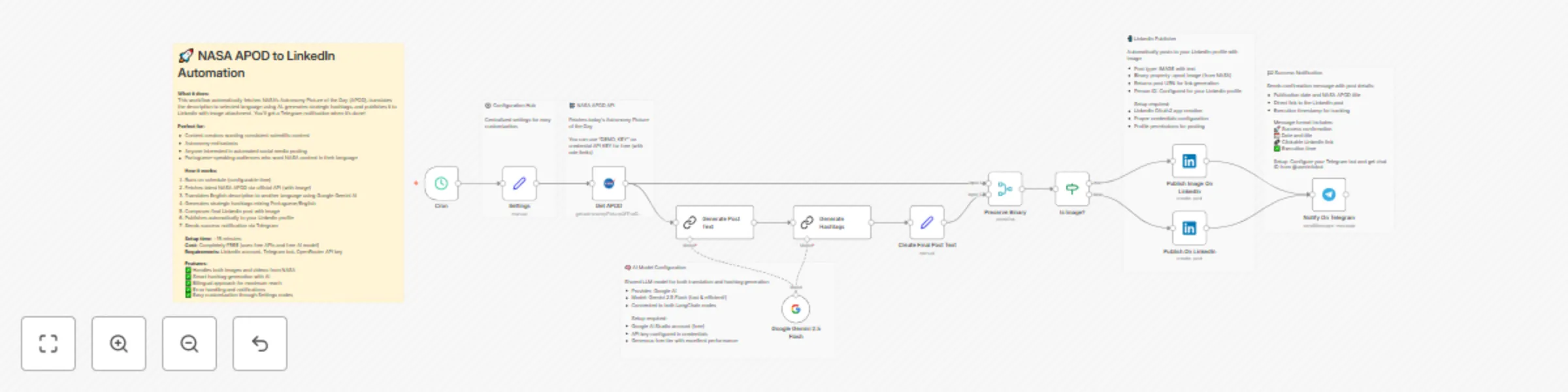
Original n8n.io sourceTransform NASA's daily astronomical wonders into engaging LinkedIn content automatically. This workflow fetches NASA's Astronomy Picture of the Day, translates it to Brazilian Portuguese using AI, generates strategic hashtags, and publishes everything to your LinkedIn profile with the stunning space image attached.
Content creators, astronomy enthusiasts, science communicators, and anyone wanting to share high-quality educational content consistently on LinkedIn. Perfect for Portuguese-speaking professionals who want to engage their network with fascinating space discoveries while building their personal brand as a science advocate.
The workflow runs on a daily schedule and handles the complete content pipeline automatically. It fetches the latest NASA APOD through the official API, including both the image and detailed explanation. The English description gets professionally translated to selected language using Google Gemini 2.5 Flash, while maintaining scientific accuracy and terminology.
Smart hashtag generation combines fixed branding tags with content-specific ones, mixing Portuguese and English for maximum reach. The final post includes the NASA image, translated description, and strategic hashtags, then gets published to your LinkedIn profile automatically.
You'll need accounts for Google AI Studio (free), LinkedIn Developer (free), and a Telegram bot for notifications. The setup takes about 15 minutes and uses only free services and APIs.
First, create your Google AI Studio account and get an API key for the AI translation services. Then set up a LinkedIn OAuth2 application to enable posting permissions. Create a Telegram bot through BotFather and get your chat ID for notifications.
Configure the Settings node with your Telegram chat ID and preferred language. The workflow comes with all prompts and configurations ready to use. Test each component individually before activating the daily automation.
All services used have generous free tiers, making this workflow completely free to operate indefinitely.
The centralized Settings node makes customization simple. Change the target language from Brazilian Portuguese to any other language by updating the translate_to_language variable. Modify the posting schedule in the CRON trigger to match your preferred timing.
Customize the post template in the "Create Final Post Text" node to match your personal brand voice. Adjust the hashtag strategy by editing the AI prompt in the "Generate Hashtags" node. Add additional social platforms by duplicating the LinkedIn publisher with different credentials.
The AI prompts can be fine-tuned for different writing styles or specific astronomical topics. You can also extend the workflow to include additional content processing, image enhancements, or cross-posting to multiple platforms while maintaining the core NASA APOD automation.
This catalog entry is organized from the workflow JSON. The node-level section below shows the executable blocks available for review before importing the template.
| Workflow | Auto-publish NASA APOD to LinkedIn with AI translation and hashtags |
|---|---|
| Complexity | advanced |
| Nodes | 18 |
| Categories | Social Media, Multimodal AI |
| Author | Vitorio Magalhães |
| Published | 07 Aug 2025 |
Use the JSON export at /data/workflows/7153/7153.json as the source template for this automation.
Open n8n, import the downloaded JSON, and review each node before activating the workflow.
Replace placeholder credentials, API keys, webhook URLs, account IDs, and environment-specific values with your own settings.
Run the workflow manually or in a staging workspace, inspect node output, and confirm downstream systems receive the expected data.
Enable the workflow only after testing, then monitor executions, errors, and rate limits during the first production runs.
Review imported nodes carefully before activation. This catalog entry is intended to help you inspect the workflow structure, understand required services, and find related templates faster.
Node names, credentials, schedules, webhook paths, and external service limits may need adjustment for your workspace.
Auto publish NASA APOD to LinkedIn with AI translation and hashtags Transform NASA's daily astronomical wonders into engaging LinkedIn content automatically. This workflow fetches NASA's Astronomy ...
Review the workflow JSON, configure any required credentials in n8n, and test the automation in a safe workspace before using it in production.
Yes. Use the block-by-block analysis and the downloadable JSON to inspect each node, then adjust credentials, prompts, schedules, filters, or destinations for your Social Media, Multimodal AI use case.