Vitorio Magalhães
Workflows by Vitorio Magalhães
Auto-download Reddit memes to Google Drive with duplicate detection & Telegram alerts
## 🎯 What this workflow does This workflow automatically monitors Reddit subreddits for new image posts and downloads them to Google Drive. It's perfect for content creators, meme collectors, or anyone who wants to automatically archive images from their favorite subreddits without manual work. The workflow intelligently prevents duplicate downloads by checking existing files in Google Drive and sends you Telegram notifications about the download status, so you always know when new content has been saved. ## 🚀 Key Features - **Multi-subreddit monitoring**: Configure multiple subreddits to monitor simultaneously - **Smart duplicate detection**: Never downloads the same image twice - **Automated scheduling**: Runs on a customizable cron schedule - **Real-time notifications**: Get instant Telegram updates about download activity - **Rate limit friendly**: Built-in delays to respect Reddit's API limits - **Cloud storage integration**: Direct upload to organized Google Drive folders ## 📋 Prerequisites Before using this workflow, you'll need: - **Reddit Developer Account**: Create an app at [reddit.com/prefs/apps](https://reddit.com/prefs/apps) - **Google Cloud Project**: With Drive API enabled and OAuth2 credentials - **Telegram Bot**: Created via @BotFather with your chat ID - **Basic n8n knowledge**: Understanding of credentials and node configuration ## ⚙️ Setup Instructions ### 1. Configure Reddit API Access - Visit reddit.com/prefs/apps and create a new "script" type application - Note your Client ID and Client Secret - Add Reddit OAuth2 credentials in n8n ### 2. Set up Google Drive Integration - Enable Google Drive API in Google Cloud Console - Create OAuth2 credentials with appropriate scopes - Configure Google Drive OAuth2 credentials in n8n - Update the folder ID in the workflow to your desired destination ### 3. Configure Telegram Notifications - Create a bot via @BotFather on Telegram - Get your chat ID (message @userinfobot) - Add Telegram API credentials in n8n ### 4. Customize Your Settings Update the Settings node with: - Your Telegram chat ID - List of subreddits to monitor (e.g., `['memes', 'funny', 'pics']`) - Optional: Adjust wait time between requests - Optional: Modify the cron schedule ## 🔄 How it works 1. **Scheduled Trigger**: The workflow starts automatically based on your cron configuration 2. **Random Selection**: Picks a random subreddit from your configured list 3. **Fetch Posts**: Retrieves the latest 30 posts from the subreddit's "new" section 4. **Image Filtering**: Keeps only posts with i.redd.it image URLs 5. **Duplicate Check**: Searches Google Drive to avoid re-downloading existing images 6. **Download & Upload**: Downloads new images and uploads them to your Drive folder 7. **Notification**: Sends a Telegram message with the download summary ## 🛠️ Customization Options ### Scheduling - Modify the cron trigger to run hourly, daily, or at custom intervals - Add timezone considerations for your location ### Content Filtering - Add upvote threshold filters to get only popular content - Filter by image dimensions or file size - Implement NSFW content filtering ### Storage & Organization - Create subfolders by subreddit - Add date-based folder organization - Implement file naming conventions ### Notifications & Monitoring - Add Discord webhook notifications - Create download statistics tracking - Log failed downloads for debugging ## 📊 Use Cases - **Content Creators**: Automatically collect memes and trending images for social media - **Digital Marketers**: Monitor visual trends across different communities - **Researchers**: Archive visual content from specific subreddits for analysis - **Personal Use**: Build a curated collection of images from your favorite subreddits ## 🎯 Best Practices - **Respect Rate Limits**: Keep the wait time between requests to avoid being blocked - **Monitor Storage**: Regularly check Google Drive storage usage - **Subreddit Selection**: Choose active subreddits with regular image posts - **Credential Security**: Use n8n's credential system and never hardcode API keys ## 🚨 Important Notes - This workflow only downloads images from i.redd.it (Reddit's image host) - Some subreddits may have bot restrictions - Reddit's API has rate limits (~60 requests per minute) - Ensure your Google Drive has sufficient storage space - Always comply with Reddit's Terms of Service and content policies
Enriching Brazilian company data with CNPJ API and Google Sheets
## Overview This workflow automatically enriches Brazilian company data by fetching comprehensive CNPJ information from the MinhaReceita.org API and updating your Google Sheets spreadsheet. Perfect for data analysts, sales teams, and anyone working with Brazilian business databases who needs to enrich company information at scale. ## What it does - **Reads CNPJ numbers** from your Google Sheets spreadsheet - **Fetches complete company data** from Brazil's Federal Revenue database via MinhaReceita.org API - **Updates your spreadsheet** with comprehensive business information including address, tax status, partners, and more - **Sends Telegram notifications** when the process is complete - **Processes data in batches** to handle large datasets efficiently ## Key Features ✅ **Free API** - No authentication required, completely free to use ✅ **Comprehensive Data** - 47+ fields of official Brazilian company information ✅ **Batch Processing** - Handles up to 100 CNPJs per batch automatically ✅ **Smart Filtering** - Only processes CNPJs that don't already have data ✅ **Real-time Updates** - Updates your spreadsheet as data is retrieved ✅ **Progress Notifications** - Get notified via Telegram when complete ## Setup Requirements ### Google Sheets Structure Your spreadsheet must contain at minimum: - **`cnpj`** column with Brazilian CNPJ numbers (numbers only, no formatting) - **`razao_social`** column (used to identify records without data) ### Credentials Needed - **Google Sheets OAuth2** credentials configured in n8n - **Telegram Bot** credentials for notifications (optional but recommended) ## Available Data Fields The workflow can populate your spreadsheet with any or all of these official fields from Brazil's Federal Revenue: ### 🏢 Company Information - `cnpj`, `razao_social`, `nome_fantasia`, `capital_social` - `porte`, `codigo_porte`, `natureza_juridica`, `codigo_natureza_juridica` ### 📍 Address & Location - `uf`, `municipio`, `codigo_municipio`, `codigo_municipio_ibge` - `bairro`, `logradouro`, `descricao_tipo_de_logradouro` - `numero`, `complemento`, `cep` - `pais`, `codigo_pais`, `nome_cidade_no_exterior` ### 📞 Contact Information - `email`, `ddd_telefone_1`, `ddd_telefone_2`, `ddd_fax` ### 💼 Business Classification - `cnae_fiscal`, `cnae_fiscal_descricao`, `cnaes_secundarios` - `regime_tributario`, `qualificacao_do_responsavel` ### 📋 Registration Status - `situacao_cadastral`, `descricao_situacao_cadastral` - `motivo_situacao_cadastral`, `descricao_motivo_situacao_cadastral` - `situacao_especial`, `identificador_matriz_filial`, `descricao_identificador_matriz_filial` - `ente_federativo_responsavel` ### 📅 Important Dates - `data_inicio_atividade`, `data_situacao_cadastral`, `data_situacao_especial` ### 🏛️ Tax Regime Information - `opcao_pelo_mei`, `data_opcao_pelo_mei`, `data_exclusao_do_mei` - `opcao_pelo_simples`, `data_opcao_pelo_simples`, `data_exclusao_do_simples` ### 👥 Partners & Shareholders - `qsa` (Complete structured data of company partners and shareholders) ## How to Use 1. **Prepare your spreadsheet** with CNPJ numbers in the `cnpj` column 2. **Configure your Telegram ID** in the Settings node for notifications 3. **Set up Google Sheets credentials** in n8n 4. **Add the desired data columns** to your spreadsheet (any combination from the list above) 5. **Run the workflow** - it will automatically process all CNPJs without existing data ## Performance & Limitations - **API Limits**: None - completely free API from MinhaReceita.org - **Data Accuracy**: Official data from Brazil's Federal Revenue Service - **Batch Size**: Configurable (default: 100 records per batch) ## Use Cases - **Lead Enrichment**: Enhance prospect databases with complete company information - **Market Research**: Gather comprehensive data about Brazilian companies - **Compliance & Due Diligence**: Verify company registration status and details - **Sales Intelligence**: Access contact information and company classification data - **Data Cleaning**: Standardize and complete existing company databases ## Prerequisites - N8N instance with Google Sheets integration - Google Sheets document with CNPJ data - Basic understanding of Brazilian CNPJ format (14-digit company registration number) - Telegram bot token (optional, for notifications) ## Important Notes - CNPJs must be active and registered with Brazil's Federal Revenue Service - The workflow only processes CNPJs where `razao_social` is empty (avoiding duplicates) - All data comes from official government sources via MinhaReceita.org - No rate limiting needed - the API is designed for bulk requests - Supports both matriz (headquarters) and filial (branch) identification
AI-powered personal finances manager with Gemini, Telegram & Google Sheets
### Who’s it for This template is designed for individuals who want to gain full control over their personal finances without the hassle of manual tracking. Ideal for freelancers, small business owners, or anyone who wants a simple, automated way to monitor income and expenses. ### How it works / What it does Using **n8n**, **Telegram**, and **Google Sheets**, this workflow allows you to log, edit, and query your financial transactions through simple Telegram messages. The AI interprets your input—whether text or audio—and automatically categorizes your income and expenses. Responses are delivered **fully formatted in Telegram HTML**, giving you clean, readable summaries and insights. Features include: * Add, edit, and delete transactions automatically * Query totals and category-specific expenses, e.g., “How much did I spend on food this month?” * Generate financial summaries and monthly reports * Automatic ID assignment and date handling ### How to set up 1. Deploy this workflow on your **self-hosted n8n instance**. 2. Connect your **Telegram Bot** and **Google Sheets** account. 3. Configure the **Google Gemini AI node** for message interpretation. 4. Update sheet headers and categories if needed. 5. Start sending messages to your Telegram bot to track expenses instantly. ## How to Set Up the Google Sheet To use this workflow, you’ll need a Google Sheet with the following structure: | Column Name | Description | | ------------------- | ----------------------------------------------- | | **id** | Unique sequential identifier (auto-incremented) | | **type** | "income" or "expense" | | **value** | Monetary value (format: 1234.56) | | **category** | Classification of the transaction | | **payment\_method** | Payment method used (e.g., card, cash, PIX) | | **description** | Details about the transaction | | **date** | Transaction date (format: yyyy-MM-dd) | Make sure the column headers match exactly as shown above, and leave the rows empty for the bot to fill automatically. ### Requirements * n8n (self-hosted or cloud instance) * Telegram Bot API * Google Sheets * Google Gemini AI or equivalent AI node
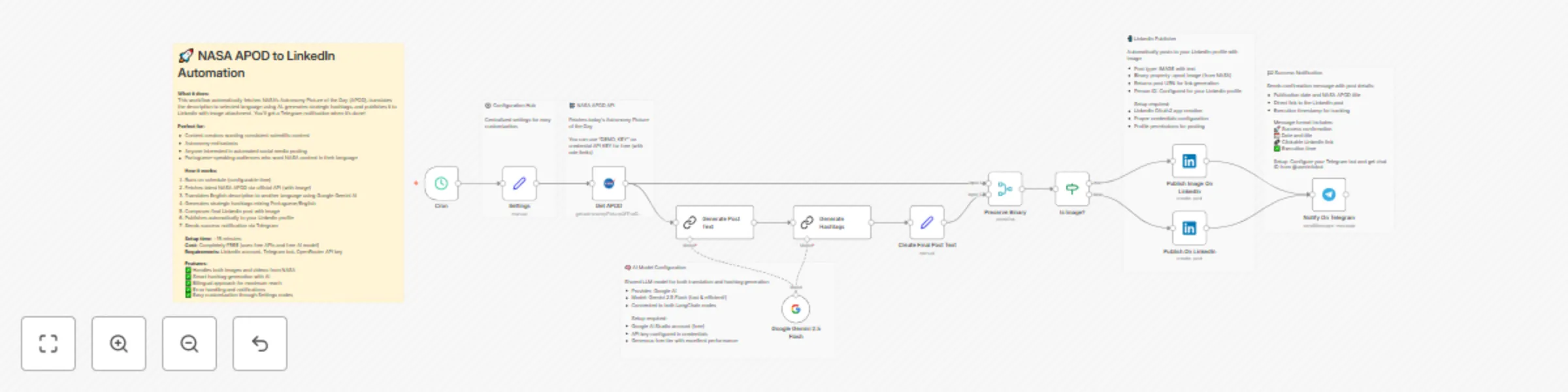
Auto-publish NASA APOD to LinkedIn with AI translation and hashtags
# Auto-publish NASA APOD to LinkedIn with AI translation and hashtags Transform NASA's daily astronomical wonders into engaging LinkedIn content automatically. This workflow fetches NASA's Astronomy Picture of the Day, translates it to Brazilian Portuguese using AI, generates strategic hashtags, and publishes everything to your LinkedIn profile with the stunning space image attached. ## Who's it for Content creators, astronomy enthusiasts, science communicators, and anyone wanting to share high-quality educational content consistently on LinkedIn. Perfect for Portuguese-speaking professionals who want to engage their network with fascinating space discoveries while building their personal brand as a science advocate. ## How it works The workflow runs on a daily schedule and handles the complete content pipeline automatically. It fetches the latest NASA APOD through the official API, including both the image and detailed explanation. The English description gets professionally translated to selected language using Google Gemini 2.5 Flash, while maintaining scientific accuracy and terminology. Smart hashtag generation combines fixed branding tags with content-specific ones, mixing Portuguese and English for maximum reach. The final post includes the NASA image, translated description, and strategic hashtags, then gets published to your LinkedIn profile automatically. ## How to set up You'll need accounts for Google AI Studio (free), LinkedIn Developer (free), and a Telegram bot for notifications. The setup takes about 15 minutes and uses only free services and APIs. First, create your Google AI Studio account and get an API key for the AI translation services. Then set up a LinkedIn OAuth2 application to enable posting permissions. Create a Telegram bot through BotFather and get your chat ID for notifications. Configure the Settings node with your Telegram chat ID and preferred language. The workflow comes with all prompts and configurations ready to use. Test each component individually before activating the daily automation. ## Requirements - LinkedIn account with posting permissions - Google AI Studio API key (free tier available) - Telegram bot token and your chat ID - Basic understanding of OAuth2 setup for LinkedIn - NASA API key (optional - demo key included) All services used have generous free tiers, making this workflow completely free to operate indefinitely. ## How to customize the workflow The centralized Settings node makes customization simple. Change the target language from Brazilian Portuguese to any other language by updating the translate_to_language variable. Modify the posting schedule in the CRON trigger to match your preferred timing. Customize the post template in the "Create Final Post Text" node to match your personal brand voice. Adjust the hashtag strategy by editing the AI prompt in the "Generate Hashtags" node. Add additional social platforms by duplicating the LinkedIn publisher with different credentials. The AI prompts can be fine-tuned for different writing styles or specific astronomical topics. You can also extend the workflow to include additional content processing, image enhancements, or cross-posting to multiple platforms while maintaining the core NASA APOD automation.