Block 1 - Check Final Status1
- Type / Role
- n8n-nodes-base.if - if
- Config choices
- Version 2.2


 Early Deal
This workflow is provided as-is. Please review and test before using in production.
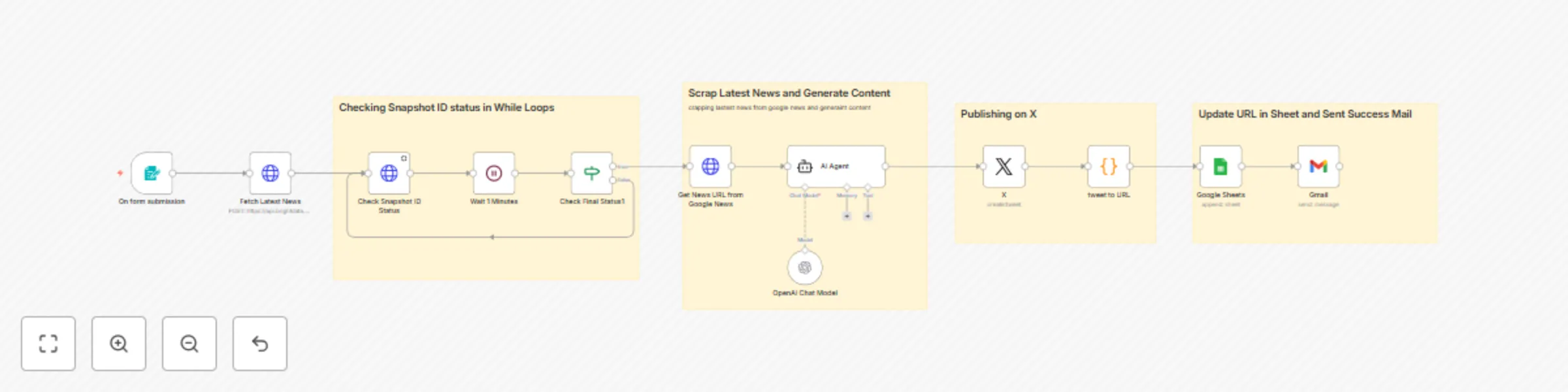
Publish Latest News on X and Other Social Media Platforms Using Keyword A comprehensive n8n automation that fetches the latest news based on keywords, generates AI powered social media content, ...
n8n-nodes-base.if, n8n-nodes-base.formtrigger, n8n-nodes-base.wait, @n8n/n8n-nodes-langchain.agent, @n8n/n8n-nodes-langchain.lmchatopenai, n8n-nodes-base.httprequest, n8n-nodes-base.twitter, n8n-nodes-base.code
This workflow is cataloged by N8N Workflows and links back to its original n8n.io source page by Dvir Sharon.
Original n8n.io sourceA comprehensive n8n automation that fetches the latest news based on keywords, generates AI-powered social media content, and automatically publishes to X (Twitter) with complete tracking and notification systems.
This workflow provides a professional news publishing solution that automatically discovers breaking news, creates engaging social media content using AI, and publishes to X (Twitter) with comprehensive tracking. Perfect for news organizations, content creators, social media managers, and businesses wanting to stay current with automated news sharing. The system uses BrightData's Google News dataset, OpenAI's GPT-4o for content generation, and multi-platform integration for complete automation.
Input:
Processing:
| Field | Description | Example |
|---|---|---|
| TweetMessage | AI-generated social media content | "Breaking: AI revolution transforming healthcare with 40% efficiency gains. New study shows promising results in patient care automation. #AI #Healthcare #Innovation #TechNews #US" |
| TweetURL | Direct link to published tweet | https://twitter.com/i/web/status/1234567890123456789 |
Prerequisites:
Step 1: Import the Workflow
Step 2: Configure API Credentials
X (Twitter) API Setup:
Credentials → + Add credential → Twitter OAuth2 API.OpenAI API Configuration:
Credentials → + Add credential → OpenAI API.Gmail Integration:
BrightData News API:
5662edde-6735-4c5d-a6c6-693043a5a9a5.gd_lnsxoxzi1omrwnka5r (Google News).Google Sheets Integration:
Step 3: Configure Google Sheets Integration
https://docs.google.com/spreadsheets/d/SHEET_ID_HERE/edit.1koxNrwdeuaSBdREuKc7JQh3d9blEk0sQDJ8VgVLjPOo.Step 4: Configure Form Interface
Form Settings:
8d320705-688c-4150-a393-cf899d2bbb52.Step 5: Configure Email Notifications
Gmail Setup:
[email protected].Step 6: Test the Workflow
Sample Test Data:
Use these examples for testing:
| News Name | Country | Expected Results |
|---|---|---|
| artificial intelligence | US | Latest AI news with US-specific hashtags |
| cricket world cup | IN | Sports news with India-focused content |
| brexit update | GB | UK political news with British hashtags |
| bushfire news | AU | Australian environmental news |
Testing Process:
Using the Form Interface
Example Inputs to Test
| News Name | Country | Expected |
|---|---|---|
| "artificial intelligence breakthrough" | "US" | Latest AI developments with tech hashtags |
| "football premier league" | "GB" | UK football news with sports hashtags |
| "stock market updates" | "IN" | Indian market news with finance hashtags |
| "hollywood movies" | "AU" | Entertainment news with Australian perspective |
Country-Specific Considerations
#USA, #American, #Breaking, #News.#India, #Indian, #News, #Breaking.#UK, #British, #News, #Breaking.#Australia, #Australian, #News, #Breaking.Google Sheets Data
The output sheet contains:
Email Notifications
Success emails include:
X (Twitter) Posts
Published content features:
Expanding Social Media Platforms
Add more platforms to the publishing workflow:
// Add LinkedIn publishing
{
  "node": "LinkedIn",
  "type": "n8n-nodes-base.linkedin",
  "parameters": {
    "text": "={{ $json.output }}",
    "additionalFields": {}
  }
}
// Add Facebook posting
{
  "node": "Facebook",
  "type": "n8n-nodes-base.facebook",
  "parameters": {
    "pageId": "YOUR_PAGE_ID",
    "message": "={{ $json.output }}"
  }
}
This catalog entry is organized from the workflow JSON. The node-level section below shows the executable blocks available for review before importing the template.
| Workflow | Auto-publish latest news on X with AI content generation using keywords and Bright Data |
|---|---|
| Complexity | advanced |
| Nodes | 16 |
| Categories | Social Media, Multimodal AI |
| Author | Dvir Sharon |
| Published | 01 Jun 2025 |
Use the JSON export at /data/workflows/4556/4556.json as the source template for this automation.
Open n8n, import the downloaded JSON, and review each node before activating the workflow.
Replace placeholder credentials, API keys, webhook URLs, account IDs, and environment-specific values with your own settings.
Run the workflow manually or in a staging workspace, inspect node output, and confirm downstream systems receive the expected data.
Enable the workflow only after testing, then monitor executions, errors, and rate limits during the first production runs.
Review imported nodes carefully before activation. This catalog entry is intended to help you inspect the workflow structure, understand required services, and find related templates faster.
Node names, credentials, schedules, webhook paths, and external service limits may need adjustment for your workspace.
Publish Latest News on X and Other Social Media Platforms Using Keyword A comprehensive n8n automation that fetches the latest news based on keywords, generates AI powered social media content, ...
Review the workflow JSON, configure any required credentials in n8n, and test the automation in a safe workspace before using it in production.
Yes. Use the block-by-block analysis and the downloadable JSON to inspect each node, then adjust credentials, prompts, schedules, filters, or destinations for your Social Media, Multimodal AI use case.