Block 1 - Telegram Bot Trigger
- Type / Role
- n8n-nodes-base.telegramTrigger - telegramTrigger
- Config choices
- Version 1


 Early Deal
This workflow is provided as-is. Please review and test before using in production.
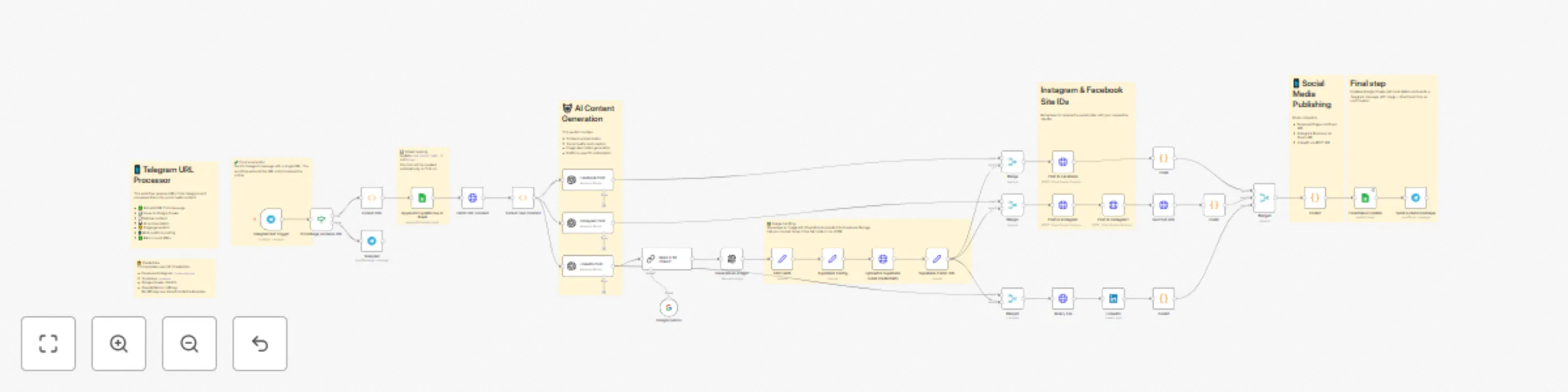
How it works This workflow turns any URL sent to a Telegram bot into ready to publish social posts: 1. Trigger: Telegram message (checks if it contains a URL). 2. Fetch & parse: Downloads the page ...
n8n-nodes-base.telegramtrigger, n8n-nodes-base.stickynote, n8n-nodes-base.function, n8n-nodes-base.httprequest, n8n-nodes-base.googlesheets, @n8n/n8n-nodes-langchain.openai, n8n-nodes-base.merge, n8n-nodes-base.if
This workflow is cataloged by N8N Workflows and links back to its original n8n.io source page by Karol Otręba.
Original n8n.io sourceThis workflow turns any URL sent to a Telegram bot into ready-to-publish social posts: 1. Trigger: Telegram message (checks if it contains a URL). 2. Fetch & parse: Downloads the page and extracts readable text + title. 3. AI writing: Generates platform-specific copy (Facebook, Instagram, LinkedIn). 4. Image: Creates an AI image and stores it in Supabase Storage. 5. Publish: Posts to Facebook Pages, Instagram Business, LinkedIn. 6. Logging: Updates Google Sheets with post URLs and sends a Telegram confirmation (image + links).
1.	Telegram – create a bot, connect via n8n Telegram credentials.
2.	OpenAI / Gemini – add API key in n8n Credentials and select it in the AI nodes.
3.	Facebook/Instagram (Graph API) – create a credential called facebookGraph with:
•	accessToken (page-scoped or system user)
•	pageId (for Facebook Page photos)
•	igUserId (Instagram Business account ID)
•	optional fbApiVersion (default v19.0)
4.	LinkedIn – connect with OAuth2 in the LinkedIn node (leave as credential).
5.	Supabase – credential supabase with url and apiKey. Ensure a bucket exists (default used in the Set node is social-media).
6.	Google Sheets – replace YOUR_GOOGLE_SHEET_ID and Sheet1. Grant your n8n Google OAuth2 access.
•	No API keys are stored in the template. Everything runs via n8n Credentials.
•	You can change bucket name, image size/quality, and AI prompts in the respective nodes.
•	The confirmation message on Telegram includes direct permalinks to the published posts.
•	Telegram Bot
•	OpenAI (or Gemini)
•	Facebook/Instagram Graph
•	LinkedIn OAuth2
•	Supabase (url + apiKey)
•	Google Sheets OAuth2
• A Telegram message that contains a URL.
•	Social posts published on Facebook, Instagram, LinkedIn.
•	Row appended/updated in Google Sheets with post URLs and image link.
•	Telegram confirmation with the generated image + post links.
This catalog entry is organized from the workflow JSON. The node-level section below shows the executable blocks available for review before importing the template.
Showing the first 24 of 42 workflow blocks. Download the JSON for the full node graph.
| Workflow | Auto-generate social media posts from URLs with AI, Telegram & multi-platform posting |
|---|---|
| Complexity | advanced |
| Nodes | 42 |
| Categories | Social Media, Multimodal AI |
| Author | Karol Otręba |
| Published | 28 Sept 2025 |
Use the JSON export at /data/workflows/9059/9059.json as the source template for this automation.
Open n8n, import the downloaded JSON, and review each node before activating the workflow.
Replace placeholder credentials, API keys, webhook URLs, account IDs, and environment-specific values with your own settings.
Run the workflow manually or in a staging workspace, inspect node output, and confirm downstream systems receive the expected data.
Enable the workflow only after testing, then monitor executions, errors, and rate limits during the first production runs.
Review imported nodes carefully before activation. This catalog entry is intended to help you inspect the workflow structure, understand required services, and find related templates faster.
Node names, credentials, schedules, webhook paths, and external service limits may need adjustment for your workspace.
How it works This workflow turns any URL sent to a Telegram bot into ready to publish social posts: 1. Trigger: Telegram message (checks if it contains a URL). 2. Fetch & parse: Downloads the page ...
Review the workflow JSON, configure any required credentials in n8n, and test the automation in a safe workspace before using it in production.
Yes. Use the block-by-block analysis and the downloadable JSON to inspect each node, then adjust credentials, prompts, schedules, filters, or destinations for your Social Media, Multimodal AI use case.