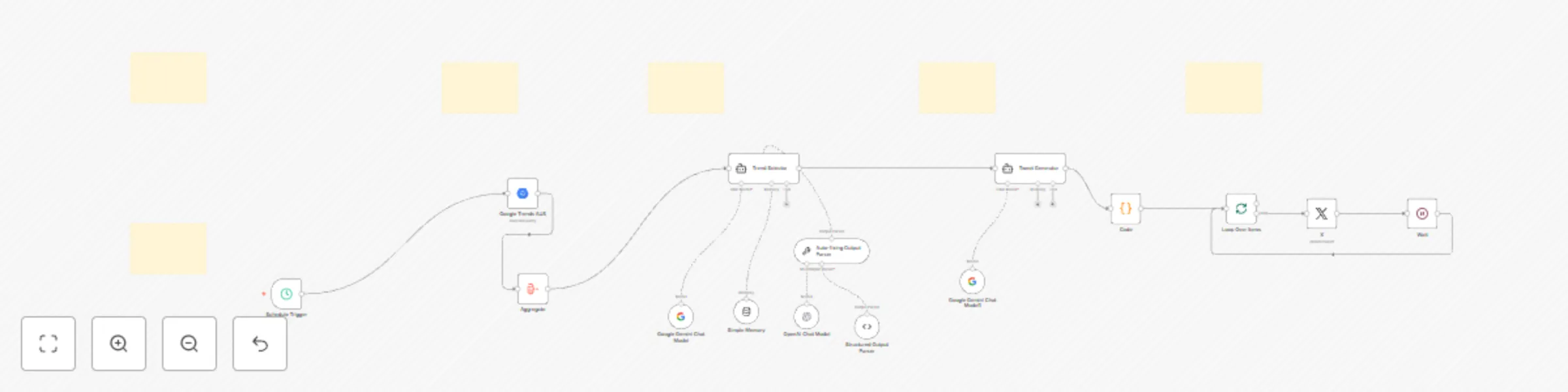
Auto-generate and post tweet threads based on Google Trends using Gemini AI

Workflow preview

Workflow preview
100%
Auto-generate and post tweet threads based on Google Trends using Gemini AI preview
Open on n8n.io

Important notice

This workflow is provided as-is. Please review and test before using in production.

1. Workflow Overview

AI Powered Twitter Automation using n8n to Check BigQuery Latest Google Trend and Publish Who is this for? This template is designed for: Content creators Tech influencers Educators and marketers w...

Best for

  • Social Media automation workflows
  • Multimodal AI automation workflows
  • advanced n8n builders looking for reusable templates

Tools used

n8n-nodes-base.twitter, @n8n/n8n-nodes-langchain.memorybufferwindow, @n8n/n8n-nodes-langchain.lmchatgooglegemini, @n8n/n8n-nodes-langchain.outputparserautofixing, @n8n/n8n-nodes-langchain.outputparserstructured, n8n-nodes-base.aggregate, @n8n/n8n-nodes-langchain.lmchatopenai, @n8n/n8n-nodes-langchain.agent

Source and attribution

This workflow is cataloged by N8N Workflows and links back to its original n8n.io source page by Amjid Ali.

Original n8n.io source

1.1 Workflow description

Title
Auto-generate and post tweet threads based on Google Trends using Gemini AI
Workflow name
Auto-generate and post tweet threads based on Google Trends using Gemini AI

AI-Powered Twitter Automation using n8n to Check BigQuery Latest Google Trend and Publish

Who is this for?

This template is designed for:

  • Content creators
  • Tech influencers
  • Educators and marketers who want to automatically tweet trend-based threads using AI and stay relevant without spending time on manual research and content writing.

What problem does this workflow solve?

Creating daily engaging Twitter threads takes time and effort. This workflow:

  • Finds trending search terms in your region (via Google Trends)
  • Selects the most relevant topic using AI
  • Generates a thread of five value-packed tweets
  • Publishes them automatically on X (Twitter)

You get high-quality, niche-specific content on autopilot β€” ideal for boosting visibility, brand awareness, and engagement.

What this workflow does

  • ⏰ Runs on a scheduled basis (daily at your preferred hour)
  • 🌍 Uses BigQuery to fetch the top 25 trending search terms
  • 🎯 AI Agent selects one niche-relevant trend
  • ✍️ AI generates a 5-part tweet thread using Gemini or OpenAI
  • 🐦 Tweets are published to X (Twitter) in sequence
  • πŸ” Works with any niche – simply modify the AI prompt

Setup Instructions

  1. πŸ”§ Google Cloud Setup

    • Create a project in Google Cloud Console
    • Enable BigQuery API
    • Use the included SQL to fetch Google Trends
  2. 🐦 Twitter Developer Setup

  3. 🧠 AI Credentials

    • Add either Gemini API Key or OpenAI Key in n8n
  4. ✨ Customize

    • Modify the AI prompts to match your niche (e.g., marketing, health, finance)
    • Adjust tweet tone, call to action, hashtags, or output format

How to customize this workflow to your needs

  • 🌍 Change Google Trends region or country in the SQL query
  • 🧠 Switch to another AI model (Claude, GPT-4o, DeepSeek, etc.)
  • πŸ“’ Replace Twitter with LinkedIn, Telegram, or Slack integration
  • πŸ“Š Add metrics or logging for tweet performance (advanced)

πŸŽ₯ Watch How It Works

> In this tutorial, I walk you through the full automation – from pulling Google Trends to posting your AI-generated tweet thread using n8n.

Example Use Cases

  • πŸ” Daily tweet series on trending tools or technologies
  • πŸ’Ή Market insights or productivity tips based on daily trends
  • πŸŽ“ Educational content scheduled automatically
  • 🧠 Personal brand building using consistent, trend-aware posts

Dependencies

  • n8n (self-hosted or cloud)
  • Google Cloud project with BigQuery enabled
  • Twitter Developer Account (OAuth 2.0 setup)
  • AI provider (Gemini or OpenAI)

Keywords

n8n twitter automation, tweet scheduler, X automation, auto post tweets, AI tweet writer, trending topics Twitter bot, Google Trends automation, AI content workflow, tweet generator using GPT, Twitter bot with Gemini, twitter + n8n

Support & Credit

Created by Amjid Ali β€” πŸ† Global CIO200 | Founder of Syncbricks

If this template saved you time, consider supporting:

➑️ paypal.me/pmptraining

πŸ“š Learn more:

1.2 Logical Blocks

This catalog entry is organized from the workflow JSON. The node-level section below shows the executable blocks available for review before importing the template.

2. Block-by-Block Analysis

Block 1 - X

Type / Role
n8n-nodes-base.twitter - twitter
Config choices
Version 2

Block 2 - Simple Memory

Type / Role
@n8n/n8n-nodes-langchain.memoryBufferWindow - memoryBufferWindow
Config choices
Version 1.3

Block 3 - Google Gemini Chat Model

Type / Role
@n8n/n8n-nodes-langchain.lmChatGoogleGemini - lmChatGoogleGemini
Config choices
Version 1

Block 4 - Auto-fixing Output Parser

Type / Role
@n8n/n8n-nodes-langchain.outputParserAutofixing - outputParserAutofixing
Config choices
Version 1

Block 5 - Structured Output Parser

Type / Role
@n8n/n8n-nodes-langchain.outputParserStructured - outputParserStructured
Config choices
Version 1.2

Block 6 - Aggregate

Type / Role
n8n-nodes-base.aggregate - aggregate
Config choices
Version 1

Block 7 - OpenAI Chat Model

Type / Role
@n8n/n8n-nodes-langchain.lmChatOpenAi - lmChatOpenAi
Config choices
Version 1.2

Block 8 - Trend Selector

Type / Role
@n8n/n8n-nodes-langchain.agent - agent
Config choices
Version 1.9

Block 9 - Tweet Generator

Type / Role
@n8n/n8n-nodes-langchain.agent - agent
Config choices
Version 1.9

Block 10 - Google Gemini Chat Model1

Type / Role
@n8n/n8n-nodes-langchain.lmChatGoogleGemini - lmChatGoogleGemini
Config choices
Version 1

Block 11 - Code

Type / Role
n8n-nodes-base.code - code
Config choices
Version 2

Block 12 - Loop Over Items

Type / Role
n8n-nodes-base.splitInBatches - splitInBatches
Config choices
Version 3

Block 13 - Wait

Type / Role
n8n-nodes-base.wait - wait
Config choices
Version 1.1

Block 14 - Google Trends AUS

Type / Role
n8n-nodes-base.googleBigQuery - googleBigQuery
Config choices
Version 2.1

Block 15 - Schedule Trigger

Type / Role
n8n-nodes-base.scheduleTrigger - scheduleTrigger
Config choices
Version 1.2

Block 16 - Sticky Note

Type / Role
n8n-nodes-base.stickyNote - stickyNote
Config choices
Version 1

Block 17 - Sticky Note11

Type / Role
n8n-nodes-base.stickyNote - stickyNote
Config choices
Version 1

Block 18 - Sticky Note12

Type / Role
n8n-nodes-base.stickyNote - stickyNote
Config choices
Version 1

Block 19 - Sticky Note13

Type / Role
n8n-nodes-base.stickyNote - stickyNote
Config choices
Version 1

Block 20 - Sticky Note14

Type / Role
n8n-nodes-base.stickyNote - stickyNote
Config choices
Version 1

Block 21 - Sticky Note15

Type / Role
n8n-nodes-base.stickyNote - stickyNote
Config choices
Version 1

3. Summary Table

Workflow Auto-generate and post tweet threads based on Google Trends using Gemini AI
Complexity advanced
Nodes 21
Categories Social Media, Multimodal AI
Author Amjid Ali
Published 11 May 2025

4. Reproducing the Workflow from Scratch

  1. 1. Download the workflow JSON

    Use the JSON export at /data/workflows/3978/3978.json as the source template for this automation.

  2. 2. Import the template into n8n

    Open n8n, import the downloaded JSON, and review each node before activating the workflow.

  3. 3. Configure credentials and variables

    Replace placeholder credentials, API keys, webhook URLs, account IDs, and environment-specific values with your own settings.

  4. 4. Test with sample data

    Run the workflow manually or in a staging workspace, inspect node output, and confirm downstream systems receive the expected data.

  5. 5. Activate and monitor

    Enable the workflow only after testing, then monitor executions, errors, and rate limits during the first production runs.

5. General Notes & Resources

Review imported nodes carefully before activation. This catalog entry is intended to help you inspect the workflow structure, understand required services, and find related templates faster.

Node names, credentials, schedules, webhook paths, and external service limits may need adjustment for your workspace.

Frequently asked questions

What does Auto-generate and post tweet threads based on Google Trends using Gemini AI do?

AI Powered Twitter Automation using n8n to Check BigQuery Latest Google Trend and Publish Who is this for? This template is designed for: Content creators Tech influencers Educators and marketers w...

What do I need before importing this workflow?

Review the workflow JSON, configure any required credentials in n8n, and test the automation in a safe workspace before using it in production.

Can I customize this workflow?

Yes. Use the block-by-block analysis and the downloadable JSON to inspect each node, then adjust credentials, prompts, schedules, filters, or destinations for your Social Media, Multimodal AI use case.