Block 1 - ✏️ Format Tags
- Type / Role
- n8n-nodes-base.set - set
- Config choices
- Version 1


 Early Deal
This workflow is provided as-is. Please review and test before using in production.
Who it’s for Blue Team leads, SOC analysts, and IT responders looking to automatically classify security alerts using AI driven logic and asset based risk signals. Ideal for teams already scorin...
n8n-nodes-base.set, n8n-nodes-base.googlesheets, n8n-nodes-base.httprequest, n8n-nodes-base.scheduletrigger, n8n-nodes-base.stickynote
This workflow is cataloged by N8N Workflows and links back to its original n8n.io source page by Adnan Tariq.
Original n8n.io sourceBlue Team leads, SOC analysts, and IT responders looking to automatically classify security alerts using AI-driven logic and asset-based risk signals.
Ideal for teams already scoring threats via CyberScan or BlueOps Module 3, and needing to prioritize next steps across Monitor / Investigate / Isolate / Escalate playbooks.
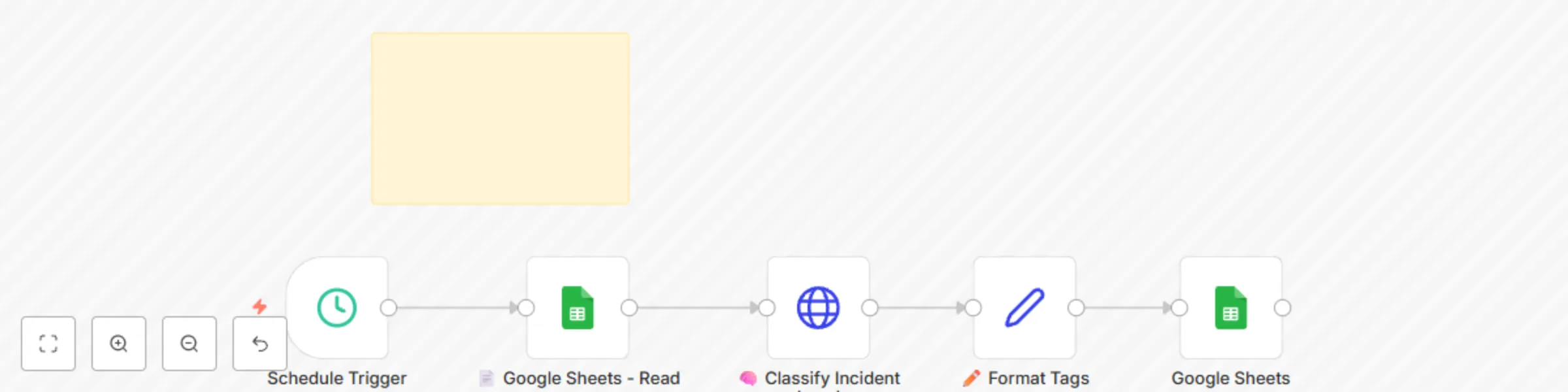
Reads recent endpoint alerts from Google Sheets
Sends alert data (hostname, IP, risk score) to OpenAI GPT model
GPT returns structured JSON with:
severity tag (Low / Medium / High / Critical)
action recommendation (Monitor / Investigate / Isolate / Escalate)
Logs the full result to a centralized incident sheet
Can be expanded to trigger automated EDR actions or email alerts
Insert OpenAI API Key Replace placeholder with your actual OpenAI secret in the HTTP Request node
Connect Sheets Use your OAuth2 credentials to access the alerts input + classified log sheet
Tune GPT Prompt Adjust language or risk thresholds inside the 🧠 Classify Incident (GPT) node
Automation Add a Cron node or Webhook to run every X minutes/hours
OpenAI API key (GPT-4 or GPT-3.5 supported)
Google Sheets (or similar DB with alerts)
n8n credentials for Sheets access
Optional: Connected playbook actions or EDR endpoint logic
Swap GPT with Claude, Gemini, or local LLM via API
Replace Google Sheets with Supabase or Airtable
Add a playbook router for Notify / Isolate logic
Integrate email or ticketing notification step
All inputs and tags are configurable. Safe placeholders are marked clearly.
Explore the full set at 👉 cyberpulsesolutions.com/blueops
This catalog entry is organized from the workflow JSON. The node-level section below shows the executable blocks available for review before importing the template.
| Workflow | Auto-classify security incidents with GPT-4 and Google Sheets for SOC teams |
|---|---|
| Complexity | intermediate |
| Nodes | 6 |
| Categories | SecOps, AI Summarization |
| Author | Adnan Tariq |
| Published | 25 Jul 2025 |
Use the JSON export at /data/workflows/6412/6412.json as the source template for this automation.
Open n8n, import the downloaded JSON, and review each node before activating the workflow.
Replace placeholder credentials, API keys, webhook URLs, account IDs, and environment-specific values with your own settings.
Run the workflow manually or in a staging workspace, inspect node output, and confirm downstream systems receive the expected data.
Enable the workflow only after testing, then monitor executions, errors, and rate limits during the first production runs.
Review imported nodes carefully before activation. This catalog entry is intended to help you inspect the workflow structure, understand required services, and find related templates faster.
Node names, credentials, schedules, webhook paths, and external service limits may need adjustment for your workspace.
Who it’s for Blue Team leads, SOC analysts, and IT responders looking to automatically classify security alerts using AI driven logic and asset based risk signals. Ideal for teams already scorin...
Review the workflow JSON, configure any required credentials in n8n, and test the automation in a safe workspace before using it in production.
Yes. Use the block-by-block analysis and the downloadable JSON to inspect each node, then adjust credentials, prompts, schedules, filters, or destinations for your SecOps, AI Summarization use case.