Auto-add new Calendly bookings to Google Sheets
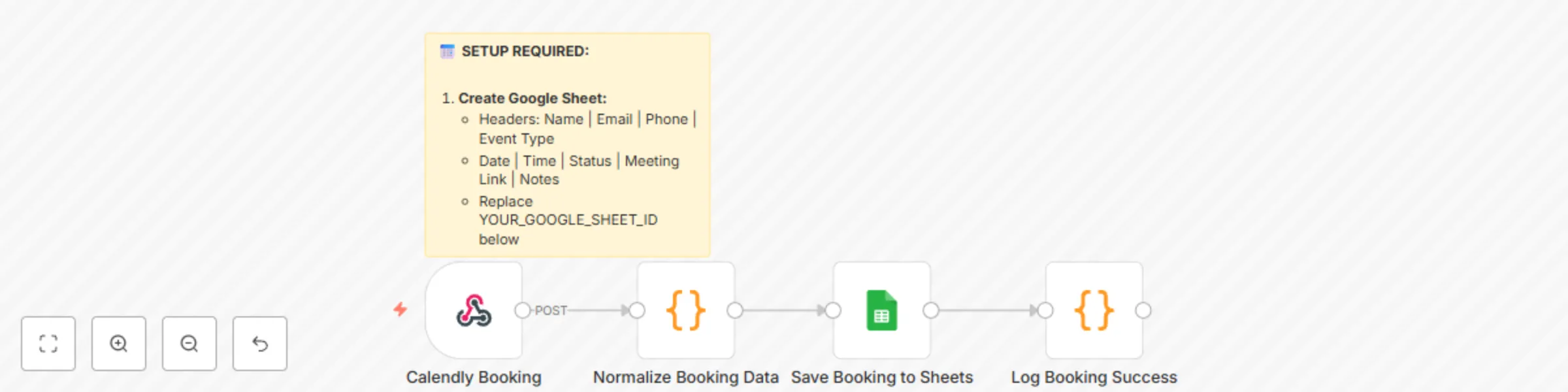
Workflow preview

$20/month : Unlimited workflows
2500 executions/month

THE #1 IN WEB SCRAPING
Scrape any website without limits
HOSTINGER  Early Deal
DISCOUNT 20% Try free
Early DealDISCOUNT 20%
Self-hosted n8n
Unlimited workflows - from $4.99/mo

#1 hub for scraping, AI & automation
6000+ actors - $5 credits/mo
Important notice
This workflow is provided as-is. Please review and test before using in production.
Overview
📅 Auto-Log Calendly Bookings to Google Sheets
This workflow automatically captures new Calendly bookings and saves them into a structured Google Sheet. It records all important details like invitee name, email, phone, event type, date, time, status, meeting link, and notes. No more manual copy-pasting from Calendly into your CRM or sheets.
⚙️ How It Works
Calendly Booking Webhook
- Listens for new bookings (
invitee.createdevent). - Triggers every time someone schedules a meeting.
- Listens for new bookings (
Normalize Booking Data
- A Code node parses Calendly’s payload.
- Extracts invitee name, email, phone number, event type, time, notes, and meeting link.
- Ensures consistent data format for Sheets.
Save Booking to Google Sheets
- The Google Sheets node appends a new row with the booking details.
- Prevents duplicate entries using append/update mode.
Log Booking Success
- A Code node logs the successful save.
- Can be extended to send confirmation emails, Slack alerts, or calendar invites.
🛠️ Setup Steps
1. Create Google Sheet
- In Google Sheets, create a new sheet with headers:
- Copy the Sheet ID from the URL.
- Replace
YOUR_GOOGLE_SHEET_IDin the workflow with your actual ID.
2. Calendly Webhook
- In your Calendly account:
- Go to Integrations → Webhooks
- Add a new webhook with the URL from the Webhook node in n8n.
- Select event type:
invitee.created.
3. Google Sheets OAuth
- In n8n, connect your Google account credentials.
- Grant permission for reading/writing Sheets.
📊 Example Output (Google Sheets Row)
| Name | Phone | Event Type | Date | Time | Status | Meeting Link | Notes | |
|---|---|---|---|---|---|---|---|---|
| David mark | [email protected] | +123456789 | Demo Call | 2025-08-29 | 3:00 PM - 3:30 PM | Scheduled | https://zoom.us/j/123456789 | Wants to discuss AI |
⚡ With this workflow, every new Calendly booking is instantly logged into your Google Sheet, keeping your scheduling records accurate and centralized.