Block 1 - When clicking ‘Execute workflow’
- Type / Role
- n8n-nodes-base.manualTrigger - manualTrigger
- Config choices
- Version 1


 Early Deal
This workflow is provided as-is. Please review and test before using in production.
What this workflow does This workflow automatically audits web pages for SEO issues and generates an executive friendly SEO report using AI. It is designed for marketers, founders, and SEO teams wh...
n8n-nodes-base.manualtrigger, n8n-nodes-base.stickynote, @n8n/n8n-nodes-langchain.lmchatopenai, @decodo/n8n-nodes-decodo.decodo, n8n-nodes-base.splitinbatches, n8n-nodes-base.code, @n8n/n8n-nodes-langchain.agent, n8n-nodes-base.googlesheets
This workflow is cataloged by N8N Workflows and links back to its original n8n.io source page by Kevin Meneses .
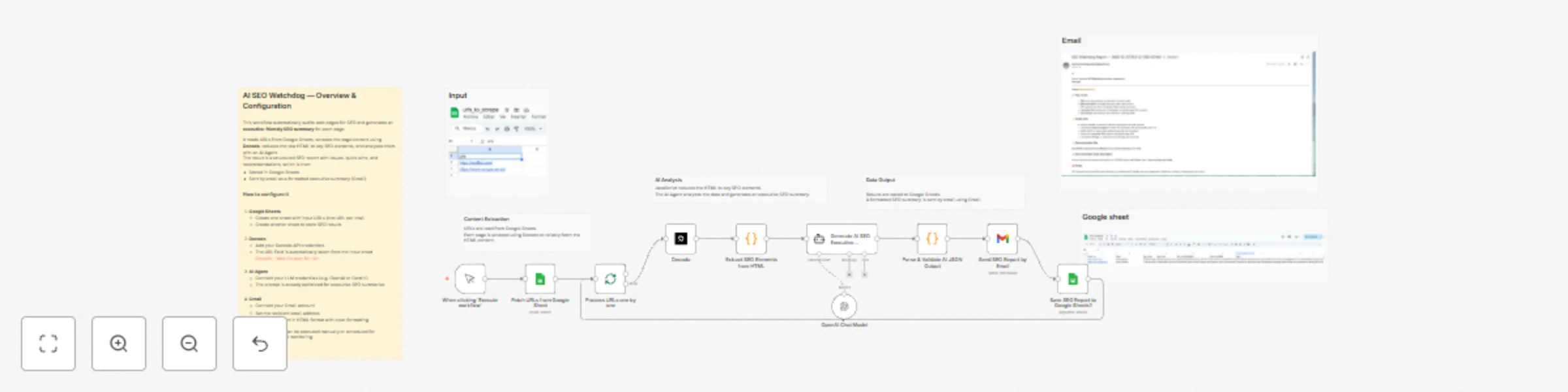
Original n8n.io sourceThis workflow automatically audits web pages for SEO issues and generates an executive-friendly SEO report using AI.
It is designed for marketers, founders, and SEO teams who want fast, actionable insights without manually reviewing HTML, meta tags, or SERP data.
The workflow:
Scrapes page content using Decodo (reliable scraping, even on protected sites)
Extracts key SEO elements (title, meta description, canonical, H1/H2, visible text)
Uses an AI Agent to analyze the page and generate:
Overall SEO status
Top issues
Quick wins
Title & meta description recommendations
Saves results to Google Sheets
Sends a formatted HTML executive report by email (Gmail)
This template is ideal for:
SEO consultants and agencies
SaaS marketing teams
Founders monitoring their landing pages
Content teams doing SEO quality control
It focuses on on-page SEO fundamentals, not backlink analysis or technical crawling.
1. Google Sheets
Create an input sheet with one URL per row
Create an output sheet to store SEO results
2. Decodo
Add your Decodo API credentials
The URL is automatically taken from the input sheet 👉 Decodo – Web Scraper for n8n
3. AI Agent
Connect your LLM credentials (OpenAI, Gemini, etc.)
The prompt is already optimized for non-technical SEO summaries
4. Gmail
Connect your Gmail account
Set the recipient email address
Emails are sent in clean HTML format
Notes & disclaimer
This is a community template
Results depend on page accessibility and content structure
It focuses on on-page SEO, not backlinks or rankings
This catalog entry is organized from the workflow JSON. The node-level section below shows the executable blocks available for review before importing the template.
| Workflow | Audit web pages for SEO issues with Decodo, GPT-4 and Google Sheets |
|---|---|
| Complexity | advanced |
| Nodes | 17 |
| Categories | Market Research, AI Summarization |
| Author | Kevin Meneses |
| Published | 01 Dec 2025 |
Use the JSON export at /data/workflows/11402/11402.json as the source template for this automation.
Open n8n, import the downloaded JSON, and review each node before activating the workflow.
Replace placeholder credentials, API keys, webhook URLs, account IDs, and environment-specific values with your own settings.
Run the workflow manually or in a staging workspace, inspect node output, and confirm downstream systems receive the expected data.
Enable the workflow only after testing, then monitor executions, errors, and rate limits during the first production runs.
Review imported nodes carefully before activation. This catalog entry is intended to help you inspect the workflow structure, understand required services, and find related templates faster.
Node names, credentials, schedules, webhook paths, and external service limits may need adjustment for your workspace.
What this workflow does This workflow automatically audits web pages for SEO issues and generates an executive friendly SEO report using AI. It is designed for marketers, founders, and SEO teams wh...
Review the workflow JSON, configure any required credentials in n8n, and test the automation in a safe workspace before using it in production.
Yes. Use the block-by-block analysis and the downloadable JSON to inspect each node, then adjust credentials, prompts, schedules, filters, or destinations for your Market Research, AI Summarization use case.