Analyze YouTube videos and auto-generate AI reports in Google Docs with DeepSeek
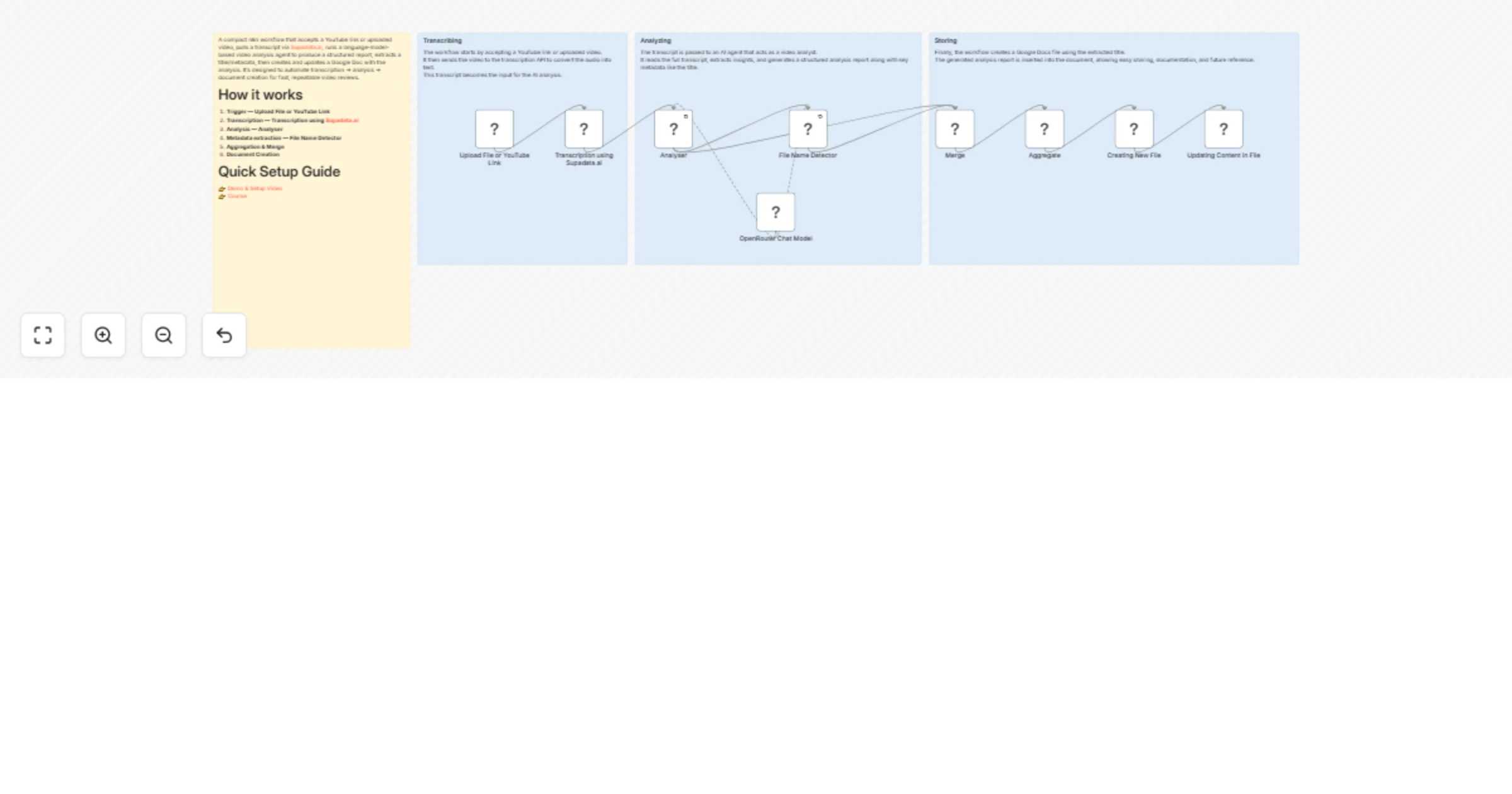
Workflow preview


 Early Deal
DISCOUNT 20%

Overview
A compact n8n workflow that accepts a YouTube link or uploaded video, pulls a transcript via Supadata.ai, runs a language-model-based video analysis agent to produce a structured report, extracts a title/metadata, then creates and updates a Google Doc with the analysis. It's designed to automate transcription → analysis → document creation for fast, repeatable video reviews.
How it works
Trigger — Upload File or YouTube Link A form trigger receives a
youtube_urlor an uploaded file/webhook event.Transcription — Transcription using Supadata.ai Calls the transcription API using the
x-api-keyheader to retrieve the video transcript/text.Analysis — Analyser The transcript is passed to the Analyser LangChain agent which runs a tailored prompt (expert video analyst) and generates a plain-text report.
Metadata extraction — File Name Detector The information extractor parses the analyser output to extract structured attributes such as the Title.
Aggregation & Merge Merge/Aggregate nodes combine the analysis and extracted fields into a single payload.
Document Creation Creating New File creates a Google Docs document using the extracted Title, and Updating Content in File inserts the analyser output into the document.
Optional Follow-ups Additional nodes can forward the document link, send it to Slack, or store metadata in a database.
Quick Setup Guide
Nodes of interest
Upload File or YouTube Link
formTrigger (webhook)— Entry point for user-supplied links or files.Transcription using Supadata.ai
httpRequest— Fetches transcript fromhttps://api.supadata.ai/...and requires thex-api-keyheader.OpenRouter Chat Model / OpenRouter Chat Model1
lmChatOpenRouter— Language model nodes connected to the Analyser and File Name Detector using the modeldeepseek/deepseek-r1-distill-llama-70b.Analyser LangChain agent node that contains the expert analysis prompt and generates a full plain-text report from the transcript. Configuration includes
hasOutputParser: trueand retry enabled.File Name Detector LangChain information extractor that extracts structured attributes like Title from the analysis output.
Merge / Aggregate Combines outputs from analysis and extraction into a single payload used for document creation.
Creating New File / Updating Content in File Google Docs nodes used to create and update documents using
googleDocsOAuth2Apicredentials.
What you’ll need (credentials)
OpenRouter account Used by OpenRouter Chat Model nodes. API key stored in the
openRouterApicredential.Supadata.ai API key Added in the HTTP header
x-api-keyin the transcription request.Google Docs OAuth2
googleDocsOAuth2Apicredential used for creating and updating Google Docs.Optional integrations Slack webhook, Google Drive, or database credentials if adding notifications or persistent storage.
Recommended settings & best practices
Prompt control Keep the Analyser prompt explicit about required sections, output style, and how to handle missing transcripts.
Retries & timeouts Enable retries for long-running model or HTTP calls. Configure proper HTTP request timeouts.
Rate limits Respect transcription and model provider rate limits. Add throttling if needed.
Input validation Validate the
youtube_urlbefore processing and handle transcript failures gracefully.Chunk transcripts Split long transcripts into chunks before sending to the LLM to avoid context limit issues.
Logging & audit Store transcripts, analysis results, and metadata for debugging and traceability.
Security Store API keys as n8n credentials rather than plaintext.
Document naming Sanitize the extracted Title to prevent invalid filename characters.
Monitoring Add error notifications via email or Slack for failed runs.
Customization ideas
Alternative transcription providers Replace Supadata.ai with AssemblyAI, Whisper (self-hosted), or YouTube captions.
Multiple output formats Export results to Google Docs, PDF, or JSON metadata.
Speaker diarization Include speaker labels and timestamps in the analysis.
Summaries & highlights Add TL;DR summaries and timestamped key moments.
Content classification Use additional LLM nodes to detect sentiment, category, or compliance issues.
Thumbnail generation Capture frames from the video to generate thumbnails.
Webhook callbacks Send the document link to Slack, email, or other systems.
Model routing Use smaller models for short videos and higher-quality models for long videos.
Human review pipeline Create a review queue for manual verification before publishing results.
Tags
video-analysis
transcription
n8n
langchain
automations
google-docs
openrouter
supadata
reporting
workflow