Block 1 - OpenRouter Chat Model
- Type / Role
- @n8n/n8n-nodes-langchain.lmChatOpenRouter - lmChatOpenRouter
- Config choices
- Version 1


 Early Deal
A compact n8n workflow that accepts a YouTube link or uploaded video, pulls a transcript via Supadata.ai, runs a language model based video analysis agent to produce a structured report, extracts a...
@n8n/n8n-nodes-langchain.lmchatopenrouter, n8n-nodes-base.merge, n8n-nodes-base.stickynote, n8n-nodes-base.httprequest, @n8n/n8n-nodes-langchain.agent, @n8n/n8n-nodes-langchain.informationextractor, n8n-nodes-base.googledocs, n8n-nodes-base.formtrigger
This workflow is cataloged by N8N Workflows and links back to its original n8n.io source page by Pratyush Kumar Jha.
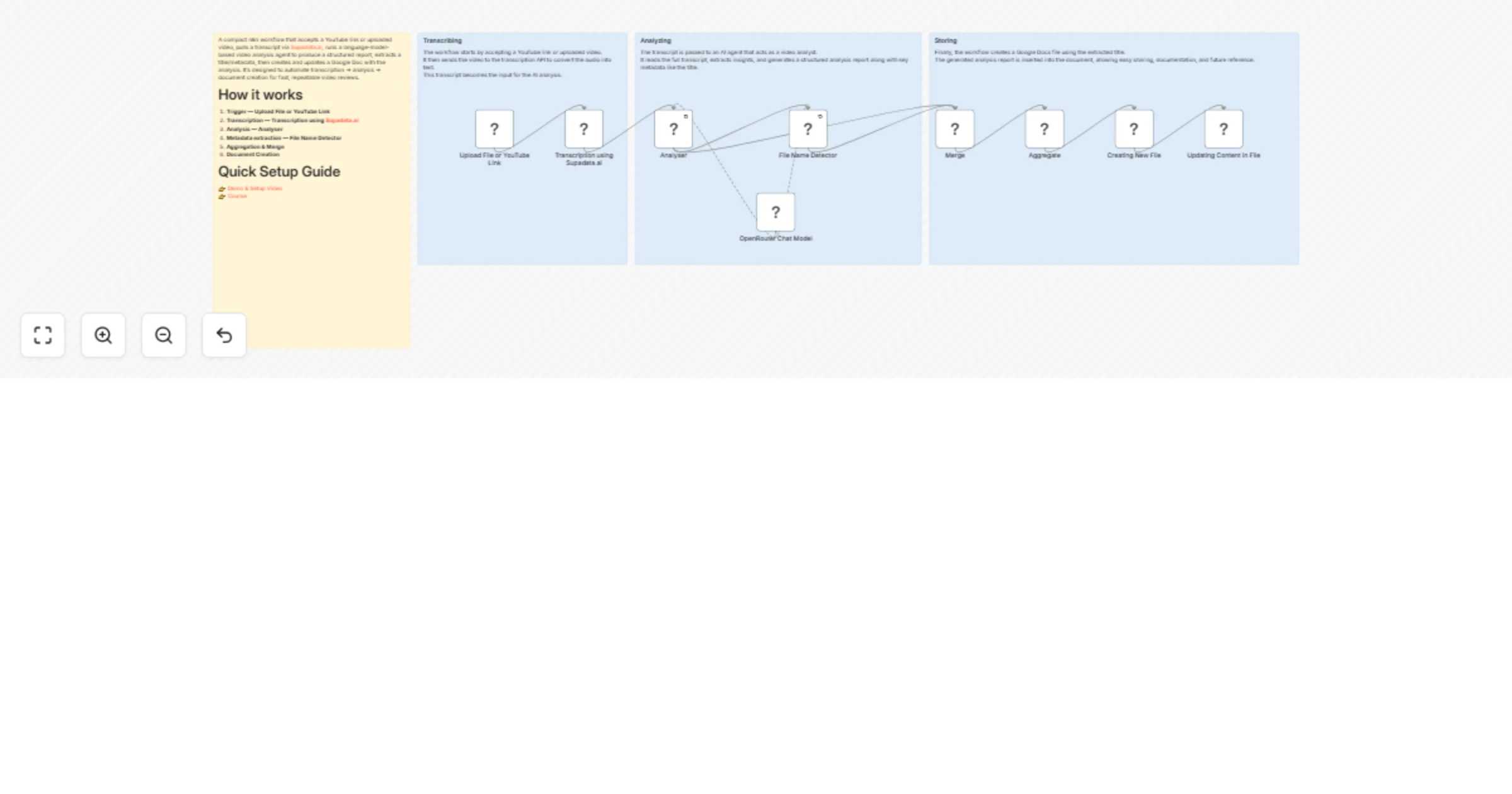
Original n8n.io sourceA compact n8n workflow that accepts a YouTube link or uploaded video, pulls a transcript via Supadata.ai, runs a language-model-based video analysis agent to produce a structured report, extracts a title/metadata, then creates and updates a Google Doc with the analysis. It's designed to automate transcription → analysis → document creation for fast, repeatable video reviews.
Trigger — Upload File or YouTube Link
A form trigger receives a youtube_url or an uploaded file/webhook event.
Transcription — Transcription using Supadata.ai
Calls the transcription API using the x-api-key header to retrieve the video transcript/text.
Analysis — Analyser The transcript is passed to the Analyser LangChain agent which runs a tailored prompt (expert video analyst) and generates a plain-text report.
Metadata extraction — File Name Detector The information extractor parses the analyser output to extract structured attributes such as the Title.
Aggregation & Merge Merge/Aggregate nodes combine the analysis and extracted fields into a single payload.
Document Creation Creating New File creates a Google Docs document using the extracted Title, and Updating Content in File inserts the analyser output into the document.
Optional Follow-ups Additional nodes can forward the document link, send it to Slack, or store metadata in a database.
Upload File or YouTube Link
formTrigger (webhook) — Entry point for user-supplied links or files.
Transcription using Supadata.ai
httpRequest — Fetches transcript from https://api.supadata.ai/... and requires the x-api-key header.
OpenRouter Chat Model / OpenRouter Chat Model1
lmChatOpenRouter — Language model nodes connected to the Analyser and File Name Detector using the model
deepseek/deepseek-r1-distill-llama-70b.
Analyser
LangChain agent node that contains the expert analysis prompt and generates a full plain-text report from the transcript.
Configuration includes hasOutputParser: true and retry enabled.
File Name Detector LangChain information extractor that extracts structured attributes like Title from the analysis output.
Merge / Aggregate Combines outputs from analysis and extraction into a single payload used for document creation.
Creating New File / Updating Content in File
Google Docs nodes used to create and update documents using googleDocsOAuth2Api credentials.
OpenRouter account
Used by OpenRouter Chat Model nodes. API key stored in the openRouterApi credential.
Supadata.ai API key
Added in the HTTP header x-api-key in the transcription request.
Google Docs OAuth2
googleDocsOAuth2Api credential used for creating and updating Google Docs.
Optional integrations Slack webhook, Google Drive, or database credentials if adding notifications or persistent storage.
Prompt control Keep the Analyser prompt explicit about required sections, output style, and how to handle missing transcripts.
Retries & timeouts Enable retries for long-running model or HTTP calls. Configure proper HTTP request timeouts.
Rate limits Respect transcription and model provider rate limits. Add throttling if needed.
Input validation
Validate the youtube_url before processing and handle transcript failures gracefully.
Chunk transcripts Split long transcripts into chunks before sending to the LLM to avoid context limit issues.
Logging & audit Store transcripts, analysis results, and metadata for debugging and traceability.
Security Store API keys as n8n credentials rather than plaintext.
Document naming Sanitize the extracted Title to prevent invalid filename characters.
Monitoring Add error notifications via email or Slack for failed runs.
Alternative transcription providers Replace Supadata.ai with AssemblyAI, Whisper (self-hosted), or YouTube captions.
Multiple output formats Export results to Google Docs, PDF, or JSON metadata.
Speaker diarization Include speaker labels and timestamps in the analysis.
Summaries & highlights Add TL;DR summaries and timestamped key moments.
Content classification Use additional LLM nodes to detect sentiment, category, or compliance issues.
Thumbnail generation Capture frames from the video to generate thumbnails.
Webhook callbacks Send the document link to Slack, email, or other systems.
Model routing Use smaller models for short videos and higher-quality models for long videos.
Human review pipeline Create a review queue for manual verification before publishing results.
video-analysis
transcription
n8n
langchain
automations
google-docs
openrouter
supadata
reporting
workflow
This catalog entry is organized from the workflow JSON. The node-level section below shows the executable blocks available for review before importing the template.
| Workflow | Analyze YouTube videos and auto-generate AI reports in Google Docs with DeepSeek |
|---|---|
| Complexity | intermediate |
| Nodes | 13 |
| Categories | Document Extraction, AI Summarization |
| Author | Pratyush Kumar Jha |
| Published | 05 Mar 2026 |
Use the JSON export at /data/workflows/13887/13887.json as the source template for this automation.
Open n8n, import the downloaded JSON, and review each node before activating the workflow.
Replace placeholder credentials, API keys, webhook URLs, account IDs, and environment-specific values with your own settings.
Run the workflow manually or in a staging workspace, inspect node output, and confirm downstream systems receive the expected data.
Enable the workflow only after testing, then monitor executions, errors, and rate limits during the first production runs.
Review imported nodes carefully before activation. This catalog entry is intended to help you inspect the workflow structure, understand required services, and find related templates faster.
Node names, credentials, schedules, webhook paths, and external service limits may need adjustment for your workspace.
A compact n8n workflow that accepts a YouTube link or uploaded video, pulls a transcript via Supadata.ai, runs a language model based video analysis agent to produce a structured report, extracts a...
Review the workflow JSON, configure any required credentials in n8n, and test the automation in a safe workspace before using it in production.
Yes. Use the block-by-block analysis and the downloadable JSON to inspect each node, then adjust credentials, prompts, schedules, filters, or destinations for your Document Extraction, AI Summarization use case.