Analyze WooCommerce product reviews with GPT-4, Airtable & Slack summaries

Workflow preview

Workflow preview
100%
Analyze WooCommerce product reviews with GPT-4, Airtable & Slack summaries preview
Open on n8n.io

Important notice

This workflow is provided as-is. Please review and test before using in production.

1. Workflow Overview

WooCommerce Product Reviews: Sentiment Analysis with Slack Summary This workflow automatically fetches product reviews from your WooCommerce store, analyzes the sentiment of each review using AI, s...

Best for

  • Market Research automation workflows
  • AI Summarization automation workflows
  • advanced n8n builders looking for reusable templates

Tools used

n8n-nodes-base.set, n8n-nodes-base.stickynote, n8n-nodes-base.scheduletrigger, n8n-nodes-base.httprequest, n8n-nodes-base.splitinbatches, @n8n/n8n-nodes-langchain.openai, n8n-nodes-base.merge, n8n-nodes-base.code

Source and attribution

This workflow is cataloged by N8N Workflows and links back to its original n8n.io source page by WeblineIndia.

Original n8n.io source

1.1 Workflow description

Title
Analyze WooCommerce product reviews with GPT-4, Airtable & Slack summaries
Workflow name
Analyze WooCommerce product reviews with GPT-4, Airtable & Slack summaries

WooCommerce Product Reviews: Sentiment Analysis with Slack Summary

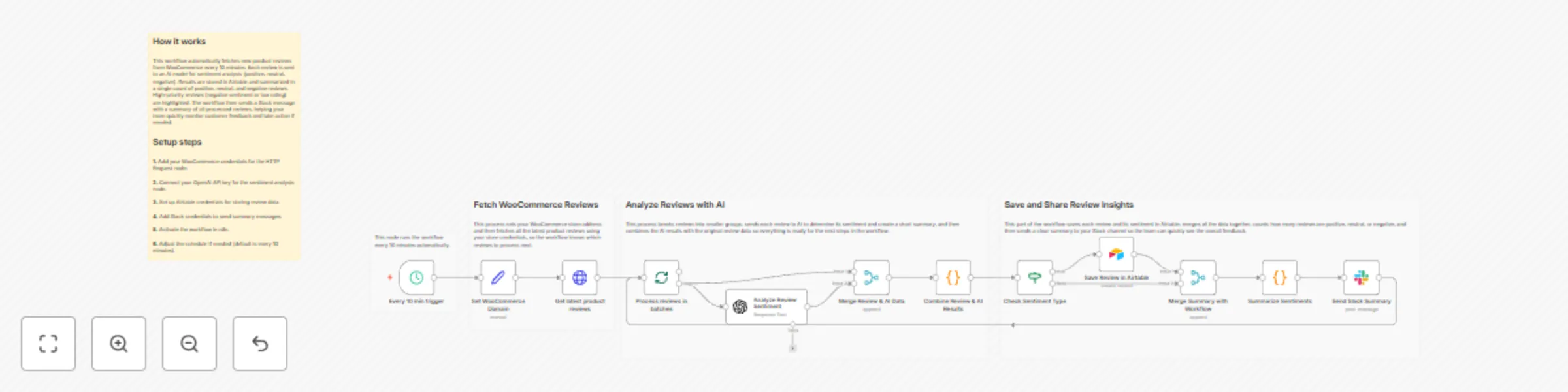
This workflow automatically fetches product reviews from your WooCommerce store, analyzes the sentiment of each review using AI, stores the results in Airtable and sends a summary of positive, neutral and negative reviews to Slack. It helps teams quickly understand overall customer feedback, track product sentiment and stay updated without manually reading all reviews.

Quick Start – Implementation Steps

  1. Import the workflow JSON file into n8n.
  2. Configure credentials:
    • WooCommerce HTTP Basic Auth (for fetching reviews)
    • OpenAI API (for sentiment analysis)
    • Airtable Personal Access Token (for storing reviews)
    • Slack API (for sending summary messages)
  3. Adjust the Cron/Schedule Trigger node to your preferred interval (e.g., every 10 minutes).
  4. Test the workflow with a few reviews to ensure AI and Slack integrations work correctly.
  5. Activate the workflow after confirming functionality.

What It Does

This workflow automates sentiment analysis and team notification:

  • Schedule Trigger – Runs the workflow automatically at defined intervals.
  • Set WooCommerce Domain – Defines the WooCommerce store to fetch reviews from.
  • Fetch Reviews – Retrieves all recent product reviews using WooCommerce API credentials.
  • Loop Over Items – Processes reviews in smaller batches for efficiency.
  • Message a Model – Sends each review to OpenAI to detect sentiment (positive, neutral, negative) and generate a short summary.
  • Merge & Code Nodes – Combines original review data with AI results and ensures proper data alignment.
  • If Node – Checks sentiment for further processing.
  • Create a Record (Airtable) – Stores each review and its sentiment in Airtable.
  • Code Summary Node – Counts positive, neutral, and negative reviews to create a summary.
  • Send a Message (Slack) – Posts the sentiment summary to the team’s Slack channel for visibility.

Who’s It For

This workflow is ideal for:

  • E-commerce managers tracking WooCommerce product feedback
  • Customer support teams monitoring review sentiment
  • Marketing and product teams seeking automated insights
  • Teams using Airtable and Slack for data tracking and collaboration

Requirements to Use This Workflow

  • An n8n instance (cloud or self-hosted)
  • WooCommerce store with API access
  • OpenAI API key for sentiment analysis
  • Airtable account with base/table configured
  • Slack workspace with API access for messaging
  • Basic familiarity with APIs and workflow automation

How It Works

  1. Schedule Trigger – Executes the workflow at the defined interval.
  2. Set WooCommerce Domain – Configures which store to fetch reviews from.
  3. Fetch Reviews – Retrieves all recent product reviews from WooCommerce.
  4. Loop Over Items – Splits reviews into manageable batches.
  5. Message a Model – Sends reviews to AI for sentiment analysis and short summary.
  6. Merge & Code Nodes – Combines AI results with original review data and prepares it for storage and summary.
  7. If Node – Checks review sentiment for saving or further processing.
  8. Create a Record (Airtable) – Saves each review with sentiment and AI summary.
  9. Code Summary Node – Counts the number of positive, neutral, and negative reviews.
  10. Send a Message (Slack) – Sends a concise summary of review sentiment to the Slack channel.

Setup Steps

  1. Import the workflow JSON into n8n.
  2. Add credentials:
    • WooCommerce HTTP Basic Auth
    • OpenAI API
    • Airtable Personal Access Token
    • Slack API
  3. Configure the WooCommerce domain in the Set WooCommerce Domain node.
  4. Test the workflow with sample reviews to ensure AI outputs correctly.
  5. Adjust the Schedule Trigger interval as needed.
  6. Activate the workflow after confirming that data flows correctly from WooCommerce → AI → Airtable → Slack.

How To Customize Nodes

Schedule Trigger

  • Adjust interval (minutes, hours, days) as needed.

Set WooCommerce Domain

  • Replace with your store domain URL.

Fetch Reviews

  • Update endpoint or filters if needed.
  • Ensure WooCommerce credentials are correct.

Message a Model

  • Change AI model or prompts to adjust sentiment analysis or summary style.

Create a Record (Airtable)

  • Map additional fields if needed.
  • Ensure the table has the necessary columns for sentiment, summary, rating, and product info.

Send a Message (Slack)

  • Customize Slack message format.
  • Change the channel ID to send summaries to the right team.

Optional Enhancements

  • Include historical review trends.
  • Automatically trigger notifications only for negative reviews.
  • Send summaries to email or other messaging apps.
  • Visualize sentiment trends in Airtable or external dashboards.

Use Case Examples

  1. Automated Sentiment Tracking – Understand customer feedback without manual reading.
  2. Team Alerts – Notify product and support teams about negative reviews quickly.
  3. Data Storage & Reporting – Keep historical sentiment in Airtable for trend analysis.
  4. Efficient Batch Processing – Process large number of reviews without overloading the system.

Troubleshooting Guide

Issue Possible Cause Solution
Reviews not fetched Wrong WooCommerce credentials or endpoint Check WooCommerce HTTP Basic Auth and store domain
AI analysis fails OpenAI API key invalid or prompt error Verify OpenAI credentials and prompt syntax
Slack message missing Incorrect Slack channel or API token Check Slack credentials and channel ID
Airtable not storing reviews Table or field mismatch Verify Airtable base, table, and column mapping

Need Help?

If you need assistance setting up the workflow, customizing AI sentiment analysis or integrating Slack summaries, feel free to contact our n8n development team at WeblineIndia. We provide workflow automation, AI integration and reporting solutions for WooCommerce stores.

1.2 Logical Blocks

This catalog entry is organized from the workflow JSON. The node-level section below shows the executable blocks available for review before importing the template.

2. Block-by-Block Analysis

Block 1 - Set WooCommerce Domain

Type / Role
n8n-nodes-base.set - set
Config choices
Version 3.4

Block 2 - Sticky Note

Type / Role
n8n-nodes-base.stickyNote - stickyNote
Config choices
Version 1

Block 3 - Every 10 min trigger

Type / Role
n8n-nodes-base.scheduleTrigger - scheduleTrigger
Config choices
Version 1.2

Block 4 - Get latest product reviews

Type / Role
n8n-nodes-base.httpRequest - httpRequest
Config choices
Version 4.3

Block 5 - Process reviews in batches

Type / Role
n8n-nodes-base.splitInBatches - splitInBatches
Config choices
Version 3

Block 6 - Analyze Review Sentiment

Type / Role
@n8n/n8n-nodes-langchain.openAi - openAi
Config choices
Version 2

Block 7 - Merge Review & AI Data

Type / Role
n8n-nodes-base.merge - merge
Config choices
Version 3.2

Block 8 - Combine Review & AI Results

Type / Role
n8n-nodes-base.code - code
Config choices
Version 2

Block 9 - Check Sentiment Type

Type / Role
n8n-nodes-base.if - if
Config choices
Version 2.2

Block 10 - Save Review in Airtable

Type / Role
n8n-nodes-base.airtable - airtable
Config choices
Version 2.1

Block 11 - Merge Summary with Workflow

Type / Role
n8n-nodes-base.merge - merge
Config choices
Version 3.2

Block 12 - Summarize Sentiments

Type / Role
n8n-nodes-base.code - code
Config choices
Version 2

Block 13 - Send Slack Summary

Type / Role
n8n-nodes-base.slack - slack
Config choices
Version 2.3

Block 14 - Sticky Note1

Type / Role
n8n-nodes-base.stickyNote - stickyNote
Config choices
Version 1

Block 15 - Sticky Note2

Type / Role
n8n-nodes-base.stickyNote - stickyNote
Config choices
Version 1

Block 16 - Sticky Note3

Type / Role
n8n-nodes-base.stickyNote - stickyNote
Config choices
Version 1

Block 17 - Sticky Note4

Type / Role
n8n-nodes-base.stickyNote - stickyNote
Config choices
Version 1

3. Summary Table

Workflow Analyze WooCommerce product reviews with GPT-4, Airtable & Slack summaries
Complexity advanced
Nodes 17
Categories Market Research, AI Summarization
Author WeblineIndia
Published 23 Dec 2025

4. Reproducing the Workflow from Scratch

  1. 1. Download the workflow JSON

    Use the JSON export at /data/workflows/12066/12066.json as the source template for this automation.

  2. 2. Import the template into n8n

    Open n8n, import the downloaded JSON, and review each node before activating the workflow.

  3. 3. Configure credentials and variables

    Replace placeholder credentials, API keys, webhook URLs, account IDs, and environment-specific values with your own settings.

  4. 4. Test with sample data

    Run the workflow manually or in a staging workspace, inspect node output, and confirm downstream systems receive the expected data.

  5. 5. Activate and monitor

    Enable the workflow only after testing, then monitor executions, errors, and rate limits during the first production runs.

5. General Notes & Resources

Review imported nodes carefully before activation. This catalog entry is intended to help you inspect the workflow structure, understand required services, and find related templates faster.

Node names, credentials, schedules, webhook paths, and external service limits may need adjustment for your workspace.

Frequently asked questions

What does Analyze WooCommerce product reviews with GPT-4, Airtable & Slack summaries do?

WooCommerce Product Reviews: Sentiment Analysis with Slack Summary This workflow automatically fetches product reviews from your WooCommerce store, analyzes the sentiment of each review using AI, s...

What do I need before importing this workflow?

Review the workflow JSON, configure any required credentials in n8n, and test the automation in a safe workspace before using it in production.

Can I customize this workflow?

Yes. Use the block-by-block analysis and the downloadable JSON to inspect each node, then adjust credentials, prompts, schedules, filters, or destinations for your Market Research, AI Summarization use case.