Block 1 - When clicking ‘Test workflow’
- Type / Role
- n8n-nodes-base.manualTrigger - manualTrigger
- Config choices
- Version 1


 Early Deal
This workflow is provided as-is. Please review and test before using in production.
Stop manually digging through Meta Ads data and spending hours trying to connect the dots. This workflow turns n8n into an AI powered media buyer that automatically analyzes your ad performance, ca...
n8n-nodes-base.manualtrigger, n8n-nodes-base.code, @n8n/n8n-nodes-langchain.lmchatgooglegemini, @n8n/n8n-nodes-langchain.outputparserstructured, n8n-nodes-base.splitout, n8n-nodes-base.googlesheets, n8n-nodes-base.stickynote, n8n-nodes-base.nocodb
This workflow is cataloged by N8N Workflows and links back to its original n8n.io source page by JJ Tham.
Original n8n.io sourceStop manually digging through Meta Ads data and spending hours trying to connect the dots.
This workflow turns n8n into an AI-powered media buyer that automatically analyzes your ad performance, categorizes your creatives, and delivers insights directly into a Google Sheet.
➡️ Watch the full 4-part setup and tutorial on YouTube: https://youtu.be/hxQshcD3e1Y
About This 4-Part Automation Series
As a media buyer, I built this system to automate the heavy lifting of analyzing ad data and brainstorming new creative ideas. This template is the first foundational part of that larger system.
✅ Part 1 (This Template): Pulling Ad Data & Getting Quick Insights Automatically pulls data into a Google Sheet and uses an LLM to categorize ad performance.
✅ Part 2: Finding the Source Files for the Best Ads Fetches the image or video files for top-performing ads.
✅ Part 3: Using AI to Understand Why an Ad Works Sends your best ads to Google Gemini for structured notes on hooks, transcripts, and visuals.
✅ Part 4: Getting the AI to Suggest New Creative Ideas Uses all the insights to generate fresh ad concepts, scripts, and creative briefs.
What This Template (Part 1) Does
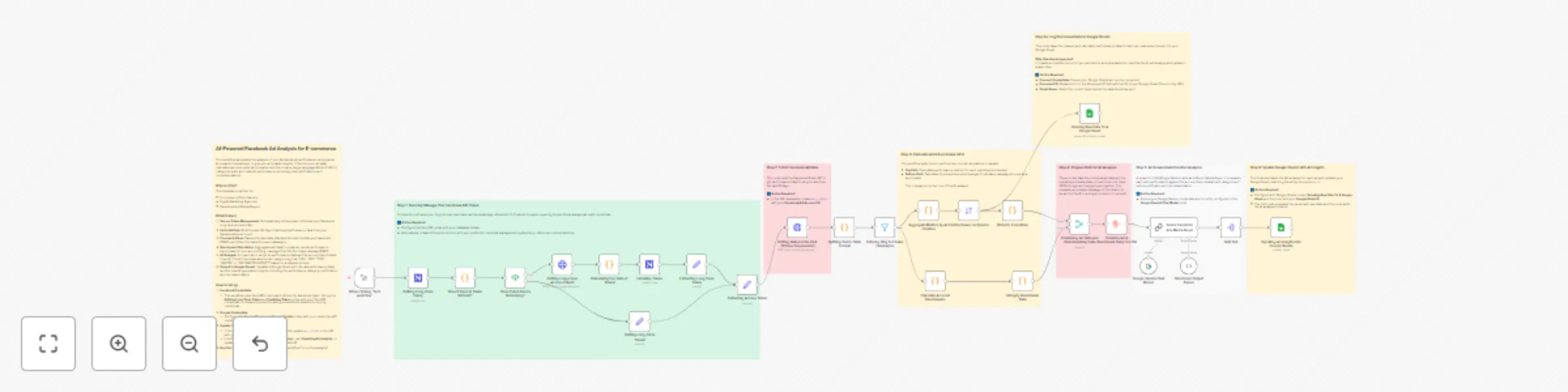
Secure Token Management Automatically retrieves and refreshes your Facebook long-term access token.
Fetch Ad Data Pulls the last 28 days of ad-level performance data from your Facebook Ads account.
Process & Clean Parses raw data, standardizes key e-commerce metrics (like ROAS), and filters for sales-focused campaigns.
Benchmark Calculation Aggregates all data to create an overall performance benchmark (e.g., average Cost Per Purchase).
AI Analysis A “Senior Media Buyer” AI persona evaluates each ad against the benchmark and categorizes it as “HELL YES,” “YES,” or “MAYBE,” with justifications.
Output to Google Sheets Updates your Google Sheet with both raw performance data and AI-generated insights.
Who Is It For?
E-commerce store owners
Digital marketing agencies
Facebook Ads media buyers
How to Set It Up
Credentials
Connect your Google Gemini and Google Sheets accounts in the respective nodes.
The template uses NocoDB for token management. Configure the “Getting Long-Term Token” and “Updating Token” nodes — or replace them with your preferred credential storage method.
Update Your IDs
In the “Getting Data For the Past 28 Days…” HTTP Request node, replace act_XXXXXX in the URL with your Facebook Ad Account ID.
In both Google Sheets nodes (“Sending Raw Data…” and “Updating Ad Insights…”), update the Document ID with your target Google Sheet’s ID.
Run the Workflow
Click “Test workflow” to run your first AI-powered analysis!
Tools Used
n8n
Facebook for Developers
Google AI Studio (Gemini)
NocoDB (or any credential database of your choice)
This catalog entry is organized from the workflow JSON. The node-level section below shows the executable blocks available for review before importing the template.
Showing the first 24 of 34 workflow blocks. Download the JSON for the full node graph.
| Workflow | Analyze Facebook Ads & send insights to Google Sheets with Gemini AI |
|---|---|
| Complexity | advanced |
| Nodes | 34 |
| Categories | Market Research, AI Summarization |
| Author | JJ Tham |
| Published | 02 Nov 2025 |
Use the JSON export at /data/workflows/10427/10427.json as the source template for this automation.
Open n8n, import the downloaded JSON, and review each node before activating the workflow.
Replace placeholder credentials, API keys, webhook URLs, account IDs, and environment-specific values with your own settings.
Run the workflow manually or in a staging workspace, inspect node output, and confirm downstream systems receive the expected data.
Enable the workflow only after testing, then monitor executions, errors, and rate limits during the first production runs.
Review imported nodes carefully before activation. This catalog entry is intended to help you inspect the workflow structure, understand required services, and find related templates faster.
Node names, credentials, schedules, webhook paths, and external service limits may need adjustment for your workspace.
Stop manually digging through Meta Ads data and spending hours trying to connect the dots. This workflow turns n8n into an AI powered media buyer that automatically analyzes your ad performance, ca...
Review the workflow JSON, configure any required credentials in n8n, and test the automation in a safe workspace before using it in production.
Yes. Use the block-by-block analysis and the downloadable JSON to inspect each node, then adjust credentials, prompts, schedules, filters, or destinations for your Market Research, AI Summarization use case.