Block 1 - Schedule Trigger
- Type / Role
- n8n-nodes-base.scheduleTrigger - scheduleTrigger
- Config choices
- Version 1.1


 Early Deal
This workflow is provided as-is. Please review and test before using in production.
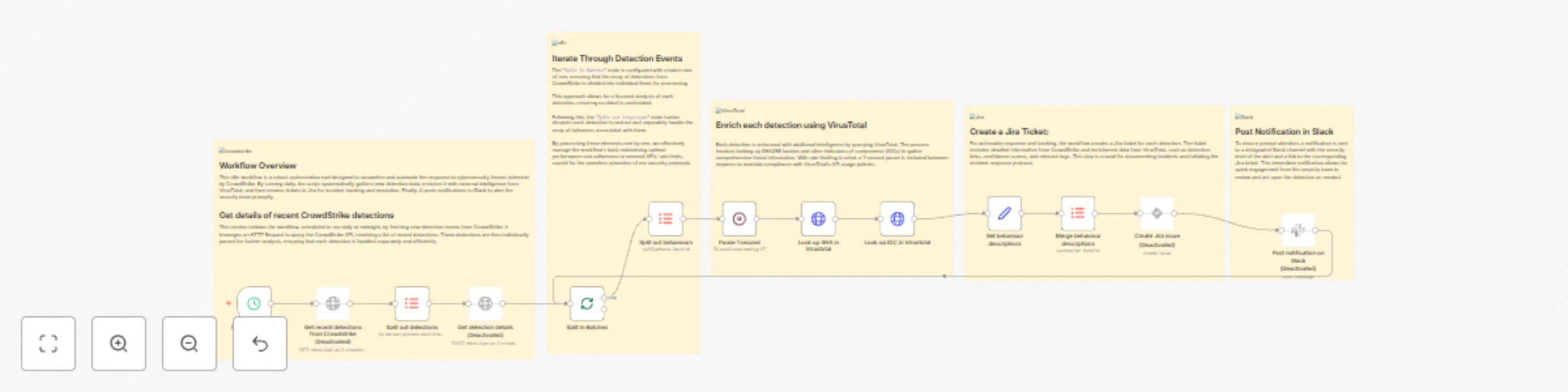
This n8n workflow automates the handling of security detections from CrowdStrike, streamlining incident response and notification processes. The workflow is triggered daily at midnight by the Sched...
n8n-nodes-base.scheduletrigger, n8n-nodes-base.itemlists, n8n-nodes-base.httprequest, n8n-nodes-base.splitinbatches, n8n-nodes-base.set, n8n-nodes-base.jira, n8n-nodes-base.slack, n8n-nodes-base.stickynote
This workflow is cataloged by N8N Workflows and links back to its original n8n.io source page by n8n Team.
Original n8n.io sourceThis n8n workflow automates the handling of security detections from CrowdStrike, streamlining incident response and notification processes. The workflow is triggered daily at midnight by the Schedule Trigger node.
It begins by fetching recent security detections from CrowdStrike using an HTTP Request node. The response is then split into individual detections for further processing. Each detection is enriched by querying the CrowdStrike API for detailed information using another HTTP Request node. The workflow then processes these detections sequentially using the Split In Batches node.
Next, it looks up behavioral information associated with each detection in VirusTotal using two HTTP Request nodes. One node queries VirusTotal based on SHA256 values, and the other based on IOC (Indicator of Compromise) values. The workflow includes a 1-second pause using the Wait node to prevent rate limiting when making requests to the VirusTotal API.
Subsequently, the workflow sets fields with relevant details from both CrowdStrike and VirusTotal, including detection links, confidence scores, filenames, usernames, and more. These details are concatenated using an Item Lists node for each detection. The final step involves creating Jira issues for each detection, including summaries with CrowdStrike alert severity and hostnames, as well as descriptions that incorporate information from CrowdStrike and VirusTotal. Information about this issue is then sent via a Slack message to a Slack user.
Potential issues during setup might include configuring the Schedule Trigger node to trigger at the correct time zone and handling potential rate limiting from the VirusTotal API, which could lead to throttled requests. Additionally, the note about a possible typo in the URL for the Virustotal nodes should be addressed to ensure correct API calls. The Jira node may need to be replaced with the latest version for compatibility. Properly configuring API credentials and handling errors that may occur during API requests are essential for a smooth workflow operation. Careful testing with sample data is recommended to validate the workflow's functionality and ensure it aligns with your organization's security incident response processes.
This catalog entry is organized from the workflow JSON. The node-level section below shows the executable blocks available for review before importing the template.
| Workflow | Analyze CrowdStrike detections - Search for IOCs in VirusTotal - Create a ticket in Jira, and post a message in Slack |
|---|---|
| Complexity | advanced |
| Nodes | 18 |
| Categories | SecOps |
| Author | n8n Team |
| Published | 13 Nov 2023 |
Use the JSON export at /data/workflows/1973/1973.json as the source template for this automation.
Open n8n, import the downloaded JSON, and review each node before activating the workflow.
Replace placeholder credentials, API keys, webhook URLs, account IDs, and environment-specific values with your own settings.
Run the workflow manually or in a staging workspace, inspect node output, and confirm downstream systems receive the expected data.
Enable the workflow only after testing, then monitor executions, errors, and rate limits during the first production runs.
Review imported nodes carefully before activation. This catalog entry is intended to help you inspect the workflow structure, understand required services, and find related templates faster.
Node names, credentials, schedules, webhook paths, and external service limits may need adjustment for your workspace.
This n8n workflow automates the handling of security detections from CrowdStrike, streamlining incident response and notification processes. The workflow is triggered daily at midnight by the Sched...
Review the workflow JSON, configure any required credentials in n8n, and test the automation in a safe workspace before using it in production.
Yes. Use the block-by-block analysis and the downloadable JSON to inspect each node, then adjust credentials, prompts, schedules, filters, or destinations for your SecOps use case.