Block 1 - When clicking ‘Execute workflow’
- Type / Role
- n8n-nodes-base.manualTrigger - manualTrigger
- Config choices
- Version 1


 Early Deal
This workflow is provided as-is. Please review and test before using in production.
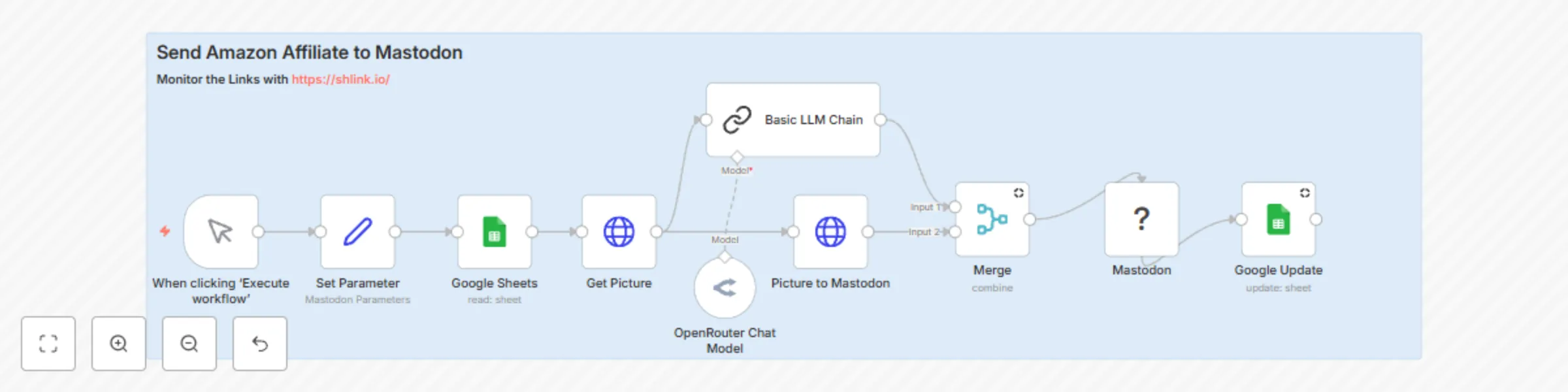
This n8n workflow automates posting Amazon affiliate products to Mastodon — complete with image upload, description, and a shortened tracking URL using Shlink. ![Bildschirmfoto 20250614 um 19.36.42...
n8n-nodes-base.manualtrigger, n8n-nodes-the-mastodon.mastodon, n8n-nodes-base.stickynote, n8n-nodes-base.googlesheets, n8n-nodes-base.set, @n8n/n8n-nodes-langchain.chainllm, @n8n/n8n-nodes-langchain.lmchatopenrouter, n8n-nodes-base.merge
This workflow is cataloged by N8N Workflows and links back to its original n8n.io source page by Joachim Hummel.
Original n8n.io sourceThis n8n workflow automates posting Amazon affiliate products to Mastodon — complete with image upload, description, and a shortened tracking URL using Shlink.
🔧 How it works
Input Source: The workflow starts by reading from a connected Google Sheet that contains:
A Send column (used as a flag to check if the row was already posted)
Image Upload: It fetches the product image via HTTP and uploads it directly to a Mastodon instance via the /media API endpoint.
URL Shortening (Shlink): The original Amazon URL is shortened using your self-hosted or cloud-hosted Shlink instance to enable click tracking and better presentation.
Text Generation: A two-line promotional text is automatically generated using a Language Model (LLM), based on the product description.
Posting to Mastodon: The post is then published on Mastodon with:
  1. The image
  2. The generated text
  3. The shortened Shlink URL
Row Update: Once published, the Send column in the Google Sheet is updated to "YES" to prevent duplicates.
Requirements
✅ Shlink – Required for shortening and tracking Amazon URLs

✅ Google Sheet – Used as a product queue and post

✅ Google Sheet Example https://link.unixweb.home64.de/w7VqY

✅ Mastodon account – OAuth2 credentials with write scope

✅ Product image URL – Must be valid and accessible

✅ n8n credentials – Set up for Google Sheets, Mastodon, and optionally OpenRouter or other LLM providers
This workflow is ideal for content creators, affiliate marketers, and automation fans who want to save time and optimize reach across the Fediverse.
#affiliate #amazon #mastodon #advertisment
This catalog entry is organized from the workflow JSON. The node-level section below shows the executable blocks available for review before importing the template.
| Workflow | Amazon affiliate links to Mastodon with AI descriptions & Shlink tracking |
|---|---|
| Complexity | intermediate |
| Nodes | 11 |
| Categories | Social Media, Multimodal AI |
| Author | Joachim Hummel |
| Published | 14 Jun 2025 |
Use the JSON export at /data/workflows/4935/4935.json as the source template for this automation.
Open n8n, import the downloaded JSON, and review each node before activating the workflow.
Replace placeholder credentials, API keys, webhook URLs, account IDs, and environment-specific values with your own settings.
Run the workflow manually or in a staging workspace, inspect node output, and confirm downstream systems receive the expected data.
Enable the workflow only after testing, then monitor executions, errors, and rate limits during the first production runs.
Review imported nodes carefully before activation. This catalog entry is intended to help you inspect the workflow structure, understand required services, and find related templates faster.
Node names, credentials, schedules, webhook paths, and external service limits may need adjustment for your workspace.
This n8n workflow automates posting Amazon affiliate products to Mastodon — complete with image upload, description, and a shortened tracking URL using Shlink. ![Bildschirmfoto 20250614 um 19.36.42...
Review the workflow JSON, configure any required credentials in n8n, and test the automation in a safe workspace before using it in production.
Yes. Use the block-by-block analysis and the downloadable JSON to inspect each node, then adjust credentials, prompts, schedules, filters, or destinations for your Social Media, Multimodal AI use case.