J

Joachim Hummel

4
Workflows

Workflows by Joachim Hummel
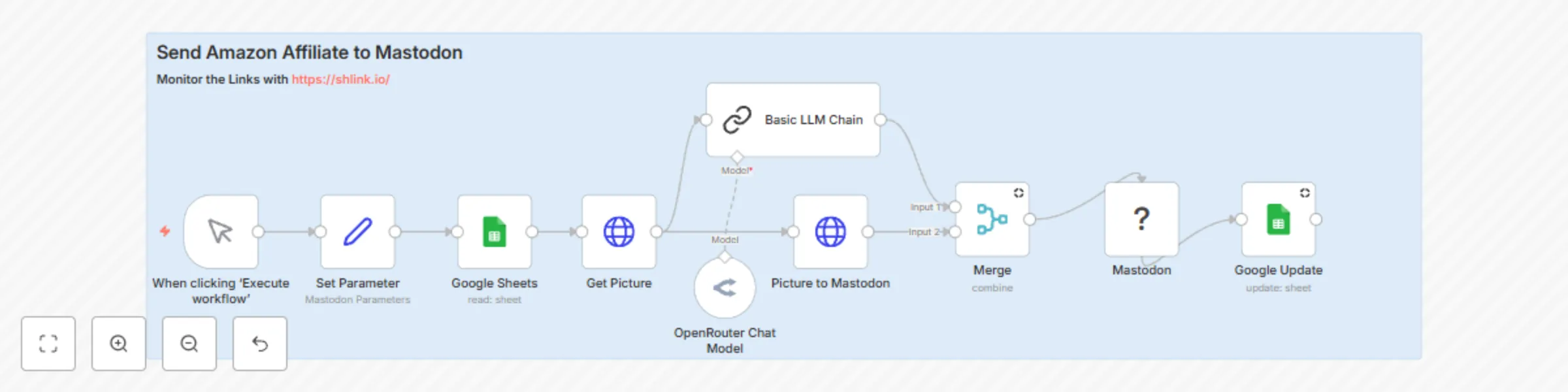
Workflow preview: Amazon affiliate links to Mastodon with AI descriptions & Shlink tracking
Free intermediate

Amazon affiliate links to Mastodon with AI descriptions & Shlink tracking

This n8n workflow automates posting Amazon affiliate products to Mastodon — complete with image upload, description, and a shortened tracking URL using Shlink. ![Bildschirmfoto 20250614 um 19.36.42.png](fileId:1515) 🔧 How it works Input Source: The workflow starts by reading from a connected Google Sheet that contains: 1. SHlink (Shortlink) 2. Amazon Link 3. Description (Optional) 4. PicURL 5. Send /NO or YES A Send column (used as a flag to check if the row was already posted) ![Bildschirmfoto 20250614 um 19.37.42.png](fileId:1514) Image Upload: It fetches the product image via HTTP and uploads it directly to a Mastodon instance via the /media API endpoint. URL Shortening (Shlink): The original Amazon URL is shortened using your self-hosted or cloud-hosted Shlink instance to enable click tracking and better presentation. Text Generation: A two-line promotional text is automatically generated using a Language Model (LLM), based on the product description. Posting to Mastodon: The post is then published on Mastodon with: 1. The image 2. The generated text 3. The shortened Shlink URL Row Update: Once published, the Send column in the Google Sheet is updated to "YES" to prevent duplicates. Requirements ✅ Shlink – Required for shortening and tracking Amazon URLs ✅ Google Sheet – Used as a product queue and post ✅ Google Sheet Example https://link.unixweb.home64.de/w7VqY ✅ Mastodon account – OAuth2 credentials with write scope ✅ Product image URL – Must be valid and accessible ✅ n8n credentials – Set up for Google Sheets, Mastodon, and optionally OpenRouter or other LLM providers This workflow is ideal for content creators, affiliate marketers, and automation fans who want to save time and optimize reach across the Fediverse. #affiliate #amazon #mastodon #advertisment

J
Joachim Hummel
Social Media
15 Jun 2025
1479
0
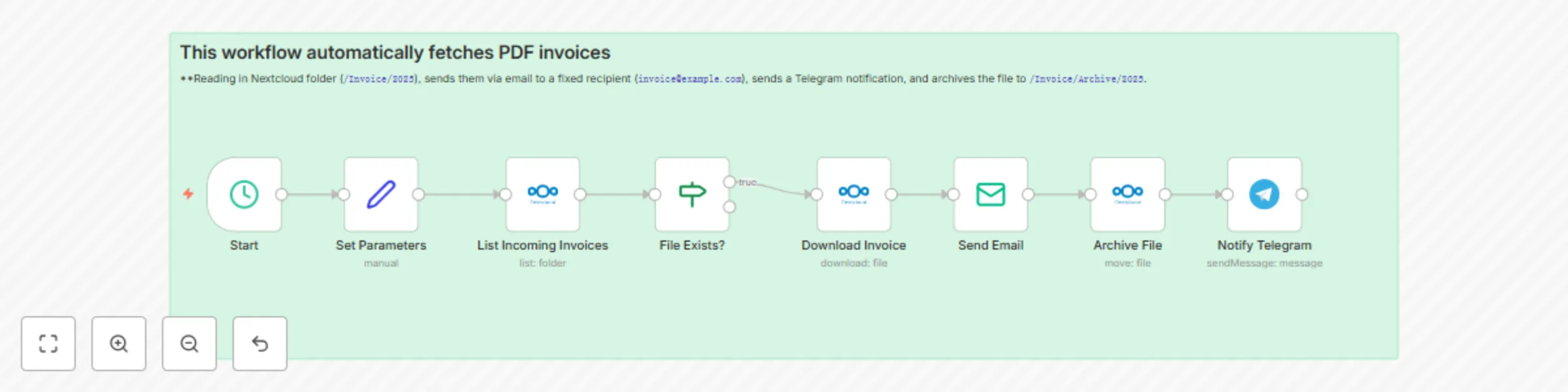
Workflow preview: Automated invoice management with Nextcloud, email and Telegram notifications
Free intermediate

Automated invoice management with Nextcloud, email and Telegram notifications

This workflow automatically fetches PDF invoices from a Nextcloud folder (`/Invoice/Incoming`), sends them via email to a fixed recipient (`[email protected]`), sends a Telegram notification, and archives the file to `/Invoice/2025/archive`. **Key Steps:** 1. Triggered daily at 8 AM 2. Lists files in `/Invoice/Incoming` 3. Filters for existing entries 4. Downloads the file 5. Sends the invoice via email 6. Sends a Telegram message with filename 7. Moves the file to archive 📦 Technologies used: - Nextcloud - SMTP Email - Telegram Bot ⚙️ Use case: Perfect for freelancers or small businesses to automate recurring invoice sending with minimal effort.

J
Joachim Hummel
Invoice Processing
5 Jun 2025
999
0

Workflow preview: N8N backup flow to Nextcloud (7-day retention)
Free intermediate

N8N backup flow to Nextcloud (7-day retention)

This workflow automates the daily backup of all your n8n workflows to a designated folder in Nextcloud. It ensures that you always have the last 7 days of backups available while automatically deleting older ones to save space. 🔧 Features Scheduled Trigger: Runs automatically once per day (can be executed manually as well). Directory Management: Creates the /N8N-Backup directory in Nextcloud if it doesn't already exist. Backup Collection: Retrieves all workflows from the n8n instance. JSON Conversion: Converts each workflow into a JSON file. Upload to Nextcloud: Saves each backup file into the specified backup directory. Retention Control: Keeps only the latest 7 backups and deletes the rest from Nextcloud. 📌 Notes Make sure to manually create the /N8N-Backup directory in your Nextcloud account before using this flow. Update the Backup Path node if you wish to change the upload directory. Ideal for teams using n8n with self-hosted instances and requiring offsite backup via Nextcloud. 🔒 Requirements n8n instance with access to the Nextcloud node. Valid credentials for your Nextcloud account with API access. Update: 08/11/2025 “Backup Flows to Nextcloud” – Import format fixed Summary: The workflow now exports one clean JSON object per workflow (no arrays, no backup/meta fields), so files can be imported 1:1 via the n8n UI. What changed: Switched from “Convert to File” to a Set node that builds the JSON in binary data. Enabled filters.include = "all" on Get many workflows to include nodes, connections, settings, pinData, and tags. Sanitized filenames and removed IDs/metadata that can break UI imports. Fixed Nextcloud path and binary property mapping (data). Verification: Generated multiple backups and imported each via UI (“Import from file”) without errors. Each file begins with { (single object) and loads with full workflow structure. Notes: Keep “Binary Property” set to data in the Nextcloud node. Filenames are sanitized to avoid special-character issues.

J
Joachim Hummel
DevOps
23 May 2025
1086
0

Workflow preview: Automatically upload scanned documents to Nextcloud via ScanservJS
Free intermediate

Automatically upload scanned documents to Nextcloud via ScanservJS

This workflow connects a USB scanner to Nextcloud via ScanservJS and the integrated API. It checks for new scans at a scheduled time (e.g., every 5 minutes). If there are any, they are automatically retrieved via HTTP request and then saved to a desired Nextcloud folder. Ideal for home offices, offices, or maker projects with Raspberry Pi and network scanners. ![Bildschirmfoto 20250504 um 16.18.42.png](fileId:1264) Nodes used: - Schedule Trigger – starts the flow cyclically - HTTP Request – retrieves document data from ScanservJS - Nextcloud Node – uploads the file directly to your Nextcloud account Requirements: - Local installation of ScanservJS (e.g., on a Raspberry Pi) - Configured USB scanner ![Bildschirmfoto 20250504 um 16.20.46.png](fileId:1265) - Nextcloud access with write permissions in the target folder

J
Joachim Hummel
File Management
4 May 2025
608
0