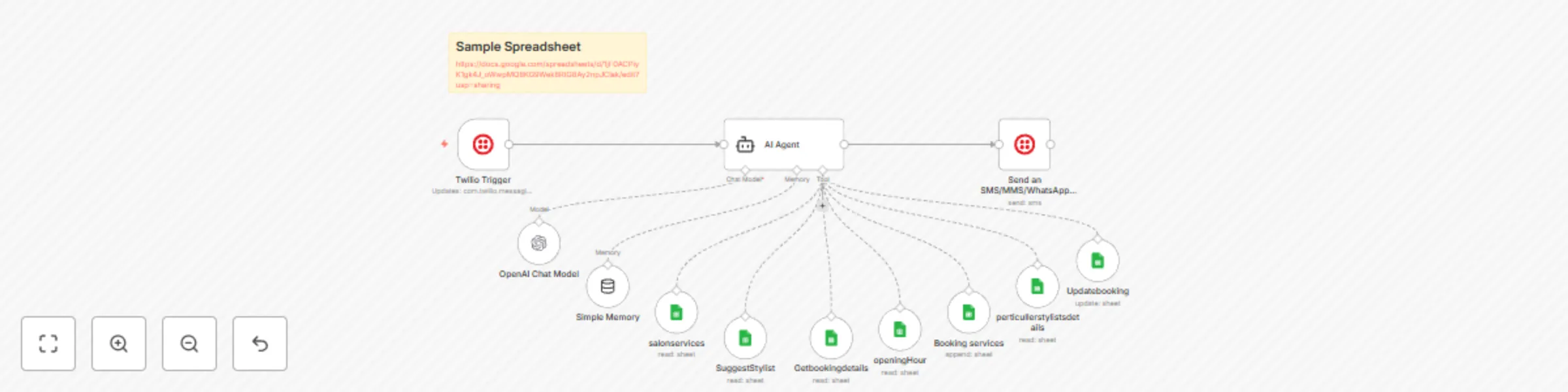
Ai-powered salon appointment booking system with WhatsApp and Google Sheets

Workflow preview

Workflow preview
100%
Ai-powered salon appointment booking system with WhatsApp and Google Sheets preview
Open on n8n.io

Important notice

This workflow is provided as-is. Please review and test before using in production.

1. Workflow Overview

What problem does this workflow solve? Salon staff often spend hours juggling appointment calls, managing bookings manually, and keeping track of customer preferences. This workflow automates you...

Best for

  • Support Chatbot automation workflows
  • AI Chatbot automation workflows
  • intermediate n8n builders looking for reusable templates

Tools used

@n8n/n8n-nodes-langchain.agent, @n8n/n8n-nodes-langchain.lmchatopenai, @n8n/n8n-nodes-langchain.memorybufferwindow, n8n-nodes-base.googlesheetstool, n8n-nodes-base.twilio, n8n-nodes-base.twiliotrigger, n8n-nodes-base.stickynote

Source and attribution

This workflow is cataloged by N8N Workflows and links back to its original n8n.io source page by InfyOm Technologies.

Original n8n.io source

1.1 Workflow description

Title
Ai-powered salon appointment booking system with WhatsApp and Google Sheets
Workflow name
Ai-powered salon appointment booking system with WhatsApp and Google Sheets

βœ… What problem does this workflow solve?

Salon staff often spend hours juggling appointment calls, managing bookings manually, and keeping track of customer preferences. This workflow automates your entire salon appointment system via WhatsApp, delivering a personalized and human-like booking experience using AI, memory, and Google Sheets.


πŸ’‘ Main Use Cases

  • πŸ’β€β™€οΈ Offer personalized stylist recommendations by remembering customer preferences and past visits.
  • πŸ“… Provide real-time availability and salon opening hour information.
  • πŸ“ Book and update appointments directly from customer chat.
  • πŸ” Simplify appointment changes by recalling previous booking details.
  • 🧠 Enable context-aware, memory-driven conversations across multiple interactions.

🧠 How It Works – Step-by-Step

1. πŸ“² Chat Message Trigger

The workflow is triggered whenever a customer sends a message to your WhatsApp salon assistant.

2. 🧠 Memory Buffer for Context Management

The assistant uses a Memory Buffer to:

  • Recognize returning customers
  • Avoid repeating questions
  • Maintain conversation flow across multiple sessions

This enables a seamless and intelligent dialogue with each customer.

3. πŸ’‡ Stylist & Service Lookup

When the customer asks for stylist suggestions, available time slots, or services:

  • Extracts request details using AI
  • Queries a Google Sheet containing:
    • Stylist availability
    • Service types
    • Salon opening hours
  • Returns personalized recommendations based on preferences and availability

4. βœ… Appointment Booking

  • Collects all necessary info:
    • Date, time, selected service, stylist, contact info
  • Stores the appointment in Google Sheets
  • Sends a confirmation message to the customer in WhatsApp

5. πŸ”„ Modify or Cancel Bookings

  • Customers can update or cancel appointments
  • Bot matches records by phone number
  • Modifies or deletes the appointment in the sheet accordingly

🧩 Integrations Used

  • WhatsApp Integration (via Twilio, Meta API, or other connector)
  • OpenAI/GPT Model for natural conversation flow and extraction
  • Google Sheets as a simple and effective appointment database
  • Memory Buffer for ongoing context across chats

πŸ‘€ Who can use this?

Perfect for:

  • πŸ’‡β€β™€οΈ Salons and barbershops
  • πŸ’… Spas and beauty centers
  • πŸ§–β€β™€οΈ Wellness studios
  • πŸ›  Developers building vertical AI assistants for SMBs

If you're looking to modernize your booking process and impress customers with an AI-powered, memory-enabled WhatsApp botβ€”this workflow delivers.


πŸš€ Benefits

  • ⏰ Save time for your staff
  • 🧠 Offer truly personalized experiences
  • πŸ“² Book appointments 24/7 via WhatsApp
  • πŸ“‹ Keep all records organized in Google Sheets
  • 🧘 Reduce human error and double bookings

πŸ“¦ Ready to Launch?

Just configure:

  • βœ… Your WhatsApp number + webhook integration
  • βœ… Google Sheet with stylist and service data
  • βœ… OpenAI key for AI-powered conversation
  • βœ… Memory Buffer to enable smart replies

And your salon will be ready to offer automated, intelligent bookingβ€”right from a simple WhatsApp chat.

1.2 Logical Blocks

This catalog entry is organized from the workflow JSON. The node-level section below shows the executable blocks available for review before importing the template.

2. Block-by-Block Analysis

Block 1 - AI Agent

Type / Role
@n8n/n8n-nodes-langchain.agent - agent
Config choices
Version 2.2

Block 2 - OpenAI Chat Model

Type / Role
@n8n/n8n-nodes-langchain.lmChatOpenAi - lmChatOpenAi
Config choices
Version 1.2

Block 3 - Simple Memory

Type / Role
@n8n/n8n-nodes-langchain.memoryBufferWindow - memoryBufferWindow
Config choices
Version 1.3

Block 4 - Booking services

Type / Role
n8n-nodes-base.googleSheetsTool - googleSheetsTool
Config choices
Version 4.7

Block 5 - SuggestStylist

Type / Role
n8n-nodes-base.googleSheetsTool - googleSheetsTool
Config choices
Version 4.7

Block 6 - openingHour

Type / Role
n8n-nodes-base.googleSheetsTool - googleSheetsTool
Config choices
Version 4.7

Block 7 - salonservices

Type / Role
n8n-nodes-base.googleSheetsTool - googleSheetsTool
Config choices
Version 4.7

Block 8 - perticullerstylistsdetails

Type / Role
n8n-nodes-base.googleSheetsTool - googleSheetsTool
Config choices
Version 4.7

Block 9 - Updatebooking

Type / Role
n8n-nodes-base.googleSheetsTool - googleSheetsTool
Config choices
Version 4.7

Block 10 - Getbookingdetails

Type / Role
n8n-nodes-base.googleSheetsTool - googleSheetsTool
Config choices
Version 4.7

Block 11 - Send an SMS/MMS/WhatsApp message

Type / Role
n8n-nodes-base.twilio - twilio
Config choices
Version 1

Block 12 - Twilio Trigger

Type / Role
n8n-nodes-base.twilioTrigger - twilioTrigger
Config choices
Version 1

Block 13 - Sticky Note

Type / Role
n8n-nodes-base.stickyNote - stickyNote
Config choices
Version 1

3. Summary Table

Workflow Ai-powered salon appointment booking system with WhatsApp and Google Sheets
Complexity intermediate
Nodes 13
Categories Support Chatbot, AI Chatbot
Author InfyOm Technologies
Published 18 Sept 2025

4. Reproducing the Workflow from Scratch

  1. 1. Download the workflow JSON

    Use the JSON export at /data/workflows/8698/8698.json as the source template for this automation.

  2. 2. Import the template into n8n

    Open n8n, import the downloaded JSON, and review each node before activating the workflow.

  3. 3. Configure credentials and variables

    Replace placeholder credentials, API keys, webhook URLs, account IDs, and environment-specific values with your own settings.

  4. 4. Test with sample data

    Run the workflow manually or in a staging workspace, inspect node output, and confirm downstream systems receive the expected data.

  5. 5. Activate and monitor

    Enable the workflow only after testing, then monitor executions, errors, and rate limits during the first production runs.

5. General Notes & Resources

Review imported nodes carefully before activation. This catalog entry is intended to help you inspect the workflow structure, understand required services, and find related templates faster.

Node names, credentials, schedules, webhook paths, and external service limits may need adjustment for your workspace.

Frequently asked questions

What does Ai-powered salon appointment booking system with WhatsApp and Google Sheets do?

What problem does this workflow solve? Salon staff often spend hours juggling appointment calls, managing bookings manually, and keeping track of customer preferences. This workflow automates you...

What do I need before importing this workflow?

Review the workflow JSON, configure any required credentials in n8n, and test the automation in a safe workspace before using it in production.

Can I customize this workflow?

Yes. Use the block-by-block analysis and the downloadable JSON to inspect each node, then adjust credentials, prompts, schedules, filters, or destinations for your Support Chatbot, AI Chatbot use case.