Block 1 - When Executed by Another Workflow
- Type / Role
- n8n-nodes-base.executeWorkflowTrigger - executeWorkflowTrigger
- Config choices
- Version 1.1


 Early Deal
This workflow is provided as-is. Please review and test before using in production.
Name: AI Powered Research Agent using Perplexity Sonar Description: This workflow acts as an AI powered research assistant using the Perplexity Sonar model. When triggered by another workflow, it s...
n8n-nodes-base.executeworkflowtrigger, n8n-nodes-base.set, n8n-nodes-base.stickynote, n8n-nodes-base.httprequest
This workflow is cataloged by N8N Workflows and links back to its original n8n.io source page by HoangSP.
Original n8n.io sourceName: AI-Powered Research Agent using Perplexity Sonar
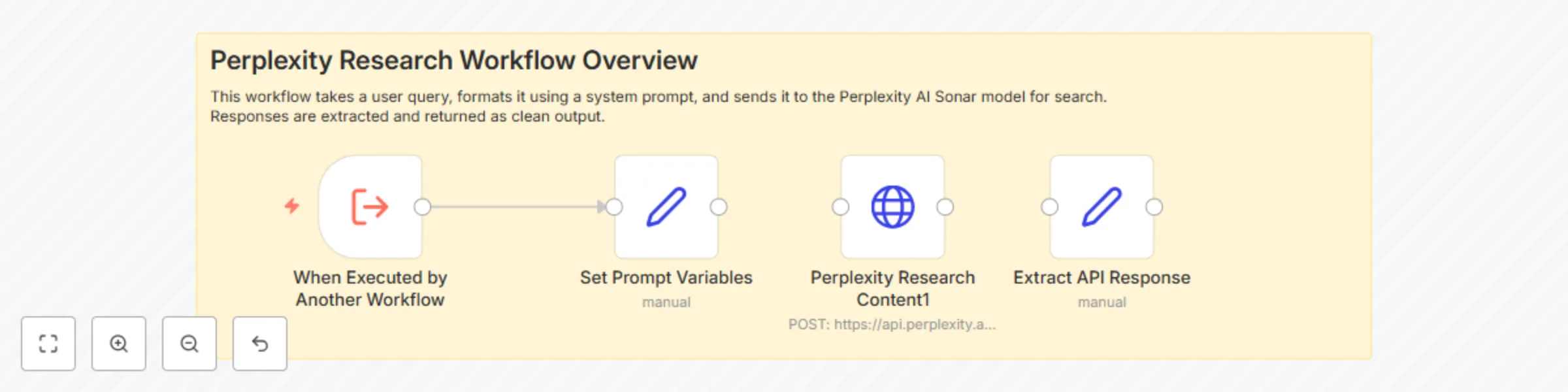
Description: This workflow acts as an AI-powered research assistant using the Perplexity Sonar model. When triggered by another workflow, it sends a user-defined prompt to the Perplexity API to retrieve up-to-date search results. The response is then parsed into a clean format for downstream processing.
How it Works: Trigger: Activated from another workflow via Execute Workflow Trigger.
Prompt Setup: Sets a system role message and user query dynamically.
API Call: Sends a POST request to Perplexity's /chat/completions endpoint with your credentials.
Response Handling: Extracts the message content from the API response.
Output: Returns the result, ready for display or further processing.
Requirements: A Perplexity AI API Key
Set up authentication via Header Auth with Bearer token
Ensure your account allows outbound HTTP requests in n8n
Customization Tips: Modify the system prompt to suit your research domain
Chain this workflow with other automation like blog creation, summaries, etc.
Replace the output handling logic to fit into Google Sheets, Notion, or Telegram
This catalog entry is organized from the workflow JSON. The node-level section below shows the executable blocks available for review before importing the template.
| Workflow | AI-powered research assistant with Perplexity Sonar API |
|---|---|
| Complexity | intermediate |
| Nodes | 5 |
| Categories | Market Research, AI Chatbot |
| Author | HoangSP |
| Published | 23 Apr 2025 |
Use the JSON export at /data/workflows/3673/3673.json as the source template for this automation.
Open n8n, import the downloaded JSON, and review each node before activating the workflow.
Replace placeholder credentials, API keys, webhook URLs, account IDs, and environment-specific values with your own settings.
Run the workflow manually or in a staging workspace, inspect node output, and confirm downstream systems receive the expected data.
Enable the workflow only after testing, then monitor executions, errors, and rate limits during the first production runs.
Review imported nodes carefully before activation. This catalog entry is intended to help you inspect the workflow structure, understand required services, and find related templates faster.
Node names, credentials, schedules, webhook paths, and external service limits may need adjustment for your workspace.
Name: AI Powered Research Agent using Perplexity Sonar Description: This workflow acts as an AI powered research assistant using the Perplexity Sonar model. When triggered by another workflow, it s...
Review the workflow JSON, configure any required credentials in n8n, and test the automation in a safe workspace before using it in production.
Yes. Use the block-by-block analysis and the downloadable JSON to inspect each node, then adjust credentials, prompts, schedules, filters, or destinations for your Market Research, AI Chatbot use case.