H

HoangSP

4
Workflows

Workflows by HoangSP

Workflow preview: Research-to-social post generator with Perplexity AI and Facebook Graph API
Free advanced

Research-to-social post generator with Perplexity AI and Facebook Graph API

## Who’s it for Teams that want to turn a chat prompt into a researched, ready-to-post social update—optionally published to Facebook. ## What it does / How it works - Chat Trigger receives the user prompt - Topic Agent optionally calls a research sub-workflow for fresh sources - Outputs are validated into a structured JSON - Post Writing Agent crafts a concise Vietnamese post - (Optional) Facebook Graph API publishes to your Page ## How to set up 1. Connect OpenAI & Facebook in **Credentials** (no API key inside nodes). 2. In **Tool: Call Perplexity Researcher**, set your research `workflowId`. 3. In **Publish: Facebook Graph API**, set your Page ID and edge. 4. Adjust prompts/tone and the `LANGUAGE` in **CONFIG**. 5. Test the flow with sample prompts in the chat. ## Requirements - n8n (Cloud or self-hosted) - OpenAI API key (stored in Credentials) - Facebook Page publish permissions - (Optional) a research workflow for Perplexity ## How to customize the workflow - Add moderation/review gates before publishing. - Duplicate the publish path for other platforms. - Store outputs in Sheets/Notion/DB for auditing. - Tune model choice & temperature for your brand voice. ## Security - Avoid hardcoding secrets in HTTP or Code nodes. - Keep identifiers (Page IDs, workflowIds) configurable in **CONFIG**.

H
HoangSP
Social Media
17 Sep 2025
339
0
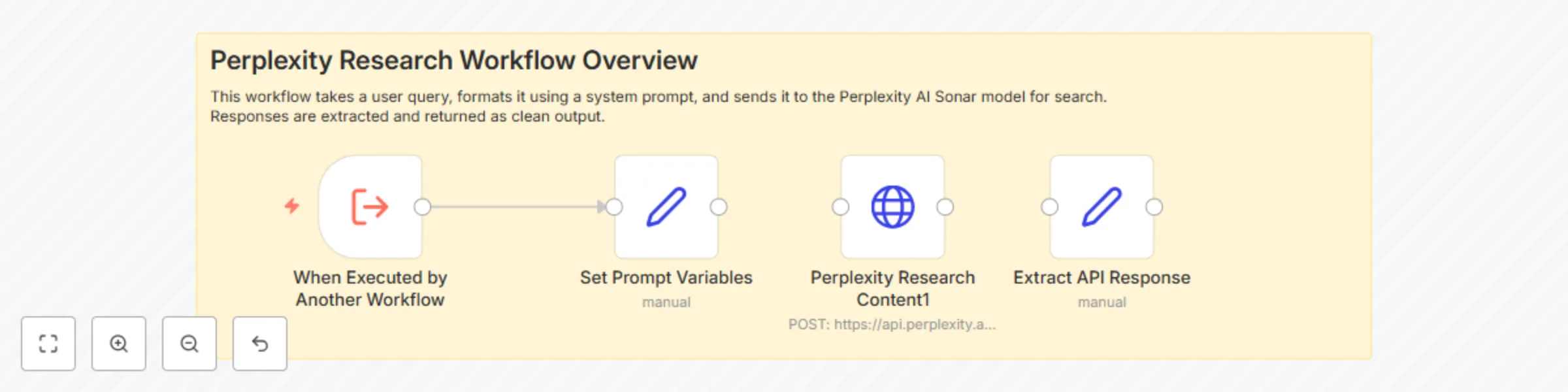
Workflow preview: AI-powered research assistant with Perplexity Sonar API
Free intermediate

AI-powered research assistant with Perplexity Sonar API

Name: AI-Powered Research Agent using Perplexity Sonar Description: This workflow acts as an AI-powered research assistant using the Perplexity Sonar model. When triggered by another workflow, it sends a user-defined prompt to the Perplexity API to retrieve up-to-date search results. The response is then parsed into a clean format for downstream processing. How it Works: Trigger: Activated from another workflow via Execute Workflow Trigger. Prompt Setup: Sets a system role message and user query dynamically. API Call: Sends a POST request to Perplexity's /chat/completions endpoint with your credentials. Response Handling: Extracts the message content from the API response. Output: Returns the result, ready for display or further processing. Requirements: A Perplexity AI API Key Set up authentication via Header Auth with Bearer token Ensure your account allows outbound HTTP requests in n8n Customization Tips: Modify the system prompt to suit your research domain Chain this workflow with other automation like blog creation, summaries, etc. Replace the output handling logic to fit into Google Sheets, Notion, or Telegram

H
HoangSP
Market Research
23 Apr 2025
1674
0
Workflow preview: Seo blog generator with GPT-4o, Perplexity, and Telegram integration
Free advanced

Seo blog generator with GPT-4o, Perplexity, and Telegram integration

### SEO Blog Generator with GPT-4o, Perplexity, and Telegram Integration This workflow helps you automatically generate SEO-optimized blog posts using **Perplexity.ai**, **OpenAI GPT-4o**, and optionally **Telegram** for interaction. --- ### 🚀 Features - 🧠 **Topic research** via Perplexity sub-workflow - ✍️ **AI-written blog post** generated with GPT-4o - 📊 Structured output with metadata: title, slug, meta description - 📩 Integration with Telegram to trigger workflows or receive outputs (optional) --- ### ⚙️ Requirements - ✅ OpenAI API Key (GPT-4o or GPT-3.5) - ✅ Perplexity API Key (with access to `/chat/completions`) - ✅ (Optional) Telegram Bot Token and webhook setup --- ### 🛠 Setup Instructions 1. **Credentials**: - Add your OpenAI credentials (`openAiApi`) - Add your Perplexity credentials under `httpHeaderAuth` - Optional: Setup Telegram credentials under `telegramApi` 2. **Inputs**: - Use the **Form Trigger** or **Telegram** input node to send a `Research Query` 3. **Subworkflow**: - Make sure to import and activate the subworkflow `Perplexity_Searcher` to fetch recent search results 4. **Customization**: - Edit prompt texts inside the `Blog Content Generator` and `Metadata Generator` to change writing style or target industry - Add or remove output nodes like Google Sheets, Notion, etc. --- ### 📦 Output Format The final blog post includes: - ✅ Blog content (1500-2000 words) - ✅ Metadata: title, slug, and meta description - ✅ Extracted summary in JSON - ✅ Delivered to Telegram (if connected) --- Need help? Reach out on the [n8n community forum](https://community.n8n.io)

H
HoangSP
Content Creation
23 Apr 2025
5476
0

Workflow preview: Medical Q&A chatbot for urology using RAG with Pinecone and GPT-4o
Free advanced

Medical Q&A chatbot for urology using RAG with Pinecone and GPT-4o

# Medical Q&A Chatbot for Urology using RAG with Pinecone and GPT-4o This template provides an AI-powered Q&A assistant for the Urology domain using Retrieval-Augmented Generation (RAG). It uses Pinecone for vector search and GPT-4o for conversational responses. ## 🧠 Use Case This chatbot is designed for clinics or medical pages that want to automate question answering for Urology-related conditions. It uses a vector store of domain knowledge to return verified responses. ## 🔧 Requirements - ✅ OpenAI API key (GPT-4o or GPT-4o-mini) - ✅ Pinecone account with an active index - ✅ Verified Urology documents embedded into Pinecone ## ⚙️ Setup Instructions 1. Create a Pinecone vector index and connect it using the Pinecone credentials node. 2. Upload Urology-related documents to embed using the `Create Embeddings for Urology Docs` node. 3. Customize the chatbot system message to reflect your medical specialty. 4. Deploy this chatbot on your website or link it with Telegram via the chat trigger node. ## 🛠️ Components - `chatTrigger`: Listens for user messages and starts the workflow. - `Medical AI Agent`: GPT-based agent guided by domain-specific instructions. - `RAG Tool Vector Store`: Fetches relevant documents from Pinecone using vector search. - `Memory Buffer`: Maintains conversation context. - `Create Embeddings for Urology Docs`: Encodes documents into vector format. ## 📝 Customization You can replace the knowledge base with any other medical domain by: - Updating the documents stored in Pinecone. - Modifying the system prompt in the AI Agent node. ## 📣 CTA This chatbot is ideal for clinics, medical consultants, or educational websites wanting a reliable AI assistant in Urology.

H
HoangSP
Support Chatbot
23 Apr 2025
3916
0