AI-powered news monitoring with Linkup, Airtable, and Slack notifications

Workflow preview

Workflow preview
100%
AI-powered news monitoring with Linkup, Airtable, and Slack notifications preview
Open on n8n.io

Important notice

This workflow is provided as-is. Please review and test before using in production.

1. Workflow Overview

This template provides a fully automated system for monitoring news on any topic you choose. It leverages Linkup's AI powered web search to find recent, relevant articles, extracts key information ...

Best for

  • Market Research automation workflows
  • AI Summarization automation workflows
  • advanced n8n builders looking for reusable templates

Tools used

n8n-nodes-base.splitinbatches, n8n-nodes-base.wait, n8n-nodes-base.scheduletrigger, n8n-nodes-base.httprequest, n8n-nodes-base.set, n8n-nodes-base.airtable, n8n-nodes-base.slack, n8n-nodes-base.aggregate

Source and attribution

This workflow is cataloged by N8N Workflows and links back to its original n8n.io source page by Guillaume Duvernay.

Original n8n.io source

1.1 Workflow description

Title
AI-powered news monitoring with Linkup, Airtable, and Slack notifications
Workflow name
AI-powered news monitoring with Linkup, Airtable, and Slack notifications

This template provides a fully automated system for monitoring news on any topic you choose. It leverages Linkup's AI-powered web search to find recent, relevant articles, extracts key information like the title, date, and summary, and then neatly organizes everything in an Airtable base.

Stop manually searching for updates and let this workflow deliver a curated news digest directly to your own database, complete with a Slack notification to let you know when it's done. This is the perfect solution for staying informed without the repetitive work.

Who is this for?

  • Marketing & PR professionals: Keep a close eye on industry trends, competitor mentions, and brand sentiment.
  • Analysts & researchers: Effortlessly gather source material and data points on specific research topics.
  • Business owners & entrepreneurs: Stay updated on market shifts, new technologies, and potential opportunities without dedicating hours to reading.
  • Anyone with a passion project: Easily follow developments in your favorite hobby, field of study, or area of interest.

What problem does this solve?

  • Eliminates manual searching: Frees you from the daily or weekly grind of searching multiple news sites for relevant articles.
  • Centralizes information: Consolidates all relevant news into a single, organized, and easily accessible Airtable database.
  • Provides structured data: Instead of just a list of links, it extracts and formats key information (title, summary, URL, date) for each article, ready for review or analysis.
  • Keeps you proactively informed: The automated Slack notification ensures you know exactly when new information is ready, closing the loop on your monitoring process.

How it works

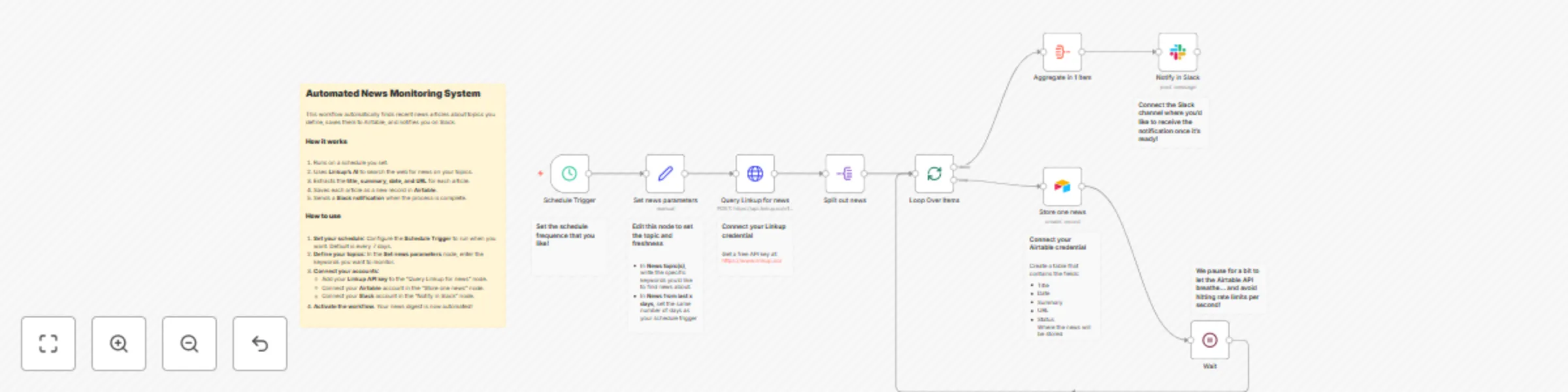
  1. Schedule: The workflow runs automatically based on a schedule you set (the default is weekly).
  2. Define topics: In the Set news parameters node, you specify the topics you want to monitor and the time frame (e.g., news from the last 7 days).
  3. AI web search: The Query Linkup for news node sends your topics to Linkup's API. Linkup's AI searches the web for relevant news articles and returns a structured list containing each article's title, URL, summary, and publication date.
  4. Store in Airtable: The workflow loops through each article found and creates a new record for it in your Airtable base.
  5. Notify on Slack: Once all the news has been stored, a final notification is sent to a Slack channel of your choice, letting you know the process is complete and how many articles were found.

Setup

  1. Configure the trigger: Adjust the Schedule Trigger node to set the frequency and time you want the workflow to run.
  2. Set your topics: In the Set news parameters node, replace the example topics with your own keywords and define the news freshness that you'd like to set.
  3. Connect your accounts:
    • Linkup: Add your Linkup API key in the Query Linkup for news node. Linkup's free plan includes €5 of credits monthly, enough for about 1,000 runs of this workflow.
    • Airtable: In the Store one news node, select your Airtable account, then choose the Base and Table where you want to save the news.
    • Slack: In the Notify in Slack node, select your Slack account and the channel where you want to receive notifications.
  4. Activate the workflow: Toggle the workflow to "Active", and your automated news monitoring system is live!

Taking it further

  • Change your database: Don't use Airtable? Easily swap the Airtable node for a Notion, Google Sheets, or any other database node to store your news.
  • Customize notifications: Replace the Slack node with a Discord, Telegram, or Email node to get alerts on your preferred platform.
  • Add AI analysis: Insert an AI node after the Linkup search to perform sentiment analysis on the news summaries, categorize articles, or generate a high-level overview before saving them.

1.2 Logical Blocks

This catalog entry is organized from the workflow JSON. The node-level section below shows the executable blocks available for review before importing the template.

2. Block-by-Block Analysis

Block 1 - Loop Over Items

Type / Role
n8n-nodes-base.splitInBatches - splitInBatches
Config choices
Version 3

Block 2 - Wait

Type / Role
n8n-nodes-base.wait - wait
Config choices
Version 1.1

Block 3 - Schedule Trigger

Type / Role
n8n-nodes-base.scheduleTrigger - scheduleTrigger
Config choices
Version 1.2

Block 4 - Query Linkup for news

Type / Role
n8n-nodes-base.httpRequest - httpRequest
Config choices
Version 4.2

Block 5 - Set news parameters

Type / Role
n8n-nodes-base.set - set
Config choices
Version 3.4

Block 6 - Store one news

Type / Role
n8n-nodes-base.airtable - airtable
Config choices
Version 2.1

Block 7 - Notify in Slack

Type / Role
n8n-nodes-base.slack - slack
Config choices
Version 2.3

Block 8 - Aggregate in 1 item

Type / Role
n8n-nodes-base.aggregate - aggregate
Config choices
Version 1

Block 9 - Split out news

Type / Role
n8n-nodes-base.splitOut - splitOut
Config choices
Version 1

Block 10 - Sticky Note

Type / Role
n8n-nodes-base.stickyNote - stickyNote
Config choices
Version 1

Block 11 - Sticky Note1

Type / Role
n8n-nodes-base.stickyNote - stickyNote
Config choices
Version 1

Block 12 - Sticky Note2

Type / Role
n8n-nodes-base.stickyNote - stickyNote
Config choices
Version 1

Block 13 - Sticky Note3

Type / Role
n8n-nodes-base.stickyNote - stickyNote
Config choices
Version 1

Block 14 - Sticky Note4

Type / Role
n8n-nodes-base.stickyNote - stickyNote
Config choices
Version 1

Block 15 - Sticky Note5

Type / Role
n8n-nodes-base.stickyNote - stickyNote
Config choices
Version 1

Block 16 - Sticky Note6

Type / Role
n8n-nodes-base.stickyNote - stickyNote
Config choices
Version 1

3. Summary Table

Workflow AI-powered news monitoring with Linkup, Airtable, and Slack notifications
Complexity advanced
Nodes 16
Categories Market Research, AI Summarization
Author Guillaume Duvernay
Published 21 Jul 2025

4. Reproducing the Workflow from Scratch

  1. 1. Download the workflow JSON

    Use the JSON export at /data/workflows/6241/6241.json as the source template for this automation.

  2. 2. Import the template into n8n

    Open n8n, import the downloaded JSON, and review each node before activating the workflow.

  3. 3. Configure credentials and variables

    Replace placeholder credentials, API keys, webhook URLs, account IDs, and environment-specific values with your own settings.

  4. 4. Test with sample data

    Run the workflow manually or in a staging workspace, inspect node output, and confirm downstream systems receive the expected data.

  5. 5. Activate and monitor

    Enable the workflow only after testing, then monitor executions, errors, and rate limits during the first production runs.

5. General Notes & Resources

Review imported nodes carefully before activation. This catalog entry is intended to help you inspect the workflow structure, understand required services, and find related templates faster.

Node names, credentials, schedules, webhook paths, and external service limits may need adjustment for your workspace.

Frequently asked questions

What does AI-powered news monitoring with Linkup, Airtable, and Slack notifications do?

This template provides a fully automated system for monitoring news on any topic you choose. It leverages Linkup's AI powered web search to find recent, relevant articles, extracts key information ...

What do I need before importing this workflow?

Review the workflow JSON, configure any required credentials in n8n, and test the automation in a safe workspace before using it in production.

Can I customize this workflow?

Yes. Use the block-by-block analysis and the downloadable JSON to inspect each node, then adjust credentials, prompts, schedules, filters, or destinations for your Market Research, AI Summarization use case.