AI-powered LinkedIn connection recommender

Workflow preview

Workflow preview
100%
AI-powered LinkedIn connection recommender preview
Open on n8n.io

Important notice

This workflow is provided as-is. Please review and test before using in production.

1. Workflow Overview

The workflow is triggered manually with user input, searches LinkedIn profiles, processes the results using AI, generates connection recommendations, and delivers them via email. It leverages AI to...

Best for

  • Lead Generation automation workflows
  • Multimodal AI automation workflows
  • intermediate n8n builders looking for reusable templates

Tools used

n8n-nodes-base.httprequest, @n8n/n8n-nodes-langchain.chainllm, @n8n/n8n-nodes-langchain.lmollama, n8n-nodes-base.emailsend, n8n-nodes-base.code, n8n-nodes-base.set, n8n-nodes-base.emailreadimap, n8n-nodes-base.stickynote

Source and attribution

This workflow is cataloged by N8N Workflows and links back to its original n8n.io source page by Oneclick AI Squad.

Original n8n.io source

1.1 Workflow description

Title
AI-powered LinkedIn connection recommender
Workflow name
AI-powered LinkedIn connection recommender

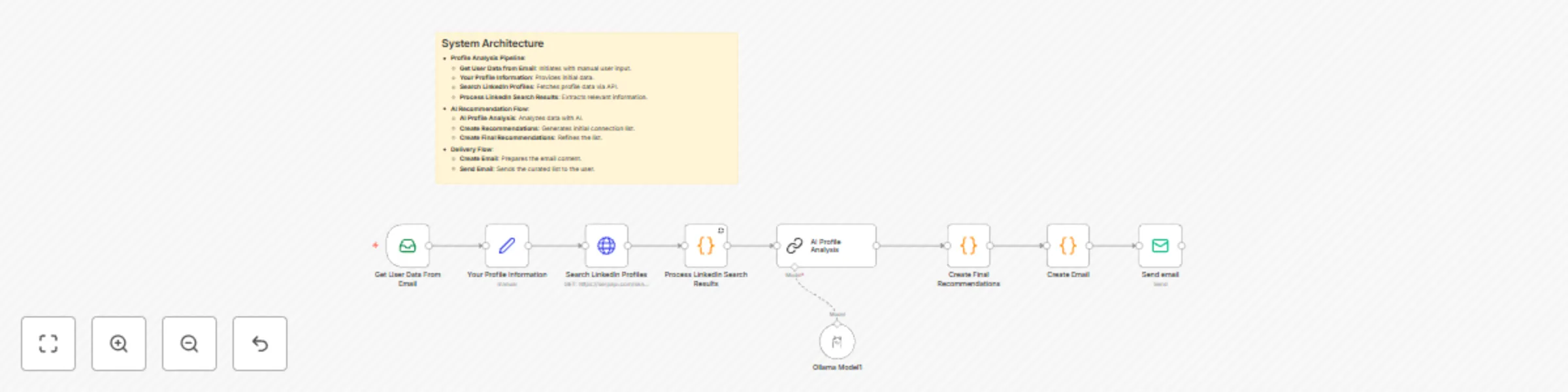
The workflow is triggered manually with user input, searches LinkedIn profiles, processes the results using AI, generates connection recommendations, and delivers them via email. It leverages AI to enhance networking opportunities based on insights from profiles.

Good to Know

  • Each email is personalized with the user’s name and recommended connections.
  • Recommendations are based on LinkedIn search results and AI analysis.
  • The system ensures data privacy by processing inputs securely.
  • Email notifications include a curated list of potential connections.

How it Works

Profile Analysis Workflow

  • Get User Data from Email: Manually inputs user email and profile information to initiate the workflow.
  • Your Profile Information: Provides initial user data for LinkedIn search.
  • Search LinkedIn Profiles: Queries LinkedIn via an API (e.g., SerpAPI) to gather profile data.
  • Process LinkedIn Search Results: Extracts relevant details from search results.

AI Recommendation Workflow

  • AI Profile Analysis: Uses an AI model (e.g., Ollama Model) to analyze profile data and suggest connections.
  • Create Recommendations: Generates a curated list of potential connections.
  • Create Final Recommendations: Refines and formats the recommendation list.
  • Create Email: Prepares a personalized email with the connection list.
  • Send Email: Delivers the email to the user.

Excel Sheet Structure

  • No persistent Excel sheet is required; data is processed in-memory and emailed directly. However, optional logging can be set up:
    • Optional Log Sheet (Recommendations):
      • Timestamp: Date and time of recommendation generation.
      • User Email: User’s email address.
      • Profile Name: User’s LinkedIn profile name.
      • Industry: User’s industry.
      • Recommended Connections: List of suggested connections.
      • Sent Status: Whether the email was sent successfully.

How to Use

  1. Import the Workflow into your n8n instance and configure email integration.
  2. Provide User Data: Manually enter the user’s email and profile information in the "Get User Data from Email" node.
  3. Configure API Credentials: Set up SerpAPI for LinkedIn searches and email service (e.g., SMTP).
  4. Run the Workflow: Execute manually to test the process.
  5. Monitor Emails: Check the user’s inbox for the curated connection list.
  6. Optional Logging: Set up a Google Sheet to log recommendations if desired.

Requirements

  • SerpAPI: For LinkedIn profile searches.
  • Email Service Integration: Gmail, SMTP, or similar for email delivery.
  • Ollama Model: For AI-based profile analysis.
  • n8n Instance: With SerpAPI, email, and function nodes.

Customizing this Workflow

  • Expand Data Sources: Integrate additional platforms (e.g., Xing) for broader searches.
  • Enhance AI: Train the Ollama Model for more specific connection criteria (e.g., job role, location).
  • Add Notifications: Include Slack or SMS alerts for admin tracking.
  • Customize Email: Adjust the email template for branding or additional details.
  • Automate Trigger: Replace manual input with a scheduled trigger or webhook.

1.2 Logical Blocks

This catalog entry is organized from the workflow JSON. The node-level section below shows the executable blocks available for review before importing the template.

2. Block-by-Block Analysis

Block 1 - Search LinkedIn Profiles

Type / Role
n8n-nodes-base.httpRequest - httpRequest
Config choices
Version 4

Block 2 - AI Profile Analysis

Type / Role
@n8n/n8n-nodes-langchain.chainLlm - chainLlm
Config choices
Version 1.7

Block 3 - Ollama Model1

Type / Role
@n8n/n8n-nodes-langchain.lmOllama - lmOllama
Config choices
Version 1

Block 4 - Send email

Type / Role
n8n-nodes-base.emailSend - emailSend
Config choices
Version 2.1

Block 5 - Create Email

Type / Role
n8n-nodes-base.code - code
Config choices
Version 2

Block 6 - Your Profile Information

Type / Role
n8n-nodes-base.set - set
Config choices
Version 3

Block 7 - Process LinkedIn Search Results

Type / Role
n8n-nodes-base.code - code
Config choices
Version 2

Block 8 - Create Final Recommendations

Type / Role
n8n-nodes-base.code - code
Config choices
Version 2

Block 9 - Get User Data From Email

Type / Role
n8n-nodes-base.emailReadImap - emailReadImap
Config choices
Version 2

Block 10 - Sticky Note

Type / Role
n8n-nodes-base.stickyNote - stickyNote
Config choices
Version 1

3. Summary Table

Workflow AI-powered LinkedIn connection recommender
Complexity intermediate
Nodes 10
Categories Lead Generation, Multimodal AI
Author Oneclick AI Squad
Published 08 Aug 2025

4. Reproducing the Workflow from Scratch

  1. 1. Download the workflow JSON

    Use the JSON export at /data/workflows/7174/7174.json as the source template for this automation.

  2. 2. Import the template into n8n

    Open n8n, import the downloaded JSON, and review each node before activating the workflow.

  3. 3. Configure credentials and variables

    Replace placeholder credentials, API keys, webhook URLs, account IDs, and environment-specific values with your own settings.

  4. 4. Test with sample data

    Run the workflow manually or in a staging workspace, inspect node output, and confirm downstream systems receive the expected data.

  5. 5. Activate and monitor

    Enable the workflow only after testing, then monitor executions, errors, and rate limits during the first production runs.

5. General Notes & Resources

Review imported nodes carefully before activation. This catalog entry is intended to help you inspect the workflow structure, understand required services, and find related templates faster.

Node names, credentials, schedules, webhook paths, and external service limits may need adjustment for your workspace.

Frequently asked questions

What does AI-powered LinkedIn connection recommender do?

The workflow is triggered manually with user input, searches LinkedIn profiles, processes the results using AI, generates connection recommendations, and delivers them via email. It leverages AI to...

What do I need before importing this workflow?

Review the workflow JSON, configure any required credentials in n8n, and test the automation in a safe workspace before using it in production.

Can I customize this workflow?

Yes. Use the block-by-block analysis and the downloadable JSON to inspect each node, then adjust credentials, prompts, schedules, filters, or destinations for your Lead Generation, Multimodal AI use case.