AI-powered lead email classification & auto-reply with GPT-4o and Gmail
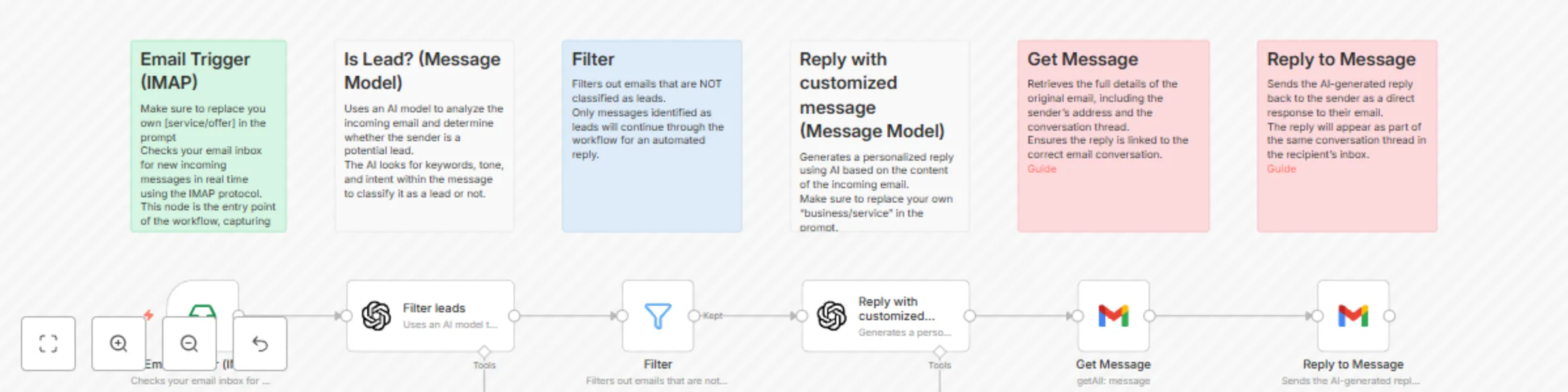
Workflow preview

$20/month : Unlimited workflows
2500 executions/month

THE #1 IN WEB SCRAPING
Scrape any website without limits
HOSTINGER  Early Deal
DISCOUNT 20% Try free
Early DealDISCOUNT 20%
Self-hosted n8n
Unlimited workflows - from $4.99/mo

#1 hub for scraping, AI & automation
6000+ actors - $5 credits/mo
Important notice
This workflow is provided as-is. Please review and test before using in production.
Overview
How it works
This workflow automatically responds to incoming emails identified as potential leads using AI-generated text.
It connects to your email inbox via IMAP, classifies incoming messages with an AI model, filters out non-leads, and sends a personalized reply to relevant messages.
Steps
- Email Trigger (IMAP): Watches your inbox for new emails in real time.
- Is Lead? (Message Model): Uses AI to determine whether the sender is a lead.
- Filter: Passes only lead emails to the next step.
- Write Customized Reply (Message Model): Generates a personalized response using AI.
- Get Message: Retrieves original email details to ensure correct threading.
- Reply to Message: Sends the AI-generated reply to the sender.
Setup Instructions
- Connect your IMAP Email credentials to the first node and set the folder to watch (e.g., INBOX).
- In the "Filter leads" node, adjust the AI prompt to match your lead qualification criteria.
- In the "Reply with customized message" node, edit the AI prompt to reflect your product, service, or business tone.
- Connect your Gmail (or other email provider) credentials in the Get Message and Reply to Message nodes.
- Test with a few sample emails before activating.
Requirements
- IMAP-enabled email account (for receiving messages)
- Gmail API access (or modify to your email provider)
- OpenAI or other AI model credentials for message analysis and reply generation
This template is ready to use, with all steps documented inside sticky notes for easy customization.