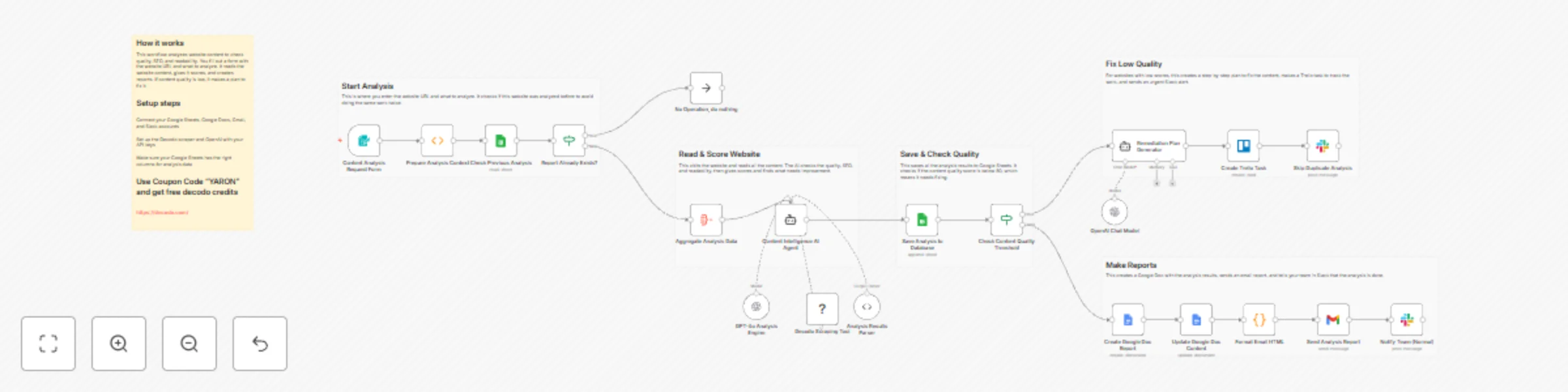
AI-powered content analysis with Decodo scraping & GPT-4o insights

Workflow preview

Workflow preview
100%
AI-powered content analysis with Decodo scraping & GPT-4o insights preview
Open on n8n.io

Important notice

This workflow is provided as-is. Please review and test before using in production.

1. Workflow Overview

This workflow contains community nodes that are only compatible with the self hosted version of n8n. AI Powered Content Analysis System Elevate your content quality with this AI powered Content Ana...

Best for

  • Market Research automation workflows
  • AI Summarization automation workflows
  • advanced n8n builders looking for reusable templates

Tools used

n8n-nodes-base.googlesheets, n8n-nodes-base.function, n8n-nodes-base.formtrigger, n8n-nodes-base.if, @n8n/n8n-nodes-langchain.outputparserstructured, @decodo/n8n-nodes-decodo.decodotool, @n8n/n8n-nodes-langchain.lmchatopenai, @n8n/n8n-nodes-langchain.agent

Source and attribution

This workflow is cataloged by N8N Workflows and links back to its original n8n.io source page by Yaron Been.

Original n8n.io source

1.1 Workflow description

Title
AI-powered content analysis with Decodo scraping & GPT-4o insights
Workflow name
AI-powered content analysis with Decodo scraping & GPT-4o insights

This workflow contains community nodes that are only compatible with the self-hosted version of n8n.

AI-Powered Content Analysis System

Elevate your content quality with this AI-powered Content Analysis System!
This workflow automatically evaluates website content using advanced scraping and AI analysis, providing comprehensive SEO insights, readability scores, and actionable improvement recommendations. Perfect for content teams ensuring optimal performance and engagement across digital properties.

What This Template Does

  1. Triggers via form submission for on-demand content analysis requests.
  2. Checks previous analyses to prevent duplicate processing.
  3. Scrapes target URLs using Decodo for comprehensive content extraction.
  4. Uses AI to evaluate content quality, SEO effectiveness, and readability.
  5. Saves analysis results to Google Sheets for historical tracking.
  6. Generates professional Google Docs reports with actionable insights.
  7. Sends email notifications with formatted analysis summaries.
  8. Alerts teams via Slack for both normal and urgent findings.
  9. Creates remediation plans and Trello tasks for low-quality content.

Key Benefits

  • Automated content quality assessment with AI-powered insights
  • Prevents duplicate analyses to optimize resource usage
  • Comprehensive SEO and readability scoring for data-driven decisions
  • Professional reporting with Google Docs and email integration
  • Immediate team alerts for urgent content improvements
  • Historical tracking and trend analysis capabilities

Features

  • Form-based trigger for easy content analysis requests
  • Duplicate detection and prevention system
  • AI-powered content evaluation using GPT-4o
  • Real-time web scraping with Decodo integration
  • Automated Google Docs report generation
  • Multi-channel notifications (Slack, Gmail)
  • Quality threshold monitoring and alerting
  • Remediation plan generation for low-quality content
  • Trello integration for task management
  • Historical analysis database in Google Sheets

Requirements

  • OpenAI API credentials for AI analysis
  • Decodo API credentials for web scraping
  • Google Sheets OAuth2 credentials with edit access
  • Google Docs OAuth2 credentials for report generation
  • Gmail OAuth2 credentials for email notifications
  • Slack Bot Token with chat:write permission
  • Trello credentials (optional for task management)
  • Environment variables for configuration settings

Target Audience

  • Content marketing and strategy teams
  • SEO specialists and digital marketers
  • Content quality assurance teams
  • Digital agencies managing multiple clients
  • Website owners and publishers
  • Content operations managers

Step-by-Step Setup Instructions

  1. Connect OpenAI credentials for AI content analysis capabilities
  2. Set up Decodo API credentials for web scraping functionality
  3. Configure Google Sheets with required analysis headers
  4. Add Google Docs credentials for automated report generation
  5. Set up Gmail and Slack credentials for notifications
  6. Optional: Configure Trello integration for task management
  7. Customize the analysis form with your industry and focus areas
  8. Test with sample URLs to verify all integrations and data flow
  9. Deploy for ongoing content quality monitoring and optimization

Pro Tip: Use coupon code "YARON" to get 23K requests for testing the workflow with the Decodo scraper

This workflow ensures your content maintains high quality standards with automated analysis, professional reporting, and immediate improvement alerts!

1.2 Logical Blocks

This catalog entry is organized from the workflow JSON. The node-level section below shows the executable blocks available for review before importing the template.

2. Block-by-Block Analysis

Block 1 - Check Previous Analysis

Type / Role
n8n-nodes-base.googleSheets - googleSheets
Config choices
Version 4.5

Block 2 - Prepare Analysis Context

Type / Role
n8n-nodes-base.function - function
Config choices
Version 1

Block 3 - Content Analysis Request Form

Type / Role
n8n-nodes-base.formTrigger - formTrigger
Config choices
Version 2.2

Block 4 - Report Already Exists?

Type / Role
n8n-nodes-base.if - if
Config choices
Version 2.2

Block 5 - Analysis Results Parser

Type / Role
@n8n/n8n-nodes-langchain.outputParserStructured - outputParserStructured
Config choices
Version 1.3

Block 6 - Decodo Scraping Tool

Type / Role
@decodo/n8n-nodes-decodo.decodoTool - decodoTool
Config choices
Version 1

Block 7 - GPT-4o Analysis Engine

Type / Role
@n8n/n8n-nodes-langchain.lmChatOpenAi - lmChatOpenAi
Config choices
Version 1

Block 8 - Content Intelligence AI Agent

Type / Role
@n8n/n8n-nodes-langchain.agent - agent
Config choices
Version 2.2

Block 9 - Check Content Quality Threshold

Type / Role
n8n-nodes-base.if - if
Config choices
Version 2.2

Block 10 - Save Analysis to Database

Type / Role
n8n-nodes-base.googleSheets - googleSheets
Config choices
Version 4.7

Block 11 - Notify Team (Normal)

Type / Role
n8n-nodes-base.slack - slack
Config choices
Version 2.3

Block 12 - Send Analysis Report

Type / Role
n8n-nodes-base.gmail - gmail
Config choices
Version 2.1

Block 13 - Format Email HTML

Type / Role
n8n-nodes-base.code - code
Config choices
Version 2

Block 14 - Remediation Plan Generator

Type / Role
@n8n/n8n-nodes-langchain.agent - agent
Config choices
Version 1.6

Block 15 - OpenAI Chat Model

Type / Role
@n8n/n8n-nodes-langchain.lmChatOpenAi - lmChatOpenAi
Config choices
Version 1.2

Block 16 - No Operation, do nothing

Type / Role
n8n-nodes-base.noOp - noOp
Config choices
Version 1

Block 17 - Sticky Note

Type / Role
n8n-nodes-base.stickyNote - stickyNote
Config choices
Version 1

Block 18 - Aggregate Analysis Data

Type / Role
n8n-nodes-base.aggregate - aggregate
Config choices
Version 1

Block 19 - Create Google Doc Report

Type / Role
n8n-nodes-base.googleDocs - googleDocs
Config choices
Version 2

Block 20 - Update Google Doc Content

Type / Role
n8n-nodes-base.googleDocs - googleDocs
Config choices
Version 2

Block 21 - Create Trello Task

Type / Role
n8n-nodes-base.trello - trello
Config choices
Version 1

Block 22 - Skip Duplicate Analysis

Type / Role
n8n-nodes-base.slack - slack
Config choices
Version 2.3

Block 23 - Sticky Note1

Type / Role
n8n-nodes-base.stickyNote - stickyNote
Config choices
Version 1

Block 24 - Sticky Note3

Type / Role
n8n-nodes-base.stickyNote - stickyNote
Config choices
Version 1

Showing the first 24 of 27 workflow blocks. Download the JSON for the full node graph.

3. Summary Table

Workflow AI-powered content analysis with Decodo scraping & GPT-4o insights
Complexity advanced
Nodes 27
Categories Market Research, AI Summarization
Author Yaron Been
Published 01 Nov 2025

4. Reproducing the Workflow from Scratch

  1. 1. Download the workflow JSON

    Use the JSON export at /data/workflows/10413/10413.json as the source template for this automation.

  2. 2. Import the template into n8n

    Open n8n, import the downloaded JSON, and review each node before activating the workflow.

  3. 3. Configure credentials and variables

    Replace placeholder credentials, API keys, webhook URLs, account IDs, and environment-specific values with your own settings.

  4. 4. Test with sample data

    Run the workflow manually or in a staging workspace, inspect node output, and confirm downstream systems receive the expected data.

  5. 5. Activate and monitor

    Enable the workflow only after testing, then monitor executions, errors, and rate limits during the first production runs.

5. General Notes & Resources

Review imported nodes carefully before activation. This catalog entry is intended to help you inspect the workflow structure, understand required services, and find related templates faster.

Node names, credentials, schedules, webhook paths, and external service limits may need adjustment for your workspace.

Frequently asked questions

What does AI-powered content analysis with Decodo scraping & GPT-4o insights do?

This workflow contains community nodes that are only compatible with the self hosted version of n8n. AI Powered Content Analysis System Elevate your content quality with this AI powered Content Ana...

What do I need before importing this workflow?

Review the workflow JSON, configure any required credentials in n8n, and test the automation in a safe workspace before using it in production.

Can I customize this workflow?

Yes. Use the block-by-block analysis and the downloadable JSON to inspect each node, then adjust credentials, prompts, schedules, filters, or destinations for your Market Research, AI Summarization use case.