Block 1 - Parse Client Data
- Type / Role
- n8n-nodes-base.code - code
- Config choices
- Version 2


 Early Deal
This workflow is provided as-is. Please review and test before using in production.
Streamline client onboarding and project setup from hours to minutes with AI driven automation. This intelligent workflow eliminates manual coordination, builds proposals, creates projects in Asana...
n8n-nodes-base.code, @n8n/n8n-nodes-langchain.agent, n8n-nodes-base.asana, n8n-nodes-base.slack, n8n-nodes-base.gmail, n8n-nodes-base.hubspot, n8n-nodes-base.googlesheets, n8n-nodes-base.stickynote
This workflow is cataloged by N8N Workflows and links back to its original n8n.io source page by Jitesh Dugar.
Original n8n.io sourceStreamline client onboarding and project setup from hours to minutes with AI-driven automation. This intelligent workflow eliminates manual coordination, builds proposals, creates projects in Asana, welcomes clients on Slack, and logs everything — ensuring 90% faster onboarding and zero dropped steps.
Transforms your client onboarding from scattered tools and emails into one seamless automation:
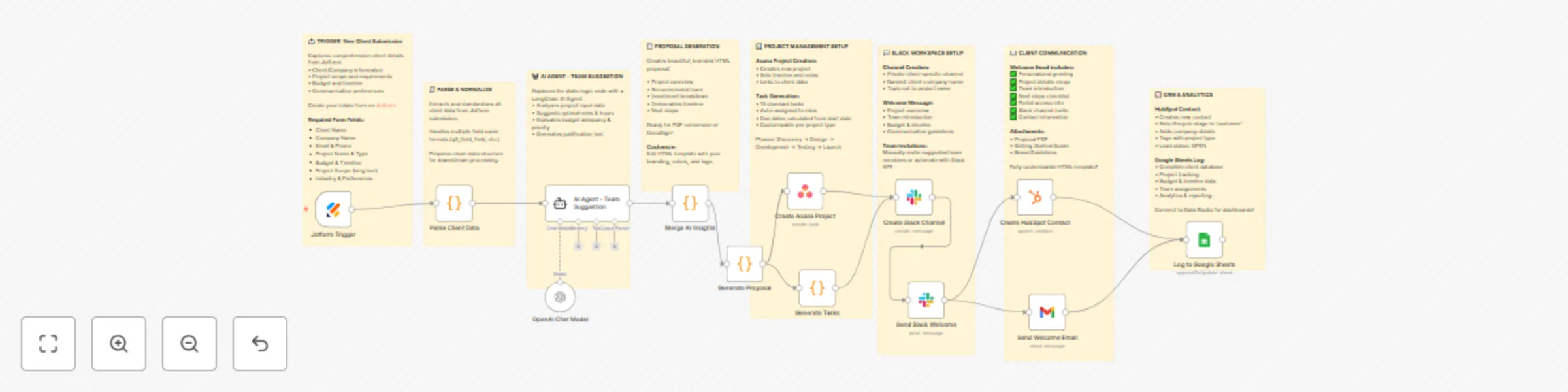
📝 Capture Client Details – Jotform intake form collects client, company, and project information.
🧠 AI-Powered Analysis – LangChain AI Agent analyzes the project scope, estimates effort, and recommends team composition.
📄 Generate Proposal – Automatically builds a professional HTML proposal summarizing goals, timeline, and estimated hours.
🗂️ Create Asana Project – Generates a new project with all key details, milestones, and assigned team members.
💬 Slack Collaboration – Creates a dedicated Slack channel, sends welcome messages, and introduces the project team.
📧 Welcome Email – Sends a personalized onboarding email to the client with project summary and next steps.
💼 CRM Sync – Creates or updates a HubSpot contact with complete project and client information.
📊 Audit Logging – Logs all onboarding activity to Google Sheets for centralized record-keeping.
🤖 AI Proposal Generation – Uses LangChain AI to generate smart project summaries and resource plans.
⚙️ End-to-End Automation – From form submission to project creation, communication, and CRM logging.
💬 Smart Slack Setup – Automatic channel creation and messaging for internal coordination.
📧 Personalized Client Emails – Beautifully formatted, professional onboarding emails.
🗂️ Asana Integration – Project creation with dynamic task templates and priorities.
📊 Google Sheets Logging – Instant audit trail for every client submission and generated proposal.
💼 CRM Integration – Automatically syncs client data with HubSpot for sales and account tracking.
🚀 Agencies & Service Providers – Automate client onboarding, proposal creation, and task setup.
🏢 Consultancies – Quickly turn client requests into structured projects with assigned resources.
💻 Freelancers & Creators – Impress clients with AI-built proposals and instant communication.
📈 Growing Teams – Scale onboarding without extra admin or coordination time.
🧠 Operations Teams – Ensure consistency and transparency across all onboarding activities.
🧾 Jotform – Client intake form (project details, budget, company info). Create your form for free on Jotform using this link
🤖 AI Agent – For analyzing project scope and building proposals.
🗂️ Asana – Project creation and task assignment.
💬 Slack – For automated client channel creation and internal communication.
📧 Gmail – For onboarding and proposal emails.
💼 HubSpot – CRM contact creation and project linkage.
📊 Google Sheets – For logging all onboarding and AI results.
📄 PDF Generation (PDF Munk) – Convert AI-generated proposals into downloadable PDFs.
💬 Slack Interactive Approvals – Add buttons for internal review before client communication.
📈 Performance Dashboard – Connect Google Sheets data to Looker Studio for tracking onboarding times.
🌍 Multilingual Support – Add translation nodes for international clients.
🔐 File Attachments – Send proposal PDFs or onboarding kits automatically via Gmail.
1️⃣ Import Template – Copy and import the JSON file into your n8n workspace. 2️⃣ Set Up Jotform – Create a form with fields for client name, company, project name, budget, and requirements. 3️⃣ Add Credentials – Connect Jotform, AI Agent, Asana, Slack, Gmail, HubSpot, and Google Sheets. 4️⃣ Configure Sheet ID – Replace YOUR_SHEET_ID in the Google Sheets node. 5️⃣ Customize Proposal HTML – Edit AI prompt and branding to reflect your company’s style. 6️⃣ Test Workflow – Submit a test form and verify Slack, Asana, Gmail, and Sheets outputs. 7️⃣ Deploy – Activate workflow and share the Jotform link with your sales or operations team.
1️⃣ Proposal Branding – Customize proposal HTML with logos, brand colors, and formatting. 2️⃣ AI Prompt Tuning – Refine the LangChain AI prompt to match your tone or project style. 3️⃣ Task Templates – Adjust task names, assignees, and due dates in the Asana creation node. 4️⃣ Slack Messaging – Update welcome message formatting and team introduction details. 5️⃣ CRM Fields – Map additional HubSpot properties for better data tracking. 6️⃣ Sheet Logging – Add more columns for tracking team recommendations or proposal scores.
⚡ 90% Faster Onboarding – Reduce manual setup from hours to minutes.
🤖 AI Precision – Intelligent proposals and team allocations that impress clients instantly.
📈 Zero Missed Steps – Every project automatically created, communicated, and logged.
💬 Seamless Collaboration – Slack, Gmail, and Asana in perfect sync.
🗂️ Complete Transparency – Every onboarding step logged for accountability and improvement.
🏆 Use Cases
🧑💼 Marketing & Creative Agencies – Automate creative project scoping and proposal creation.
💻 Software Development Teams – Rapidly assess client tech requirements and allocate developers.
🧾 Consulting Firms – Build data-backed, AI-enhanced proposals for client engagements.
🏢 Corporate PMOs – Standardize project setup and approvals across multiple departments.
💡 Refine AI Prompt – Include examples of past projects to improve proposal quality.
💬 Add Slack Approvals – Insert “manager approval” logic before sending proposals.
📄 Attach PDFs – Use PDF Munk for branded, downloadable proposals.
📊 Track Conversion – Link HubSpot deal stage changes based on Asana progress.
📅 Monitor Efficiency – Use Sheet timestamps to calculate average onboarding time.
This workflow demonstrates:
AI integration using Agents
Multi-app orchestration and data syncing
Advanced HTML and email template customization
Real-world Asana and Slack API usage
CRM syncing and Google Sheets logging
Modular, scalable n8n workflow design
Workflow Structure Visualization
📝 Jotform Submission ↓ 🧠 AI Project Analysis (Agent) ↓ 📄 Proposal Generation (HTML) ↓ 🗂️ Asana Project Creation ↓ 💬 Slack Channel Setup & Message ↓ 📧 Gmail Welcome Email ↓ 💼 HubSpot Contact Creation ↓ 📊 Google Sheets Log
Import this template today and let AI handle the heavy lifting. Your team saves hours, your clients get instant engagement — and your entire process runs flawlessly. ✨
This catalog entry is organized from the workflow JSON. The node-level section below shows the executable blocks available for review before importing the template.
| Workflow | AI-powered client onboarding with Jotform, Asana, Slack, and HubSpot |
|---|---|
| Complexity | advanced |
| Nodes | 21 |
| Categories | Lead Nurturing, AI Chatbot |
| Author | Jitesh Dugar |
| Published | 14 Oct 2025 |
Use the JSON export at /data/workflows/9628/9628.json as the source template for this automation.
Open n8n, import the downloaded JSON, and review each node before activating the workflow.
Replace placeholder credentials, API keys, webhook URLs, account IDs, and environment-specific values with your own settings.
Run the workflow manually or in a staging workspace, inspect node output, and confirm downstream systems receive the expected data.
Enable the workflow only after testing, then monitor executions, errors, and rate limits during the first production runs.
Review imported nodes carefully before activation. This catalog entry is intended to help you inspect the workflow structure, understand required services, and find related templates faster.
Node names, credentials, schedules, webhook paths, and external service limits may need adjustment for your workspace.
Streamline client onboarding and project setup from hours to minutes with AI driven automation. This intelligent workflow eliminates manual coordination, builds proposals, creates projects in Asana...
Review the workflow JSON, configure any required credentials in n8n, and test the automation in a safe workspace before using it in production.
Yes. Use the block-by-block analysis and the downloadable JSON to inspect each node, then adjust credentials, prompts, schedules, filters, or destinations for your Lead Nurturing, AI Chatbot use case.