AI newsletter builder: Crawl sites with Dumpling AI, summarize with GPT-4o

Workflow preview

Workflow preview
100%
AI newsletter builder: Crawl sites with Dumpling AI, summarize with GPT-4o preview
Open on n8n.io

Important notice

This workflow is provided as-is. Please review and test before using in production.

1. Workflow Overview

Who is this for? This workflow is built for newsletter writers, marketers, content creators, or anyone who curates and summarizes web articles. It’s especially helpful for virtual assistants and fo...

Best for

  • Social Media automation workflows
  • AI Summarization automation workflows
  • intermediate n8n builders looking for reusable templates

Tools used

n8n-nodes-base.manualtrigger, n8n-nodes-base.googlesheets, n8n-nodes-base.httprequest, n8n-nodes-base.splitout, n8n-nodes-base.set, n8n-nodes-base.code, @n8n/n8n-nodes-langchain.openai, n8n-nodes-base.gmail

Source and attribution

This workflow is cataloged by N8N Workflows and links back to its original n8n.io source page by Yang.

Original n8n.io source

1.1 Workflow description

Title
AI newsletter builder: Crawl sites with Dumpling AI, summarize with GPT-4o
Workflow name
AI newsletter builder: Crawl sites with Dumpling AI, summarize with GPT-4o

Who is this for?

This workflow is built for newsletter writers, marketers, content creators, or anyone who curates and summarizes web articles. It’s especially helpful for virtual assistants and founders who need to quickly turn web content into digestible, branded newsletters using AI.


What problem is this workflow solving?

Manually reading, summarizing, and formatting multiple articles into a newsletter takes time and focus. This workflow automates the process using Dumpling AI for crawling, GPT-4o for summarization, and Gmail for delivery—so you can go from raw URLs to a polished email in minutes.


What this workflow does

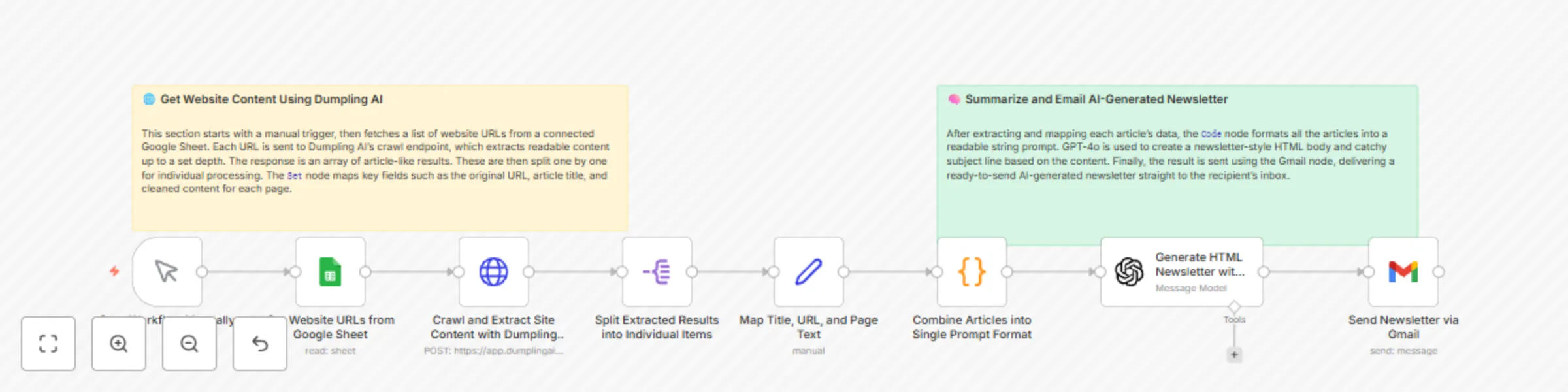
  • Starts manually (can also be scheduled)
  • Reads a list of article URLs from Google Sheets
  • Sends URLs to Dumpling AI to crawl and extract content
  • Splits each article into a single item for processing
  • Uses a Code node to clean and structure article data
  • Uses an Edit Fields node to merge articles into one JSON block
  • GPT-4o summarizes and generates HTML content for the newsletter
  • Sends the formatted newsletter via Gmail

Setup

  1. Google Sheets

    • Create a sheet with a column (A) for article URLs
    • Update the Read URLs from Google Sheet node to use your Sheet ID and tab name
    • Connect your Google account in the credentials
  2. Dumpling AI

    • Sign up at https://app.dumplingai.com
    • Create an agent for web crawling under /crawl
    • Add your Dumpling API key in the HTTP headers of the Crawl Content with Dumpling AI node
  3. Split Node

    • Breaks apart the array of articles from Dumpling AI so each article is processed individually
  4. Code Node

    • Structures each article as JSON with title, url, and cleaned text content
  5. Edit Fields Node

    • Gathers all structured articles back into a single JSON array to prepare for AI summarization
  6. OpenAI (GPT-4o)

    • Processes the article list and returns a formatted subject line and HTML newsletter content
  7. Gmail

    • Connect your Gmail account to send the AI-generated newsletter to your inbox or team
    • Update the recipient field in the Send HTML Email via Gmail node

How to customize this workflow to your needs

  • Replace the manual trigger with a Schedule node to send newsletters weekly
  • Modify the GPT-4o prompt to change tone (e.g., more professional, funny, casual)
  • Add filtering logic to skip low-value articles
  • Connect Slack, Airtable, or Notion for internal team usage
  • Change Gmail to SendGrid or Outlook if preferred

Final Notes

This workflow uses:

  • Dumpling AI /crawl endpoint to extract article content
  • Split, Code, and Edit Fields nodes to format multi-article input
  • GPT-4o for summarization and HTML formatting
  • Gmail for delivery

This setup eliminates manual steps and delivers fast, consistent newsletters powered by AI.

1.2 Logical Blocks

This catalog entry is organized from the workflow JSON. The node-level section below shows the executable blocks available for review before importing the template.

2. Block-by-Block Analysis

Block 1 - Start Workflow Manually

Type / Role
n8n-nodes-base.manualTrigger - manualTrigger
Config choices
Version 1

Block 2 - Get Website URLs from Google Sheet

Type / Role
n8n-nodes-base.googleSheets - googleSheets
Config choices
Version 4.5

Block 3 - Crawl and Extract Site Content with Dumpling AI

Type / Role
n8n-nodes-base.httpRequest - httpRequest
Config choices
Version 4.2

Block 4 - Split Extracted Results into Individual Items

Type / Role
n8n-nodes-base.splitOut - splitOut
Config choices
Version 1

Block 5 - Map Title, URL, and Page Text

Type / Role
n8n-nodes-base.set - set
Config choices
Version 3.4

Block 6 - Combine Articles into Single Prompt Format

Type / Role
n8n-nodes-base.code - code
Config choices
Version 2

Block 7 - Generate HTML Newsletter with Subject Using GPT-4o

Type / Role
@n8n/n8n-nodes-langchain.openAi - openAi
Config choices
Version 1.8

Block 8 - Send Newsletter via Gmail

Type / Role
n8n-nodes-base.gmail - gmail
Config choices
Version 2.1

Block 9 - Sticky Note

Type / Role
n8n-nodes-base.stickyNote - stickyNote
Config choices
Version 1

Block 10 - Sticky Note1

Type / Role
n8n-nodes-base.stickyNote - stickyNote
Config choices
Version 1

3. Summary Table

Workflow AI newsletter builder: Crawl sites with Dumpling AI, summarize with GPT-4o
Complexity intermediate
Nodes 10
Categories Social Media, AI Summarization
Author Yang
Published 14 May 2025

4. Reproducing the Workflow from Scratch

  1. 1. Download the workflow JSON

    Use the JSON export at /data/workflows/4030/4030.json as the source template for this automation.

  2. 2. Import the template into n8n

    Open n8n, import the downloaded JSON, and review each node before activating the workflow.

  3. 3. Configure credentials and variables

    Replace placeholder credentials, API keys, webhook URLs, account IDs, and environment-specific values with your own settings.

  4. 4. Test with sample data

    Run the workflow manually or in a staging workspace, inspect node output, and confirm downstream systems receive the expected data.

  5. 5. Activate and monitor

    Enable the workflow only after testing, then monitor executions, errors, and rate limits during the first production runs.

5. General Notes & Resources

Review imported nodes carefully before activation. This catalog entry is intended to help you inspect the workflow structure, understand required services, and find related templates faster.

Node names, credentials, schedules, webhook paths, and external service limits may need adjustment for your workspace.

Frequently asked questions

What does AI newsletter builder: Crawl sites with Dumpling AI, summarize with GPT-4o do?

Who is this for? This workflow is built for newsletter writers, marketers, content creators, or anyone who curates and summarizes web articles. It’s especially helpful for virtual assistants and fo...

What do I need before importing this workflow?

Review the workflow JSON, configure any required credentials in n8n, and test the automation in a safe workspace before using it in production.

Can I customize this workflow?

Yes. Use the block-by-block analysis and the downloadable JSON to inspect each node, then adjust credentials, prompts, schedules, filters, or destinations for your Social Media, AI Summarization use case.