Block 1 - Receive Meeting Data
- Type / Role
- n8n-nodes-base.webhook - webhook
- Config choices
- Version 2.1


 Early Deal
This workflow is provided as-is. Please review and test before using in production.
How it Works This workflow accepts meeting transcripts via webhook (Zoom, Google Meet, Teams, Otter.ai, or manual notes), immediately processing them through an intelligent pipeline that eliminates...
n8n-nodes-base.webhook, n8n-nodes-base.code, n8n-nodes-base.openai, n8n-nodes-base.slack, n8n-nodes-base.notion, n8n-nodes-base.gmail, n8n-nodes-base.googlecalendar, n8n-nodes-base.googlesheets
This workflow is cataloged by N8N Workflows and links back to its original n8n.io source page by Daniel Shashko.
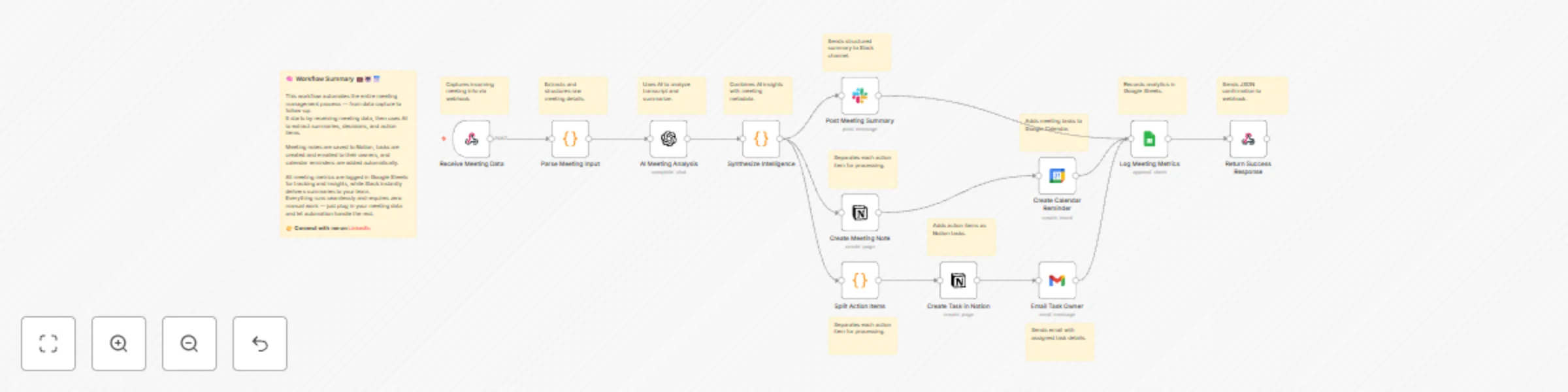
Original n8n.io sourceThis workflow accepts meeting transcripts via webhook (Zoom, Google Meet, Teams, Otter.ai, or manual notes), immediately processing them through an intelligent pipeline that eliminates post-meeting admin work. The system parses multiple input formats (JSON, form data, transcription outputs), extracting meeting metadata including title, date, attendees, transcript content, duration, and recording URLs.
OpenAI analyzes the transcript to extract eight critical dimensions: executive summary, key decisions with ownership, action items with assigned owners and due dates, discussion topics, open questions, next steps, risks/blockers, and follow-up meeting requirements—all returned as structured JSON. The intelligence engine enriches each action item with unique IDs, priority scores (weighing urgency + owner assignment + due date), status initialization, and meeting context links, then calculates a completeness score (0-100) that penalizes missing owners and undefined deadlines.
Multi-channel distribution ensures visibility: Slack receives formatted summaries with emoji categorization for decisions (✅), action items (🎯) with priority badges and owner assignments, and completeness scores (📊). Notion gets dual-database updates—meeting notes with formatted decisions and individual task cards in your action item database with full filtering and kanban capabilities. Task owners receive personalized HTML emails with priority color-coding and meeting context, while Google Calendar creates due-date reminders as calendar events.
Every meeting logs to Google Sheets for analytics tracking: attendee count, duration, action items created, priority distribution, decision count, completeness score, and follow-up indicators. The workflow returns a JSON response confirming successful processing with meeting ID, action item count, and executive summary. The entire pipeline executes in 8-12 seconds from submission to full distribution.
chat:write scope, get bot token, replace channel ID placeholder with your #meeting-summaries channelOnce configured, this workflow becomes your team's institutional memory—capturing every commitment and decision while eliminating hours of weekly admin work, ensuring accountability is automatic and follow-through is guaranteed.
Built by Daniel Shashko
Connect on LinkedIn
This catalog entry is organized from the workflow JSON. The node-level section below shows the executable blocks available for review before importing the template.
Showing the first 24 of 25 workflow blocks. Download the JSON for the full node graph.
| Workflow | AI meeting summary & action item tracker with Notion, Slack, and Gmail |
|---|---|
| Complexity | advanced |
| Nodes | 25 |
| Categories | Project Management, AI Summarization |
| Author | Daniel Shashko |
| Published | 29 Oct 2025 |
Use the JSON export at /data/workflows/10286/10286.json as the source template for this automation.
Open n8n, import the downloaded JSON, and review each node before activating the workflow.
Replace placeholder credentials, API keys, webhook URLs, account IDs, and environment-specific values with your own settings.
Run the workflow manually or in a staging workspace, inspect node output, and confirm downstream systems receive the expected data.
Enable the workflow only after testing, then monitor executions, errors, and rate limits during the first production runs.
Review imported nodes carefully before activation. This catalog entry is intended to help you inspect the workflow structure, understand required services, and find related templates faster.
Node names, credentials, schedules, webhook paths, and external service limits may need adjustment for your workspace.
How it Works This workflow accepts meeting transcripts via webhook (Zoom, Google Meet, Teams, Otter.ai, or manual notes), immediately processing them through an intelligent pipeline that eliminates...
Review the workflow JSON, configure any required credentials in n8n, and test the automation in a safe workspace before using it in production.
Yes. Use the block-by-block analysis and the downloadable JSON to inspect each node, then adjust credentials, prompts, schedules, filters, or destinations for your Project Management, AI Summarization use case.