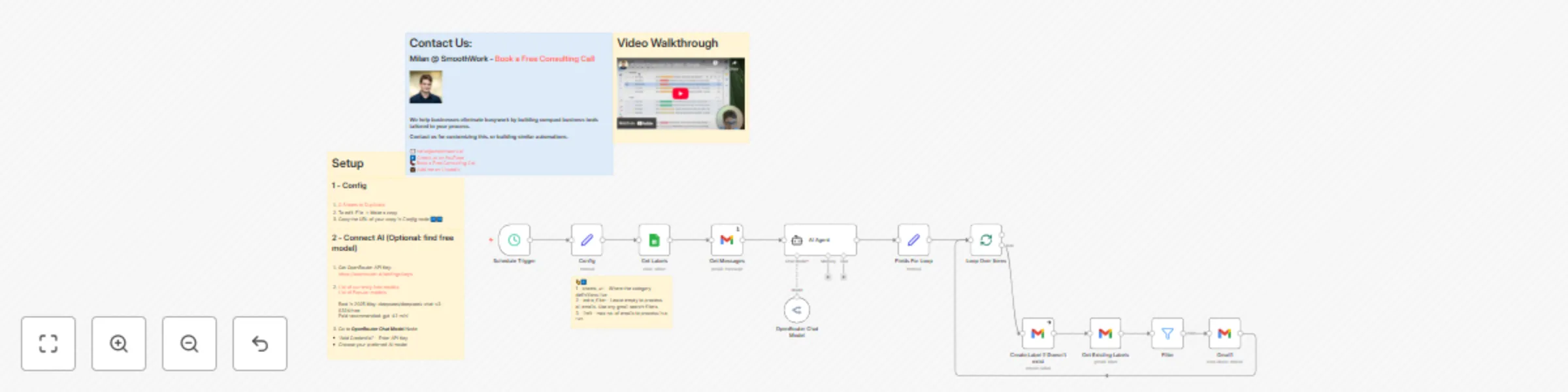
AI email organizer for GMail - advanced email management & sorting

Workflow preview

Workflow preview
100%
AI email organizer for GMail - advanced email management & sorting preview
Open on n8n.io

Important notice

This workflow is provided as-is. Please review and test before using in production.

1. Workflow Overview

Video Introduction Want to automate your inbox or need a custom workflow? [ Book a Call](https://smoo...

Best for

  • Ticket Management automation workflows
  • AI Summarization automation workflows
  • advanced n8n builders looking for reusable templates

Tools used

n8n-nodes-base.scheduletrigger, n8n-nodes-base.stickynote, n8n-nodes-base.set, @n8n/n8n-nodes-langchain.agent, @n8n/n8n-nodes-langchain.lmchatopenrouter, n8n-nodes-base.googlesheets, n8n-nodes-base.gmail, n8n-nodes-base.splitinbatches

Source and attribution

This workflow is cataloged by N8N Workflows and links back to its original n8n.io source page by Milan Vasarhelyi - SmoothWork.

Original n8n.io source

1.1 Workflow description

Title
AI email organizer for GMail - advanced email management & sorting
Workflow name
AI email organizer for GMail - advanced email management & sorting

Video Introduction

Want to automate your inbox or need a custom workflow? 📞 Book a Call | 💬 DM me on Linkedin

Transform your messy inbox into a calm, organized command center - in minutes - using this ready-to-use n8n automation!

Tired of your Gmail looking like this?

With this template, you can have this instead:


What does this automation do?

  • AI-powered categorization: Every new email is analyzed with OpenRouter AI and sorted into categories you define (like Orders, Support, Invoices, Urgent, etc.).
  • Instant color-coded labels: The workflow creates and applies Gmail labels with custom colors, so you can spot important messages at a glance.
  • Supports Gmail’s Multiple Inboxes: Display different categories in their own sections—see what matters most right away.
  • Flexible and customizable: You control the categories and definitions using a simple Google Sheet.

How it works – Step by Step

See the full setup & demo:

  1. Copy the Template

    • Open the n8n workflow template and click Use for free.
    • Log in (or sign up) for n8n Cloud for the quickest start.

  2. Customize Your Categories in Google Sheets

    • Use the provided Google Sheets template linked in the workflow notes.
    • Go to File → Make a copy to your own Drive.
    • Edit the categories and their definitions for your business.

    Example:

    • Add categories like “Existing Order Questions,” define each one to guide the AI, and copy your Google Sheet’s URL into the workflow config node.

  3. Connect AI with OpenRouter

    • Go to OpenRouter.ai, log in, and generate a new API key.
    • Paste your API key into the workflow where prompted.

  4. Test and Activate the Workflow

    • Connect your Gmail account to n8n.
    • Hit “Test Workflow”—watch as the AI processes your latest emails and applies labels automatically.

    • Labels will appear instantly in Gmail, and any missing ones are created by the automation.

  5. Schedule Automatic Runs

    • Switch workflow status to Active in n8n.
    • Set the scheduler trigger—most people use hourly, but you can use crontab.guru for custom times (like only business hours).

Tips for Best Results

  • Color Code Your Labels:
    In Gmail, you can assign colors to labels—set high-priority categories (like “Customer Complaints”) to a bright color to stand out.

  • Upgrade Your Gmail View:
    Enable Multiple Inboxes in Gmail’s settings and set up sections for your key categories. Example search queries:

    • in:inbox label:customer-complaints OR label:urgent-emails
    • in:inbox label:existing-order-questions
    • in:inbox label:support-requests


Why Use This?

  • Get rid of inbox chaos for good - no more lost emails or missed deadlines
  • Fully customize the system to your business with just a Google Sheet
  • Works with zero coding - set up in 10-15 minutes
  • Flexible: add auto-replies, draft suggestions, and more as you grow

1.2 Logical Blocks

This catalog entry is organized from the workflow JSON. The node-level section below shows the executable blocks available for review before importing the template.

2. Block-by-Block Analysis

Block 1 - Schedule Trigger

Type / Role
n8n-nodes-base.scheduleTrigger - scheduleTrigger
Config choices
Version 1.2

Block 2 - Sticky Note

Type / Role
n8n-nodes-base.stickyNote - stickyNote
Config choices
Version 1

Block 3 - Config

Type / Role
n8n-nodes-base.set - set
Config choices
Version 3.4

Block 4 - AI Agent

Type / Role
@n8n/n8n-nodes-langchain.agent - agent
Config choices
Version 1.8

Block 5 - OpenRouter Chat Model

Type / Role
@n8n/n8n-nodes-langchain.lmChatOpenRouter - lmChatOpenRouter
Config choices
Version 1

Block 6 - Sticky Note1

Type / Role
n8n-nodes-base.stickyNote - stickyNote
Config choices
Version 1

Block 7 - Get Labels

Type / Role
n8n-nodes-base.googleSheets - googleSheets
Config choices
Version 4.5

Block 8 - Sticky Note2

Type / Role
n8n-nodes-base.stickyNote - stickyNote
Config choices
Version 1

Block 9 - Create Label if Doesn't exist

Type / Role
n8n-nodes-base.gmail - gmail
Config choices
Version 2.1

Block 10 - Get Existing Labels

Type / Role
n8n-nodes-base.gmail - gmail
Config choices
Version 2.1

Block 11 - Loop Over Items

Type / Role
n8n-nodes-base.splitInBatches - splitInBatches
Config choices
Version 3

Block 12 - Filter

Type / Role
n8n-nodes-base.filter - filter
Config choices
Version 2.2

Block 13 - Gmail1

Type / Role
n8n-nodes-base.gmail - gmail
Config choices
Version 2.1

Block 14 - Fields For Loop

Type / Role
n8n-nodes-base.set - set
Config choices
Version 3.4

Block 15 - Get Messages

Type / Role
n8n-nodes-base.gmail - gmail
Config choices
Version 2.1

Block 16 - Sticky Note4

Type / Role
n8n-nodes-base.stickyNote - stickyNote
Config choices
Version 1

Block 17 - Sticky Note10

Type / Role
n8n-nodes-base.stickyNote - stickyNote
Config choices
Version 1

Block 18 - Sticky Note3

Type / Role
n8n-nodes-base.stickyNote - stickyNote
Config choices
Version 1

3. Summary Table

Workflow AI email organizer for GMail - advanced email management & sorting
Complexity advanced
Nodes 18
Categories Ticket Management, AI Summarization
Author Milan Vasarhelyi - SmoothWork
Published 05 Jun 2025

4. Reproducing the Workflow from Scratch

  1. 1. Download the workflow JSON

    Use the JSON export at /data/workflows/4687/4687.json as the source template for this automation.

  2. 2. Import the template into n8n

    Open n8n, import the downloaded JSON, and review each node before activating the workflow.

  3. 3. Configure credentials and variables

    Replace placeholder credentials, API keys, webhook URLs, account IDs, and environment-specific values with your own settings.

  4. 4. Test with sample data

    Run the workflow manually or in a staging workspace, inspect node output, and confirm downstream systems receive the expected data.

  5. 5. Activate and monitor

    Enable the workflow only after testing, then monitor executions, errors, and rate limits during the first production runs.

5. General Notes & Resources

Review imported nodes carefully before activation. This catalog entry is intended to help you inspect the workflow structure, understand required services, and find related templates faster.

Node names, credentials, schedules, webhook paths, and external service limits may need adjustment for your workspace.

Frequently asked questions

What does AI email organizer for GMail - advanced email management & sorting do?

Video Introduction Want to automate your inbox or need a custom workflow? [ Book a Call](https://smoo...

What do I need before importing this workflow?

Review the workflow JSON, configure any required credentials in n8n, and test the automation in a safe workspace before using it in production.

Can I customize this workflow?

Yes. Use the block-by-block analysis and the downloadable JSON to inspect each node, then adjust credentials, prompts, schedules, filters, or destinations for your Ticket Management, AI Summarization use case.